.svg)
Microsoft Purview DLP Now Reaches the Enterprise Browser
Island's browser-layer controls. Purview's classifiers, labels, and policies. Now working together – natively.

Most enterprise data protection was built for a different era, one where sensitive data moved through managed networks, known endpoints, and sanctioned applications. Today, users work across dozens of browser-based tools, unmanaged SaaS apps, and AI services, and that's where most data actually moves.
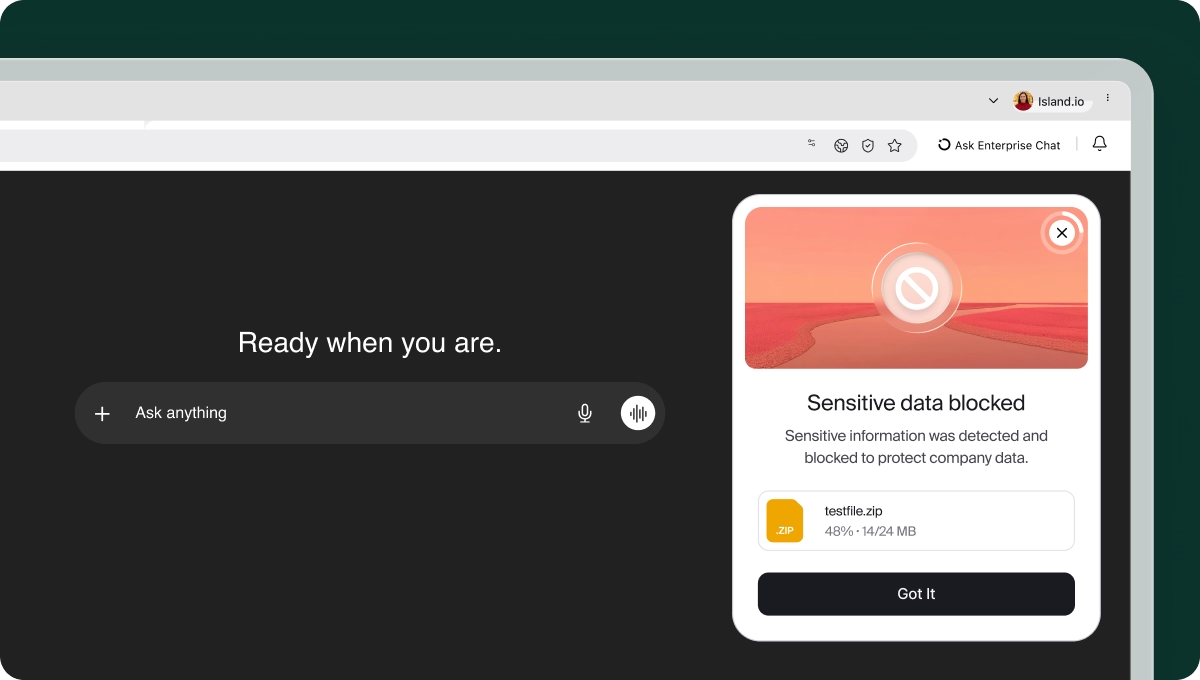
Microsoft Purview is one of the most widely deployed DLP platforms in the enterprise. Now integrated with Island, Purview's classifiers, sensitivity labels, and DLP policies reach the exact moment users interact with data; the moment a user types a prompt, uploads a file, or pastes sensitive content into a web application and before it moves, across the Island Enterprise Browser and Island Extension, on any device.
For Island customers running Microsoft Purview, it means the policies already configured in your tenant now apply at the moment data is entered, modified, or shared, on any device.
The moment that matters: When users interact with data
Enterprise data protection has traditionally focused on files, network traffic, and endpoints. But there's a layer that's harder to reach: the moment a user types, pastes, or interacts with data inside the browser and before it moves anywhere.
According to the 2026 Cost of Insider Risks Global Report, 55% of all insider-related incidents now stem from simple employee negligence, like pasting sensitive data into unauthorized windows or AI prompts, driving the average annual cost of insider risk to a record $19.5 million per organization.
When an employee pastes a customer record into ChatGPT, types sensitive credentials into a web form, uploads a contract to an unsanctioned file-sharing service, or shares credentials through a browser extension, that interaction happens in real time. Inspecting and governing that moment, before data leaves the session, is where this integration focuses.
This isn't a niche problem. The browser is the most-used enterprise application, and user input is one of the most common ways sensitive data moves.
Bringing Microsoft Purview DLP Policies to the Browser Layer
Island was built on a foundational premise: the browser is an essential control plane for enterprise work and not just a delivery mechanism for applications. Browser-layer DLP enforcement has always been core to that; inspecting data at the moment users interact with it, before it moves.
This integration extends that existing enforcement to Island customers running Microsoft Purview. Rather than adding a new policy framework or asking security teams to manage another console, Island now surfaces browser-layer signals directly into Purview, using the same classifiers, sensitive information types, and sensitivity labels already configured in your tenant.
No new agents required – just Purview protection, extended to the browser.
How the integration works
The integration connects the Island Enterprise Browser and Island Extension with Microsoft Purview network data security through an Azure AD consented application via Microsoft Graph API.
Once an administrator grants consent and configures a Purview network collection or DLP policy, Island begins evaluating browser-level activity against those policies in real time. This includes:
- Typed and pasted input: content entered into any web application or AI tool
- File uploads and downloads: inspected before transfer completes
- AI interactions: prompts and inputs submitted to generative AI services
Matching events surface automatically in Purview's Activity Explorer, enriching DSPM, Insider Risk Management, and AI compliance workflows with presentation-layer context that traditional controls cannot provide.
This coverage extends across managed and unmanaged devices, including BYOD environments and third-party contractors without requiring MDM enrollment or VDI.
What this unlocks for security teams
AI governance at the source
Sensitive data entered into AI tools through the browser is inspected and governed by existing Purview policies in real time before it leaves the session.
Unmanaged app protection
Detect and act on data shared with unsanctioned SaaS, shadow IT, and AI services over HTTP/HTTPS, apps that traditional network and endpoint controls cannot reach.
BYOD and contractor coverage
Extend DLP enforcement to unmanaged devices without requiring MDM enrollment, VDI, or traditional endpoint agents. Enforcement follows the user, regardless of device ownership.
Richer investigation context
Browser-layer signals enrich Purview DSPM, Insider Risk Management, and AI compliance workflows with identity, device posture, and session awareness, making findings more actionable and investigations more precise.
Conclusion
Data protection that stops at the network or endpoint isn't enough for the way enterprises actually work today. Users interact with data through browsers, in AI tools, SaaS applications, and extensions, and that's precisely where oversight has been missing.
The Island and Microsoft Purview integration doesn't replace what Purview already does well. It extends it to the last mile: the moment a user actually touches data. For security teams already invested in Purview, it means existing policy infrastructure finally reaches the place it was always meant to protect.
To learn more, request a demo here or visit the Island listing on the Microsoft Security Store.
FAQs
- Does this require a new DLP policy framework? No. The integration uses your existing Purview classifiers, sensitive information types, and sensitivity labels. No parallel policy infrastructure is required.
- Does it work on unmanaged devices? Yes. Island enforcement extends to BYOD and contractor devices without requiring MDM enrollment, endpoint agents, or VDI.
- What types of browser activity does Island inspect? Typed and pasted input, file uploads and downloads, browser extension activity, and AI interactions.
- Where do Island signals appear in Purview? Events surface in Activity Explorer and enrich Purview DSPM, Insider Risk Management, and AI compliance workflows.
- What licenses are required? An Island Enterprise Browser or Island Extension license, plus Microsoft Purview E5 or equivalent licensing and Purview Pay As You Go subscription configured. Contact your Island representative for details.
.avif)
Tamar Cohen is a Product Manager at Island, leading AI Protect. Her work focuses on defining how enterprises can safely operationalize AI, from preventing sensitive data leakage to controlling how AI agents execute actions across production environments.


.svg)
.svg)

