Reduce AI cost with visibility you can act on
The AI budget is the fastest growing line in your organization. It is also the least explained.

As companies chase innovation and efficiency, AI tools are seeing widespread adoption. Oftentimes, individual teams and users are using new AI tools with little oversight. Since most of these tools have usage-based pricing, it can quickly lead to uncontrolled spending and surprise bills.
In May 2026, an AI consultant told Axios that a client had spent half a billion dollars on Claude in a single month after failing to put usage limits on employee licenses. At Amazon, overspending on a Claude project that matched author details to product listings went unnoticed for about five months, the Financial Times reported. The project cost $1.8 million, 860% over its budget. Microsoft went the other way. It told engineers in its Experiences and Devices group to stop using Claude Code by the end of June and move to GitHub Copilot CLI, a decision Windows Central tied in part to cost.
When the invoice does arrive, it tells you what you spent. It does not tell you what that money produced, including which teams drove the number, what work came out of it, or whether a frontier model was doing a cheaper model's job.
Island AI Experience & Cost Intelligence closes that gap, and then it acts. It is built on the Island Enterprise Agentic Control Plane, which sits at every point where users and agents meet AI. From those control points, organizations run every part of AI enablement together: seeing what it costs and what it returns, securing it, and enforcing controls on all of it. This post is about the cost and experience capabilities. A report tells you the budget is gone. Control is what keeps it from going.
How organizations answer this today
The investment side of an AI program is easy to describe. Seat licenses for the tools each department picked. Token budgets for the builders. Security tooling around all of it, and a new role or two whose whole job is making adoption happen. Real money, committed on the belief that AI pays for itself.
The measurement side is weaker. Visibility is usually little more than the monthly bill. Each vendor reports its own aggregate in its own dashboard, so the adoption picture the board asks for gets assembled by hand from numbers that do not agree. The closest thing to an adoption metric is token consumption, which says how much but never what for. When one team finds a workflow that genuinely works, nobody can see it, name it, or repeat it elsewhere. And the budget owner, unable to say what changed or what it returned, is left to ask for more budget without a clear picture of what the return on that extra spend will be.
The industry has a name for the first phase of enterprise AI: tokenmaxxing, growing consumption as fast as possible on the assumption that more usage means more value. Most organizations already sense that phase has to end. The next one judges every token by what it returned, and to do that, you need to be able to answer "what did this token buy?" Moving from maximizing consumption to maximizing value takes visibility of the task itself. Almost nobody has it.
Agents make all of it sharper. An agent spends on its own schedule, retries on its own judgment, and appears on the invoice as the user who launched it. The fastest growing consumers of AI budget are the ones no adoption tool even claims to measure.
Island's AI Experience & Cost Intelligence solves this problem with the following capabilities.
What visibility at runtime looks like
AI is now everywhere: chat apps, copilots embedded in business tools, coding agents, internal builds. Covering all of it with deep visibility is the hard part of the problem. Island covers it with control points across the endpoint, the network, the MCP tool-call path, LLM gateways, and direct integrations with AI vendors. Every interaction that crosses one of them becomes a structured record, whichever tool a team picked.
Here is what that looks like. An analyst asks a frontier model to summarize the numbers for her weekly business review. The model is wrong for the task. A routine summary needs none of its reasoning power, so she pays more for every answer and waits longer for each one. Island classifies the task as a document summary and identifies that a mid-tier model answers this class of work faster, at a fifth of the cost. The analyst gets notified in the moment that the model does not fit the task, with the right one suggested. Run daily across 2,000 knowledge workers, that one habit is millions a year spent on work a cheaper model does just as well.
The same visibility covers agents. When a developer starts a coding agent to close out a bug ticket, Island sees the agent start, every tool call, and the model, the tokens, and the cost behind each step. One session, human and agent together, correlated end to end.
No other cost tool can tell these stories. Billing APIs see the monthly total. Gateways see the traffic that routes through them. Adoption tools see time spent in a window. Island sees the interaction itself, with nothing to instrument. Every AI tool that touches the Island surface becomes visible, including the shadow AI tools nobody procured. Seeing all of it in one place is what makes consolidation and an honest adoption picture possible.
Cost intelligence across every vendor
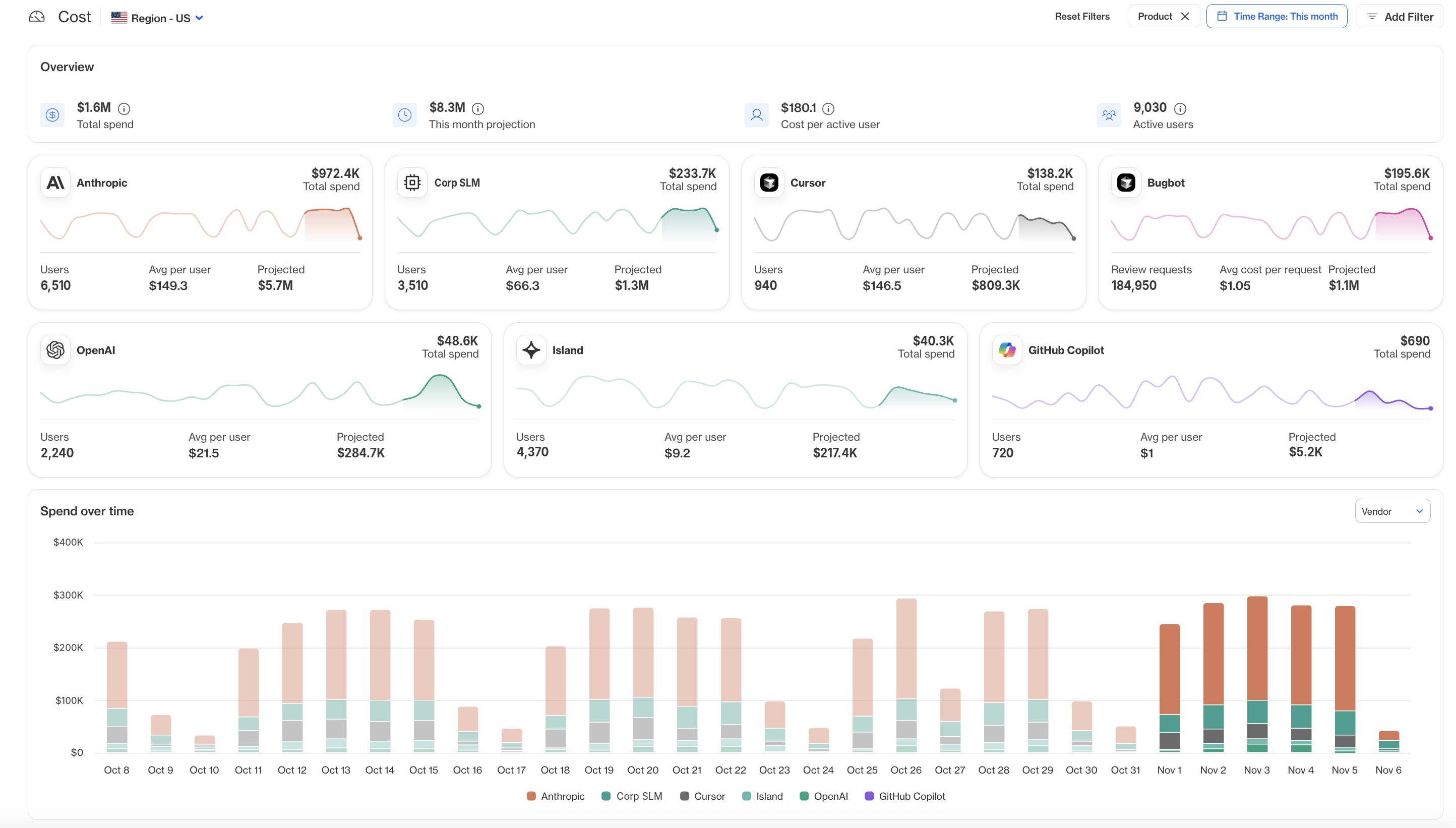
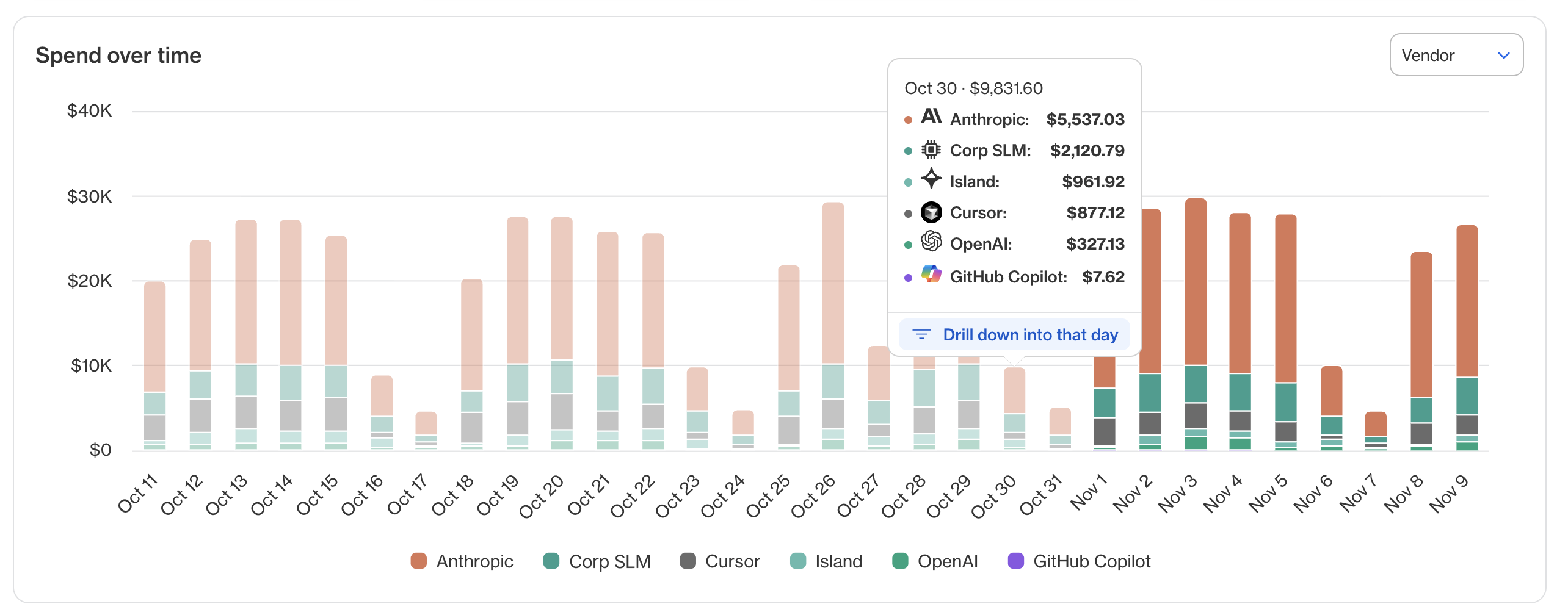
Island tracks usage and correlates it with cost. It tracks cost by:
- User, team, business unit, and cost center
- Vendor, product line, and model
- The session itself, which can be used to analyze the actual task and what it is being used for
The visibility is real time and cross-vendor, which means cost anomalies surface the day they happen, not on the invoice.
Island addresses the four primary places AI budgets leak:
Model-fit mismatch. Expensive frontier models running tasks a smaller, cheaper model handles just as well. Finding this requires knowing what the task was, and Island does, because it analyzes the session rather than counting the tokens. This is the single largest saving available in most AI programs, and it is invisible to any tool that stops at metadata. When Island finds it, the employee gets pointed to the right model, or the request automatically gets routed to one.
Rework loops. A user who does not yet know how to work with AI, no context, no desired outcome, just a question thrown at the model, reprompts four times and pays five times for one answer. From the outside, that reads as healthy engagement. From the session, it reads as a coaching opportunity. Island coaches the user in the flow of work. The agent version of this is similar: continuous retries based on the agent's own judgement. Island can see this and end the loop before it gets expensive.
Personal and non-business usage consuming enterprise tokens. Island identifies it, tells the user, and can redirect them in runtime to their personal or to a seat-based tool, so the enterprise meter stops running on private errands.
License and tool consolidation. Seats nobody uses, and two tools doing one job. At renewal, you negotiate from your own usage data instead of the vendor's self-reported aggregate.
For finance, every one of these numbers is attributed to user, team, and task. Spend maps to teams, projects, and outcomes, which makes chargeback, forecasting, and ROI analysis a query instead of a quarterly reconstruction.
Model and vendor agnostic
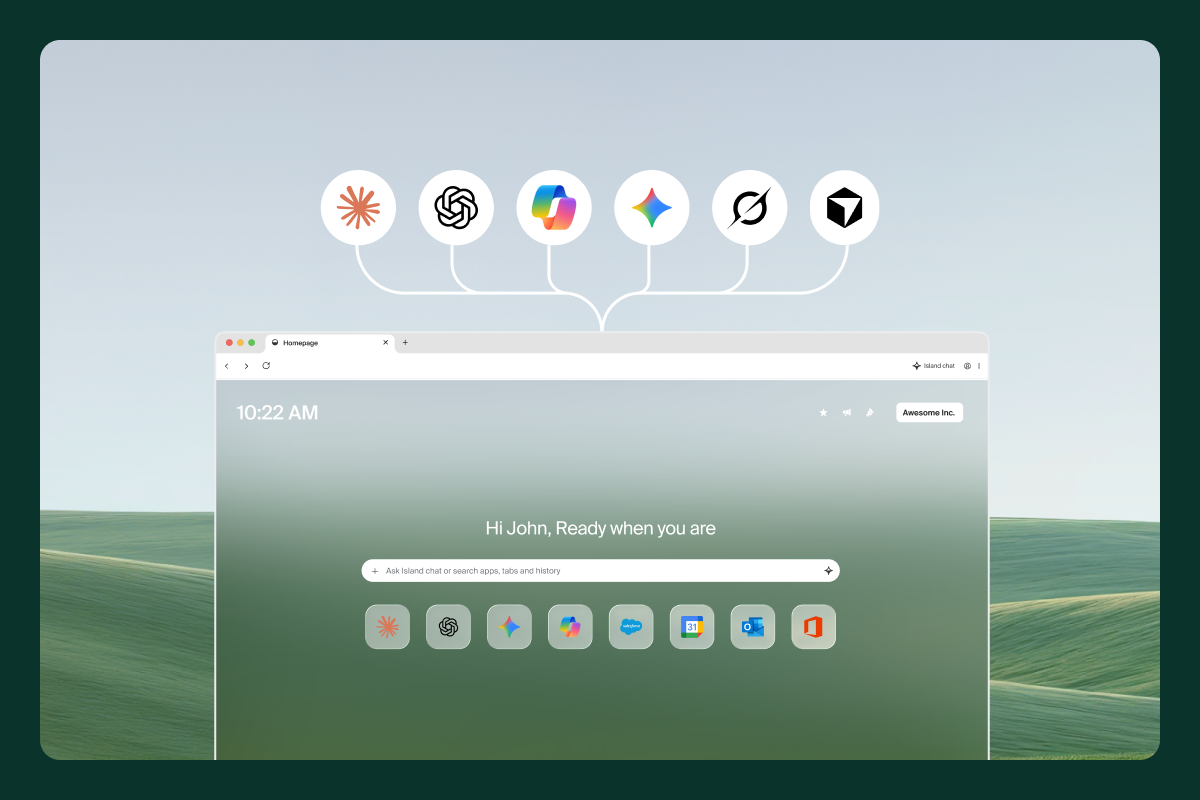
A new AI is releasing every week, and the lead changes hands often. The model that writes your code best this quarter may trail next quarter. And the best model for support tickets is rarely the best one for code. Standardize on a single vendor, and every task runs on that vendor's models, including the ones another provider handles better or for less.
Island is model and vendor agnostic and covers major providers as well as SaaS apps with AI components, such as Salesforce and Snowflake. Each team can use the right model for each job, and that choice is where much of the return comes from. Usage, cost, and performance arrive on the same terms for every model in use, which makes comparisons fair and renewal negotiations easier. When Island routes a request to a better-fit model, it chooses from every model your organization has approved, a longer list than any one vendor's lineup. If a stronger or cheaper model ships next month, the work moves to it without a migration project.
From visibility to control
The Enterprise Agentic Control Plane's control points provide enforcement, not just visibility. Island intervenes at four levels, from lightest to firmest:
Inform. The user sees their own usage and spend, and gets notified in the moment when something is off: the model does not fit the task, the session is burning tokens on rework, the spend limit is approaching.
Coach. When the problem is proficiency, the answer is guidance, delivered in the flow of work with the specifics of what went wrong, not a generic tip in a training portal.
Route. When the problem is the destination, Island redirects it. A request suited to a cheaper model goes to the cheaper model. Personal usage gets steered to the user's personal or seat-based tool. The work continues; the waste stops
Limit. Policy sets spend limits on the models, tools, MCP servers, and APIs an agent may reach. When a limit is hit, access narrows.
None of this has to arrive at once. Most organizations start in observe mode, take a quarter of reports to the board, and turn on coaching, routing, and limits as trust in the data grows. The levels build on each other. By the time a limit takes effect, the user has been informed, coached, and offered an alternative, so enforcement lands as the end of a conversation rather than a wall. That is the difference between a cost report and a cost policy. A report tells you the spike happened, a policy decides whether it does.
Coaching in the flow of work
Enablement does not end at the admin dashboard. Island can communicate with end users wherever they work, so every insight reaches the person it is about, such as their own usage and spend, the right model for the task at hand, and guidance for working better with AI. This happens in the moment, when it is most relevant to the end user. Because Island measures proficiency, including prompt quality, the guidance is specific to what that person's own sessions were missing, not a generic tip in a training course. Proficiency rises, rework falls, and the same budget produces more finished work.
Island also includes the AI Coach, an end-user facing app that shows each employee their own AI usage and cost. Employees already see fragments of this inside individual vendor tools. The AI Coach puts it in one view, broken down by tool, model, and day, and draws its cost data from direct API integrations so the figures are accurate.
The numbers come with guidance. The AI Coach flags cost anomalies and saving opportunities, and it highlights workflows that are common across the organization, such as the MCP servers colleagues use.
The AI Coach is available right on the user’s homepage, regardless of what browser they use, making it an easy and ever-present tool. And managers have an additional view, which shows their direct reports’ AI usage and spend.
Adoption, proficiency, and who needs help
Track who is using AI, how often, and how well. Usage tells you who logged in. Proficiency tells you who is getting value.
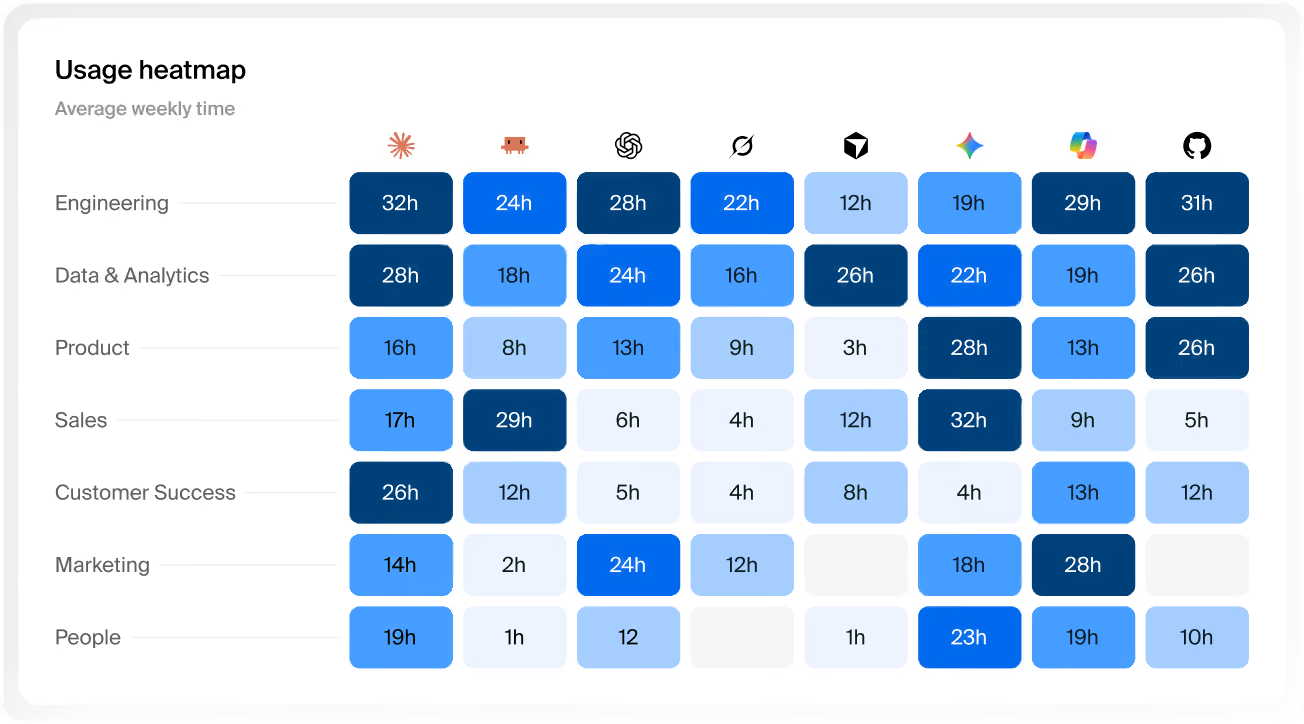
Two engineers each run fifty sessions a week on the same model at the same cost. One delegates multi-step work and reviews the output. The other uses a frontier model as autocomplete. From a metadata perspective, the two are identical. Island can tell them apart, because the difference lives in the session, and they need opposite interventions.
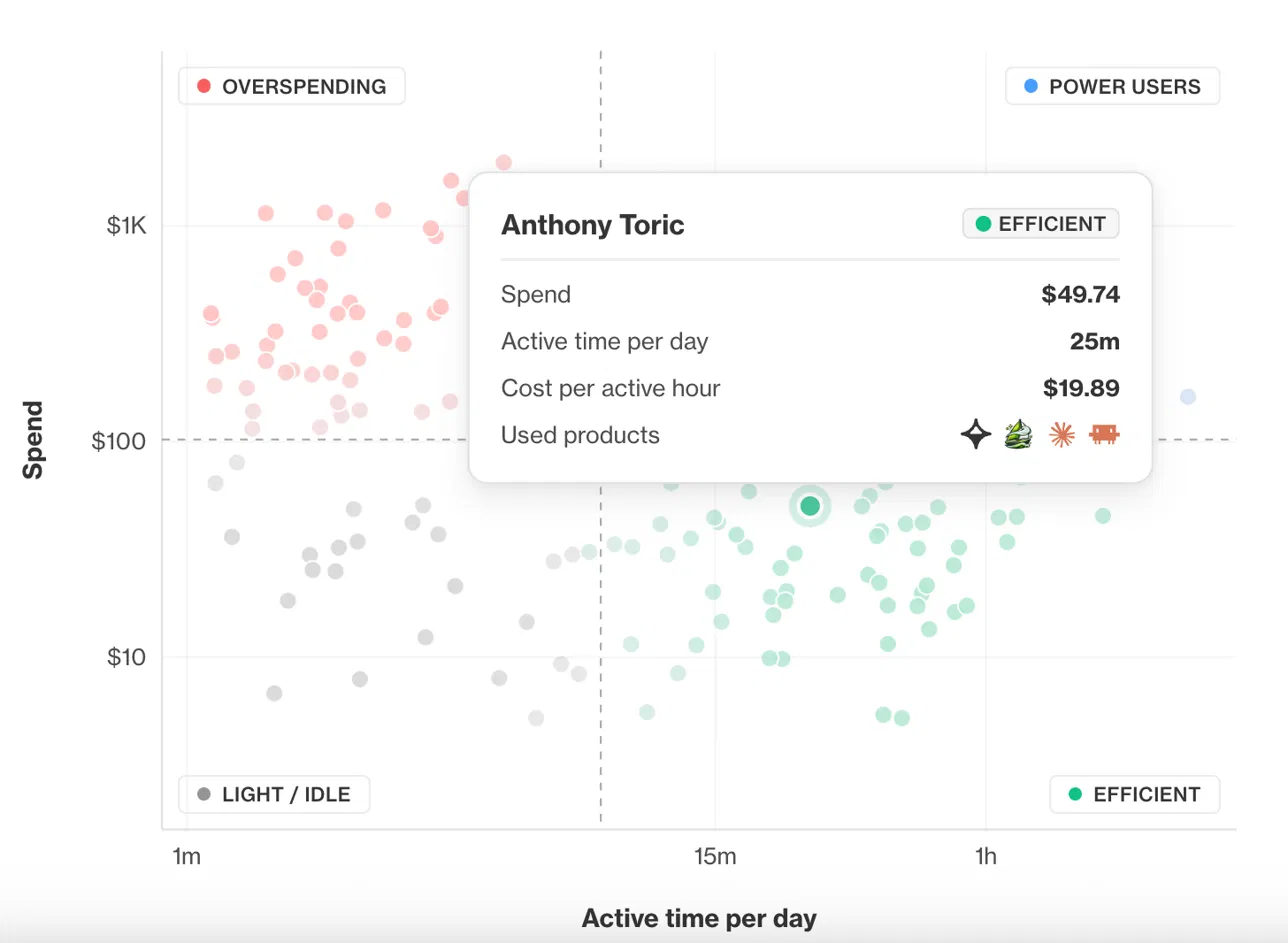
Island classifies users as power users, specialists, enthusiasts, or beginners based on what they use, how often, and the sophistication of how they work. Managers see the distribution across their teams and the organization. The head of AI gets an answer to the questions that decides next year's budget, including who is actually getting value from this, and what would it take to get everyone else there?

Island can also help you scale what works. When one team's AI workflow is effective, Island can identify it: which tasks, which tools, which prompts, at what cost. This works here, let's reproduce it over there. Scaling what already works is the cheapest ROI available, and it is invisible to any tool that measures adoption in tokens.
This is also where ROI stops being an estimate. Spend sits on one side, attributed to a user, a team, and a task. The work that ran sits on the other. The reports this produces are built for the board, and they rest on measurement rather than surveys: not only how much time employees say AI saved them, but what ran, what it cost, what it produced, and how that changed over the quarter. The same accounting covers agents, whose spend attributes to an owner, a task, and an outcome like anyone else's.
Performance and experience
AI apps and agents now hold a large share of the workday, and they deserve the monitoring core applications get. A slow MCP server costs you twice: once in tokens, once in the hour the engineer spent waiting.
Island monitors the live experience inside AI apps and agents and detects slow MCP tool calls, elevated error rates, rate limits, device and network problems, and vendor-side latency or outages, with the cause identified automatically and usually before anyone files a ticket. That cuts mean time to identify and mean time to resolve. It also feeds planning. If developer devices cannot keep up with agentic workloads, Island detects it and identifies the bottleneck, so you can decide between new hardware and remote infrastructure with data instead of anecdotes.
One platform for AI enablement
The control points that make this possible were not built for cost. They are the Enterprise Agentic Control Plane, and AI Experience & Cost Intelligence is one of the use cases it solves, alongside Agentic Endpoint Posture, Agentic Identity, and AI Protect. It uses the same telemetry pipeline, same identity model, and the same console. For a CIO, that is the practical point: cost, adoption, experience, and security for the entire AI program, covering users and agents alike, from one platform you already deploy, without a new agent, a new data pipeline, or a new vendor to reconcile against the others.
The organizations that win with AI will be the ones who can prove what it returns, in numbers tied to named teams, and who can act on those numbers the moment they move. Buying AI was the easy part.
To learn more about AI Experience & Cost Intelligence, schedule a demo.
FAQs
What does AI Experience & Cost Intelligence cover that a vendor's own dashboard doesn't?
A vendor dashboard reports account-level aggregate data for that vendor's product. Island records every AI interaction across every provider in use, each event tied to a resolved user identity and correlated end to end, from prompt to response to tool call to tool response, with model, provider, latency, tokens, and cost attached. You get the individual action, not the monthly total.
Where does the data come from, and do we have to instrument our AI tools?
The data comes from the Island surface: the Island Enterprise Browser, Island Extension, Island Desktop, Island Network, the Island MCP Gateway, the browser's local MCP server, LLM gateway integration, inference hooks, API integrations including the Claude Compliance API, endpoint detection and response (EDR) and mobile device management (MDM) integrations, and OpenTelemetry ingest. Any AI interaction that crosses one of those points becomes a structured event. Nothing to instrument.
Does Island read employee prompts?
Island analyzes sessions to compute derived signals: task type, prompt quality, model fit, retry patterns. What the system computes and what an administrator can open are two different questions, and the second one is a setting you hold. Visibility depth is configurable per group and per region, from metadata only, to derived signals, to full session, and manager views default to team-level aggregates. Organizations already inspecting AI traffic for data protection are running this analysis on a pipeline their legal team has already approved; this is the first time it gives something back beyond a block.
Does it only report on cost, or can it enforce a limit?
It enforces. Policy sets spend limits on the models and tools an agent may reach, including MCP servers and APIs, and access narrows once a limit is hit. Users get a warning as they approach the limit and can request an extension, so no one is cut off mid-task.
How do we prove ROI with this?
Every AI action has a cost and attributes to a user, a team, and a project, so spend and outcome sit side by side for any initiative. Because Island measures what actually ran rather than asking employees to estimate time saved, the ROI number holds up in front of a board.
What does it measure about performance and user experience?
Island watches the live experience inside AI apps and agents and detects slow MCP tool calls, elevated error rates, rate limits, device and network problems, and vendor-side latency or outages, then identifies the cause automatically. That cuts mean time to identify and mean time to resolve. Most of these events surface before a user files a ticket.

Tom Schneidman is a Product Manager at Island, responsible for the Digital Experience product domain. His work focuses on helping enterprises understand and improve how their people work, turning application and workforce experience data into actionable insight that drives productivity, efficiency, and better outcomes across the organization.