.svg)
Island: The Enterprise Browser for AI Agents
We are the #1 Enterprise Browser. Now, we are bringing it to agents.
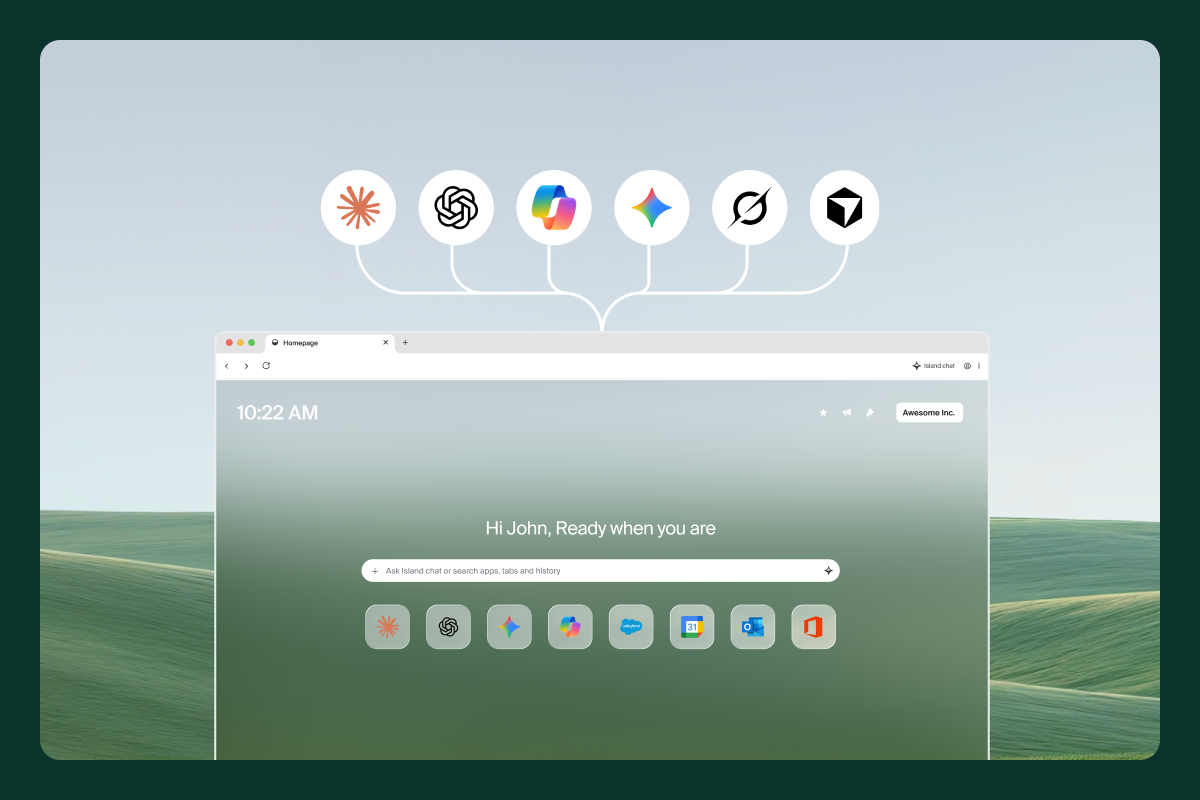
Every enterprise department is deploying AI agents. Sales agents update CRM after calls. HR agents onboard new employees. Finance agents process invoices. IT agents resolve helpdesk tickets. Security agents triage alerts. Legal agents review contracts.
Agents come in different shapes — cloud-hosted or local, triggered automatically or launched by the user. These agents need the same thing, a browser. A significant portion of enterprise workflows run through web applications, and agents need to navigate them, fill forms, extract data, and chain actions across systems. Many also need access to internal applications behind the firewall.
We pioneered the enterprise browser market, and today, we have the top product in the category, which is trusted by leading banks, healthcare providers, manufacturers, and more. We have millions of happy end users across the world. Now, we are launching the best enterprise browser for agents.
The Current Approach: Consumer Browser + AI Provider Extension
Today’s setup is a consumer browser with an extension from the AI provider (Claude, OpenAI, etc.) that exposes browser MCPs to the agent. The extension gives the agent access to the browser’s capabilities, such as navigation, page reading, form interaction, and clicks, via MCP tools.
.png)
This creates a number of challenges:
Poor enterprise controls
Consumer browsers do not include enterprise capabilities, such as identity integration and data protection. Agents can read everything and do anything with no governance or oversight. There is no way to distinguish between an agent action or user action and sensitive credentials are exposed.
This can lead security incidents such as:
- Data leakage due to agent mishandling or exfiltration
- Destructive actions like deleting records from company tools
- Credential exposure or loss
It makes agents slower
Oftentimes, browser MCP servers are overly reliant on screenshot-based analysis to understand a webpage and how to navigate it. This is a slow, sometimes unreliable process compared to interacting with low-level browser APIs.
Increased costs
Web pages have a lot of content to process, including HTML, CSS, JavaScript. This often requires the agent to do extensive analysis to make sense. Without proper optimization, this can lead to excessive token consumption and increase the overall AI expense.
Why Island Wins
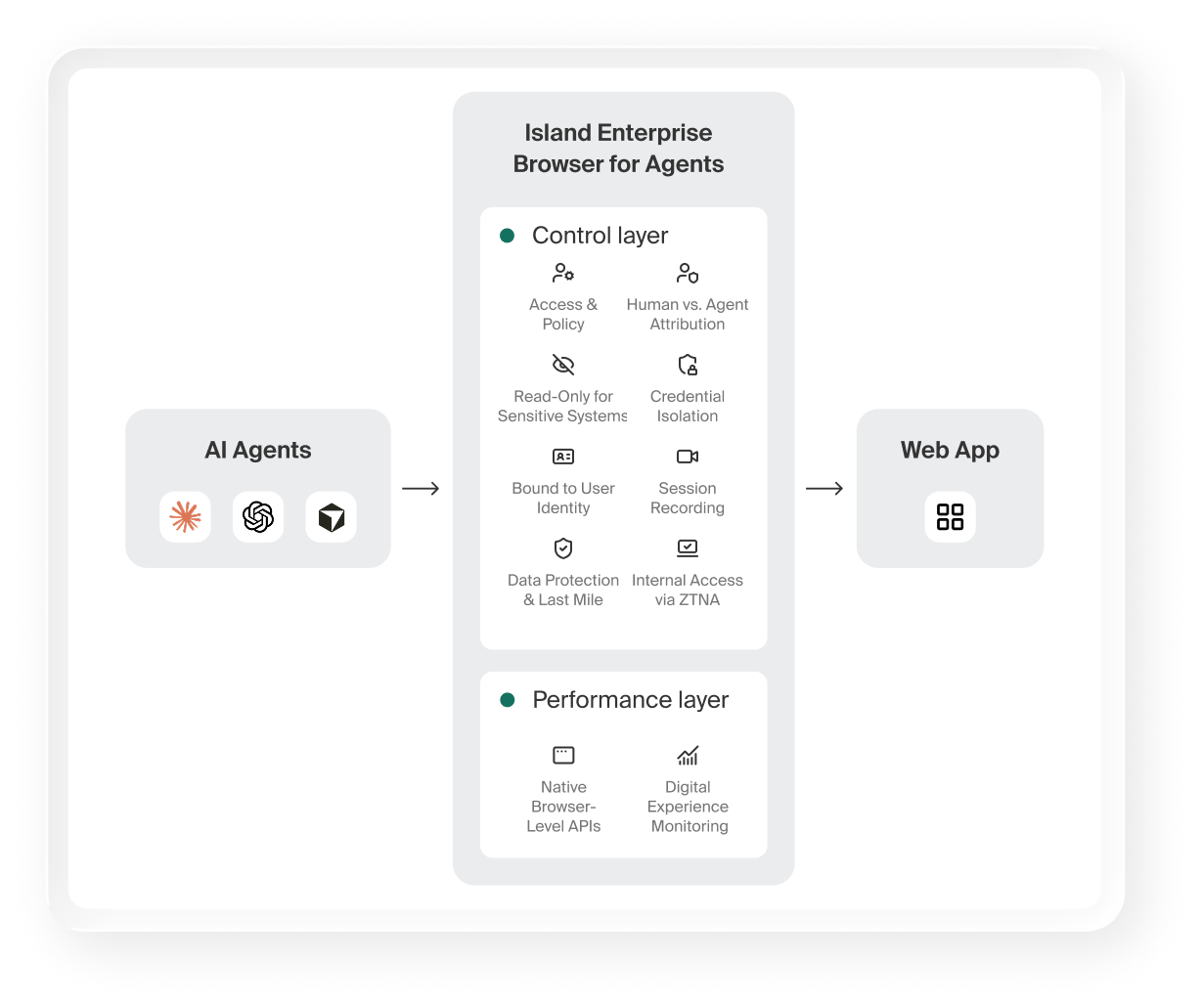
Island is the Enterprise Browser for Agents. It gives agents governed, enterprise-ready access to web apps, SaaS apps, and public websites. Island is not bolted onto a consumer browser. It is the browser. Every capability below is native and cannot be bypassed or disabled. It can be deployed on the device or in the cloud, in headless or fully rendered mode, to address both local and remote agents.
Governed Access and Policy Enforcement
Island controls which agents can access the browser, under what conditions, and which browser tools they can use. Admins define per-agent, per-application policies for MCP tool usage – which pages the agent can interact with, what DOM operations are allowed, whether the agent can read or also write. Unlike AI provider extensions that expose all browser MCPs without restrictions, Island’s MCP layer is policy-governed: the agent only gets the capabilities it is authorized to use. Island applies the full enterprise policy fabric to agent activity, the same way it does for human users. Island is also fully local with no need to use a cloud-based browser, which ensures it stays within your governance capabilities.

Bound to User Identity, with Granular Policies
Every agent action is tied to the user’s enterprise identity via full identity provider (IdP) federation. The browser knows the user’s identity, group membership, roles, device posture, and network context. Agents inherit this identity. They act as the user, governed by the user’s permissions. However, policy can be defined for the user, for the user and their agents, or for only their agents. This allows the convenience of the agent inheriting the user’s identity while still allowing you to place additional controls on what the agent is and isn’t allowed to do.
User vs. Agent Event Attribution
Every event in Island’s audit log is attributed: was this action taken by the human user, or by an agent acting on their behalf? This is critical for forensic investigations and compliance with regulations such as SOC 2, ISO 27001, HIPAA, PCI DSS, and forthcoming AI-specific regulations like the EU AI Act and Colorado SB 26-189
Faster Agents and Optimization
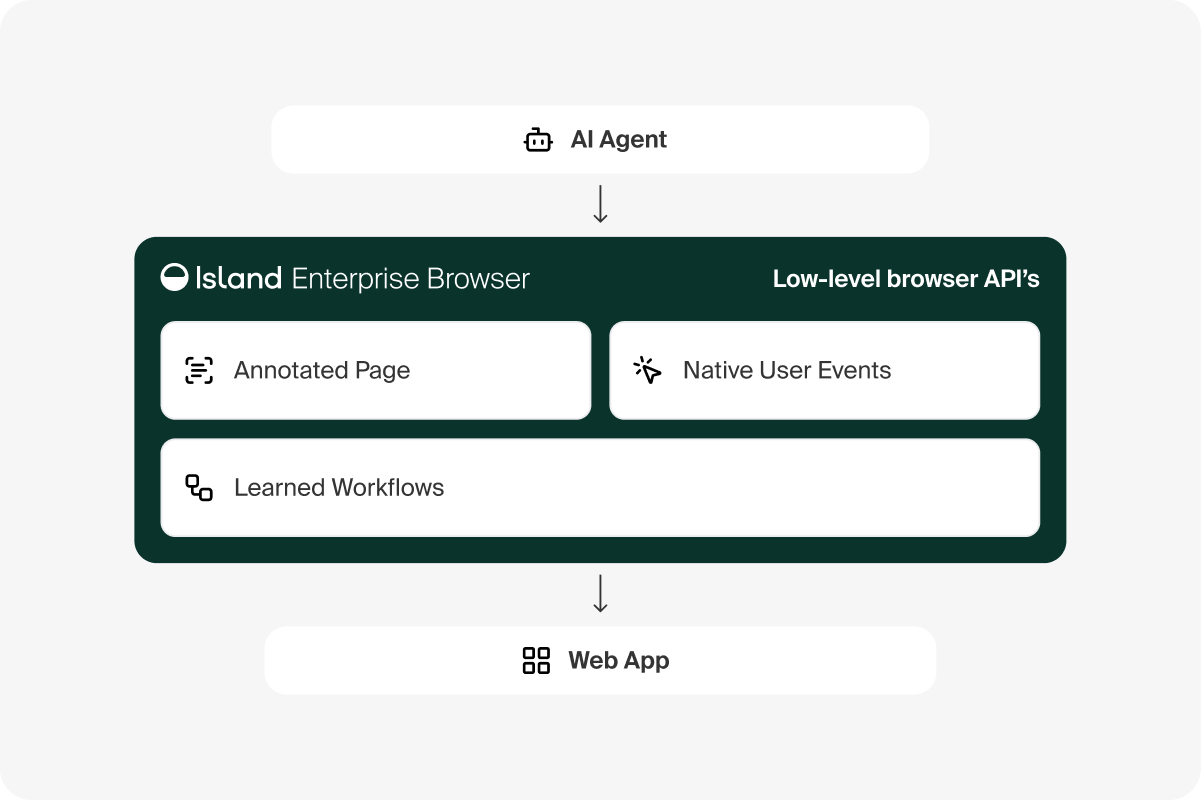
Island learns from repeated agent workflows. When an agent executes the same multi-step process across sessions, the browser optimizes execution, remembering navigation paths, pre-loading resources, and reducing time-to-completion on subsequent runs.
Native Browser-Level APIs for Agent Performance
Island owns the browser engine. Agents interact with pages through low-level browser APIs, not through screenshot-based guessing. These low-level APIs are annotation based and have advanced capabilities for giving the AI the most precise and agent-friendly information. It can also inject user events, which is not possible from the DOM. This means agents read pages faster, interact more reliably, and execute workflows with significantly higher accuracy than approaches that rely on taking screenshots and interpreting pixels.
Cost Reduction
Island optimizations also mean agents do not need to process as much web content or rely on screenshot analysis, both of which can lead to excessive token usage. In addition to improving agent speeds, this also reduces the overall cost of agent browser actions.
Full Session Recording
Every agent session can be visually recorded. Security and compliance teams get complete playback of everything the agent did, including every page visited, every click, every form submission.
Read-Only Mode for Sensitive Systems
Agents can be set to read-only mode on sensitive applications, which allows them to view and extract data but they cannot modify records, submit forms, or perform write actions. This is configurable per application, so agents operate freely on low-risk apps while critical systems restrict writes entirely.
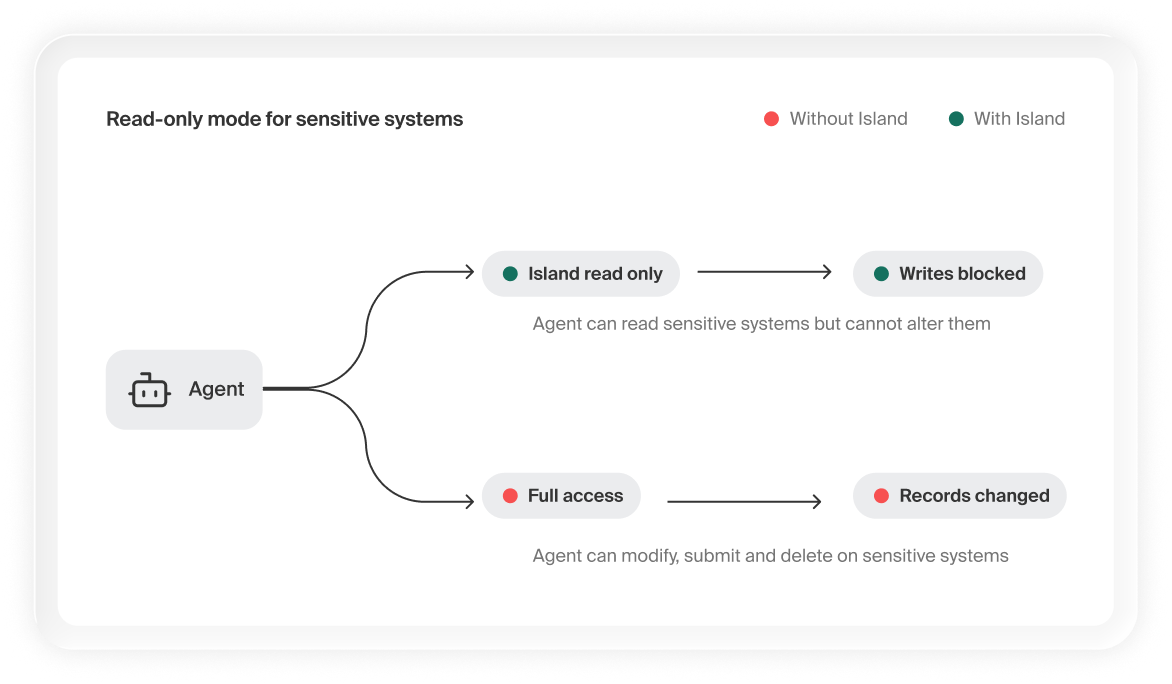
Without Island — an agent on a sensitive system such as an ERP has full access and can modify, submit, or delete records with no human oversight.
With Island — read-only mode lets the agent view and extract data while blocking writes on sensitive systems. Configurable per application.
Data Protection and Last Mile Control
Island enforces data protection at the DOM/presentation layer, pre-encryption. It sees rendered content, clipboard operations, file uploads, print jobs, and screen captures, intercepting sensitive data before it leaves. Admins also define data boundaries: a perimeter of sanctioned business applications that agents can operate within. Agents cannot move data into anything outside the boundary. Together, these controls govern both what data an agent can extract and where it can send it.
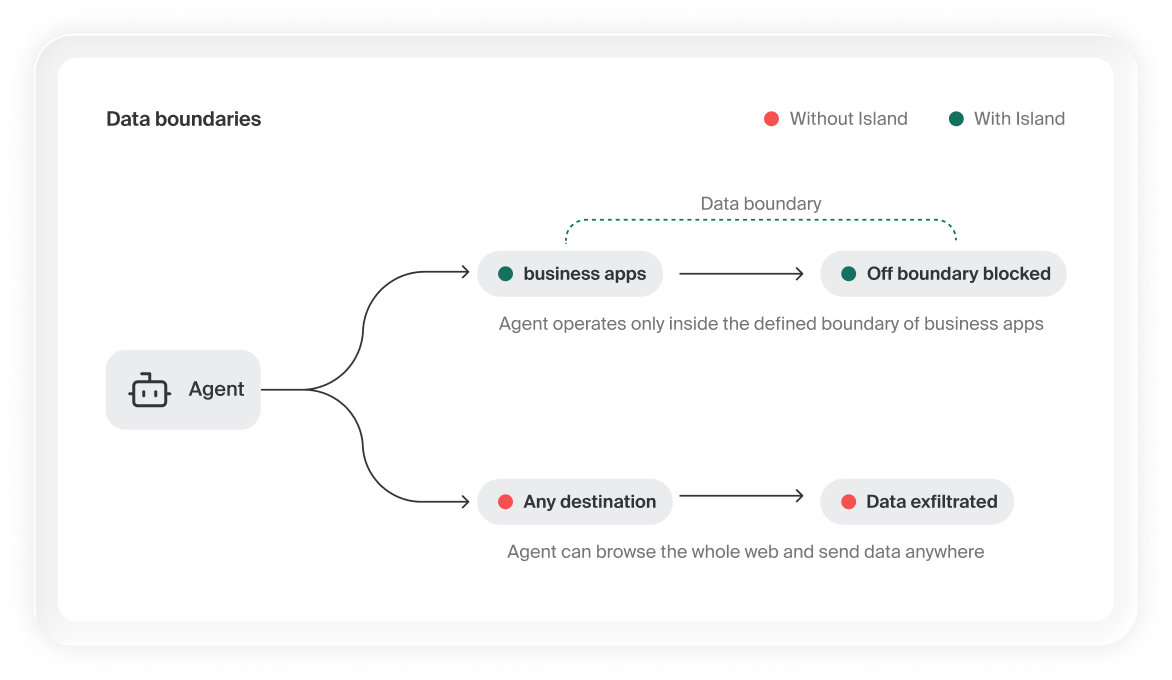
Without Island — the agent can browse the whole web and move data anywhere – copy from Salesforce and send it to personal mail, a pastebin, or an unknown SaaS tool.
With Island — the browser enforces the business data boundary. Work inside the perimeter proceeds normally, while any navigation or data egress to an off-boundary destination is blocked.
Credential Isolation via Password Manager
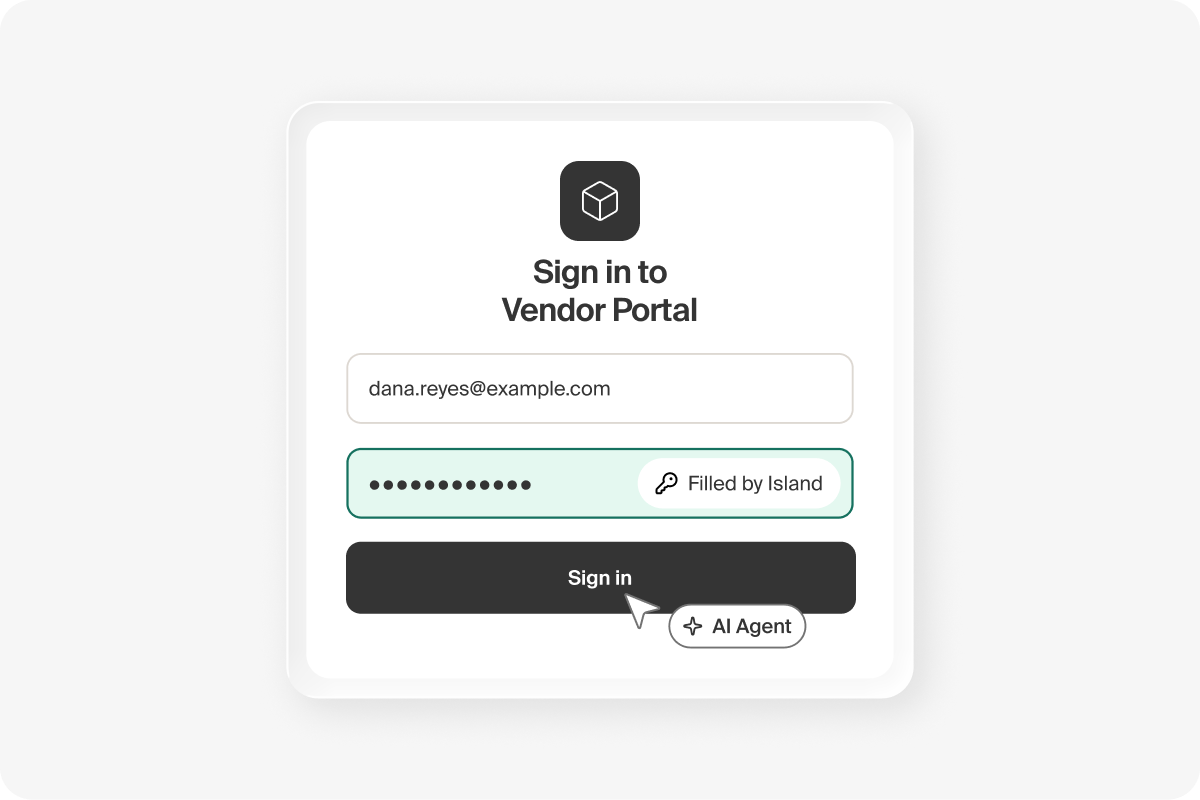
Island’s built-in password manager inserts credentials into login forms. The agent can authenticate into any web application, including pages with no IdP integration. While the agent can theoretically read page content after injection, Island adds protections that prevent programmatic credential extraction, and credentials do not flow through the AI model’s context window.
Internal App Access via ZTNA
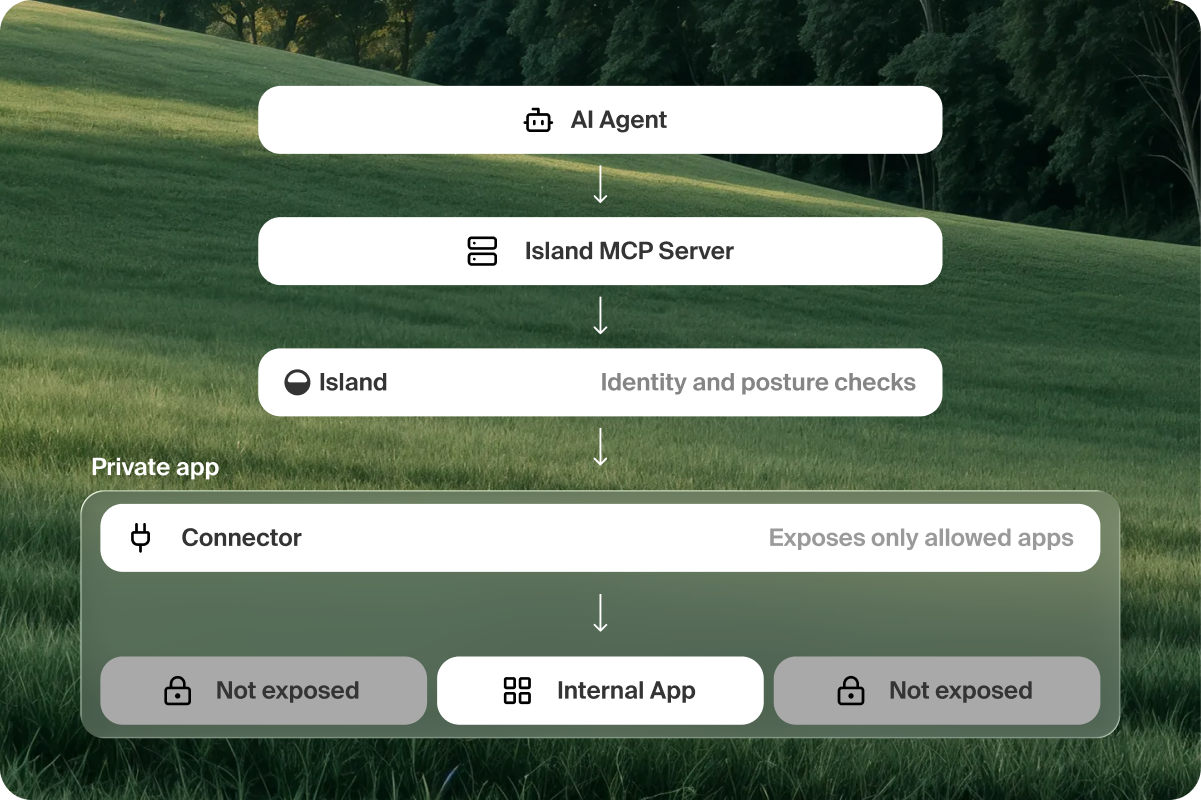
Agents reach internal applications through Island’s ZTNA connectors – no VPN required. The browser’s access policy defines which internal apps are reachable, with full identity and device posture checks.
Digital Experience Monitoring (DEX) for Agents
Island’s DEX provides visibility into agent performance – page load times, interaction latency, errors, and completion rates. Understand how agents experience your web applications, identify bottlenecks, and measure automation ROI.
Conclusion
AI agents are quickly becoming ubiquitous, and in many cases, they need access to the browser to be truly useful. Many enterprise tools are web apps — including internal apps behind a ZTNA connector or VPN — and agents have to be able to navigate them, extract information, upload files, and fill forms.
Island is the enterprise browser for agents — a fully-governed method for agents to interact with web content, complete with policy enforcement, visibility, data protections, credential isolation, optimizations, DEX, and more. All of these capabilities are built directly into the browser, not bolted on, which prevents them from being bypassed or disabled.

Yuval Krigel is a Director of Product Management at Island, where he leads end-user experience and productivity. He builds products that help IT teams enable AI across their organizations, helping enterprises move from AI pilots to everyday use.

Nir Chachamovitz is an Engineering Manager in Island’s Core group, where his team is opening the Island Enterprise Browser to AI agents. They build the browser-level APIs that let agents read pages and act on them with the identity and permissions of the people they work for. The same team builds the browser experience millions of people use every day.
.png)
.png)



.png)
.svg)
.svg)

