.svg)
BadBlocker: 11 Million Users, One Server Call Away from Compromise
Inside “Adblock for YouTube,” a trusted Chrome extension whose permissions and architecture could, with one server-side change, be weaponized to read your pages, steal your data, and act as you inside your browser.
TL;DR
Adblock for YouTube (cmedhionkhpnakcndndgjdbohmhepckk) is a Chrome Web Store extension with over 11 million installs and a 4.4-star rating. It blocks ads on YouTube and it works well.
It also contains the architectural ingredients for arbitrary JavaScript execution on any website, activated by a single server-side configuration change, without an extension update, without a store review, and without any visible sign that something has changed. In practical terms, that could mean reading pages, stealing data, and acting as the user inside personal accounts, work apps, admin panels, and other sensitive browser sessions.
We have not observed a malicious payload being delivered to users. What we found is a capability, one that exists today, in production, in 11 million browsers. Combine that with the suspicious profile of a developer whose extension history includes Chrome Web Store removals for malware, and the risk becomes hard to dismiss.
The extension that 11 million people trust
Search "youtube adblock" in the Chrome Web Store and the first result is Adblock for YouTube. People install it for the obvious reason, they don't want to sit through ads on YouTube, whether they're watching a tutorial, a product demo, or a funny cat compilation video on their lunch break. It has over 11 million installs, 374,000 reviews, and a 4.4-star rating. Among the hundreds of thousands of extensions in the store, it ranks #31 overall. It does what it says, blocks ads on YouTube. Millions of people run it, including employees inside enterprise environments, and none of them have ever had a reason to think twice about it.
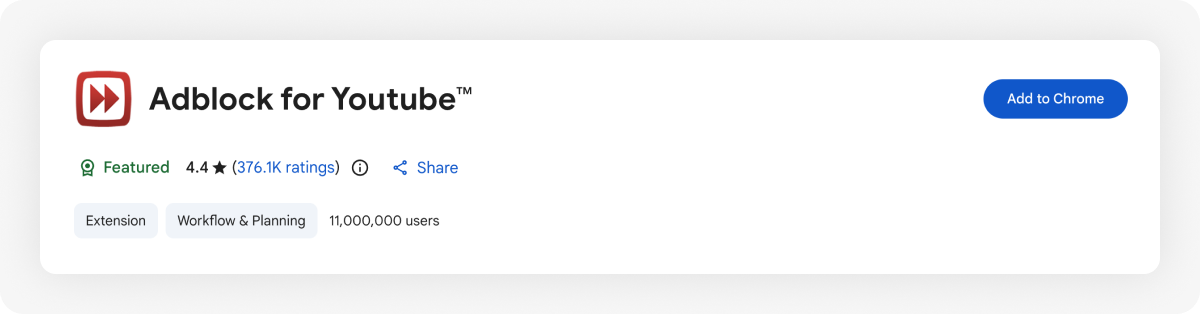
The extension has been on the Chrome Web Store since 2014, accumulating years of code changes, ownership changes, and quiet shifts in what it could do inside the browser. More on that later.
A trusted category with dangerous permissions
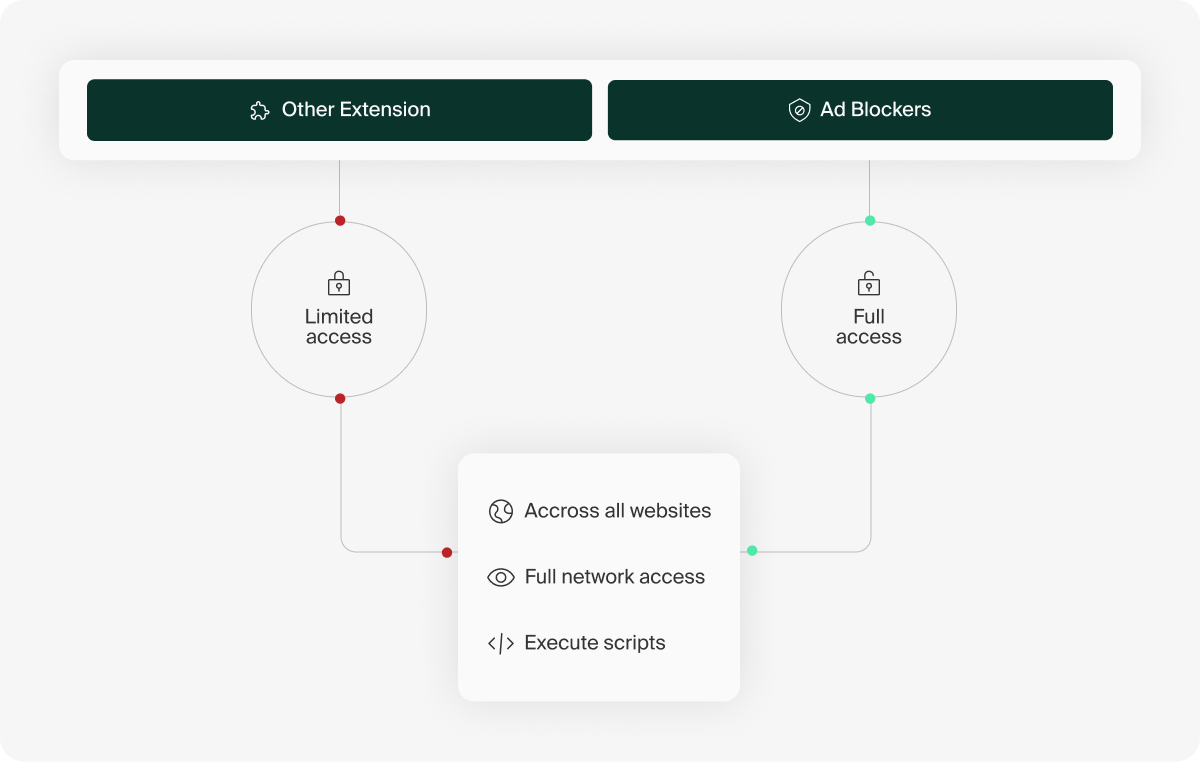
Ad blockers get unusual trust because they do unusual work. To block ads, they often need to inspect requests, change pages, hide elements, and react quickly when ad systems change.
That makes broad permissions easier to justify in this category than almost anywhere else. Users expect ad blockers to be powerful. Store reviewers expect them to ask for sensitive access. The category gets a level of permission tolerance most extensions would never receive.
That permission tolerance is the risk. Mature ad blockers have spent years building safer ways to use broad access, so they can adapt to changing ad systems without giving the backend open-ended control over what happens inside the page. When that boundary disappears, the same trust that makes ad blockers useful becomes a direct path into the user’s browser.
A YouTube-only extension that runs everywhere
Adblock for YouTube is not a general-purpose ad blocker. Its promise is narrower: block ads on YouTube.
But open the manifest, and the first thing you see is this:
"host_permissions": ["<all_urls>"]<all_urls> means the extension can run on every website the browser visits: webmail, banking, SaaS apps, admin consoles, internal tools, everything.
But this is Adblock for YouTube. Why would a YouTube ad blocker need access to every page?
You could argue that YouTube ads are dynamic, or that YouTube players are embedded on third-party websites. That is fair. A YouTube ad blocker may need some flexibility beyond youtube.com. But that flexibility should still be tied to YouTube: YouTube origins, YouTube frames, player URLs, or request patterns related to YouTube playback. It should not require a blank check across the web.h
The code includes a check that appears intended to limit where injection runs. Before injection, the extension checks whether the current URL contains “youtube.com”:
var isAdBlockWorksOnPage = function(url) { return /youtube\.com/.test(url);};On paper, this looks like a gatekeeper: the extension asks for access to every site, but claims to run only when YouTube is involved. In practice, the check does not validate the hostname, frame origin, or embedded player context. It only checks whether the string youtube.com appears anywhere in the full URL.
These all pass:
https://www.facebook.com/page?ref=youtube.com        ✓ passes
https://bank.example.com/search?q=youtube.com         ✓ passes
https://internal.corp.com/redirect?from=youtube.com   ✓ passes
So the extension requests all-site access, then relies on a gatekeeper that can be bypassed by putting youtube.com anywhere in the URL. That was enough for us to dig deeper.
Remote controlled script injection
Every 24 hours, the extension fetches its configuration from a remote server:
fetch("https://api.adblock-for-youtube.com/api/v2/rules?version=7.2.1")The response includes standard ad-blocking rules - network filters, CSS selectors - but also a field called scripletsRules. The extension ships with a library of scriptlets (small JavaScript functions used for ad blocking), and the server controls which ones to execute and with what arguments.
Scriptlets are common in ad blockers, but the dangerous boundary is whether a remote server can select powerful scriptlets and supply executable code after installation. In this case, the extension does not merely fetch static filter rules; it fetches instructions that can cause MAIN-world JavaScript injection.
function injectedFunction(script, scriptId) {
if (window[scriptId])
return; var policy = window.trustedTypes.createPolicy('default', {
createScript: function (input) { return input; },
});
var safeScriptContent = policy.createScript(script);
window[scriptId] = true;
var scriptTag = document.createElement('script');
scriptTag.setAttribute('type', 'text/javascript');
scriptTag.textContent = safeScriptContent;
var parent = document.head || document.documentElement;
parent.appendChild(scriptTag);
parent.removeChild(scriptTag);}
function executeScriptOnPage(tabId, script) {
injectionString = "(()=>{try {".concat(
script,
";} catch (e) {console.log(e)}})();"
);
return [4, chrome.scripting.executeScript({
target: { tabId: tabId },
func: injectedFunction,
injectImmediately: true,
world: 'MAIN',
args: [injectionString, 'aby-38oj8EJVO3Uu7t4G9PdfI'],
})];
}One of those scriptlets is trusted-create-element, which creates an HTML element on the page. Now imagine if the server responds with the following:
{
"name": "trusted-create-element",
"args": ["body", "script", "", "/* any JavaScript here */"]
}
In this scenario, the created element is a <script> tag and its content is supplied directly by the server. Once appended to the DOM, it executes in the context of the page, creating a full remote-controlled script injection path with access to the DOM, browsing sessions, forms, page state, and user actions.
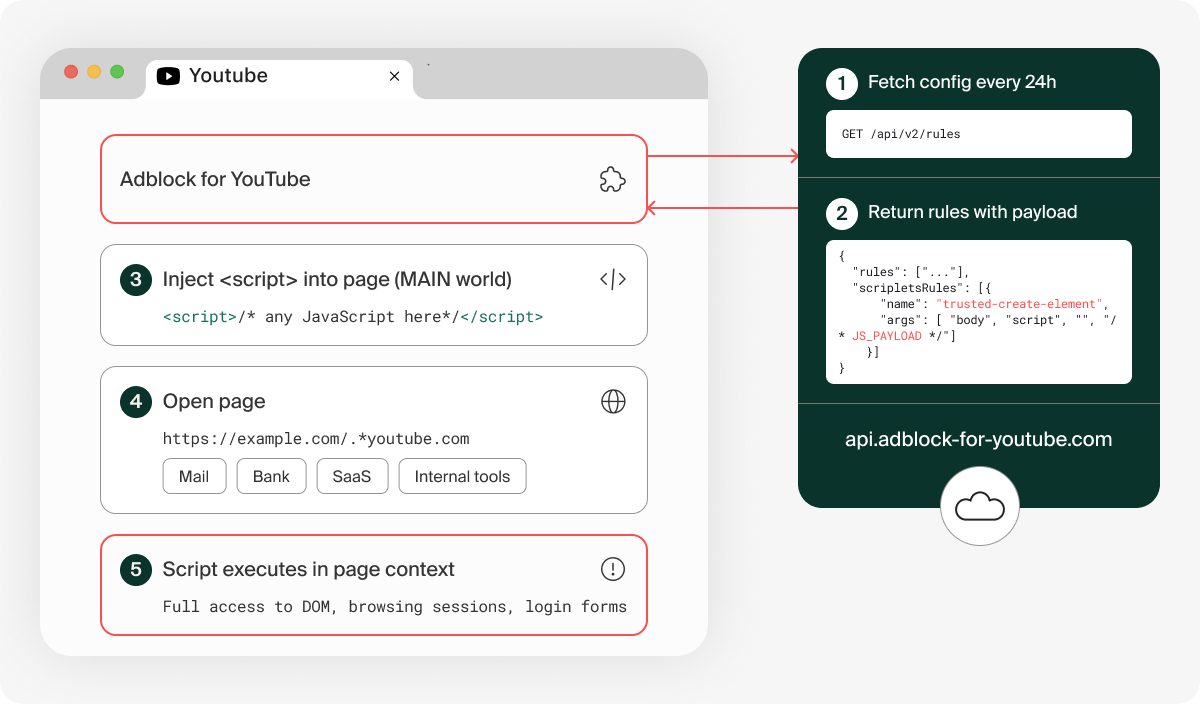
At the time of our analysis, trusted-create-element was not active in the server response. The capability is dormant, not absent. Activating it requires a single server-side change, no extension update, no store review.
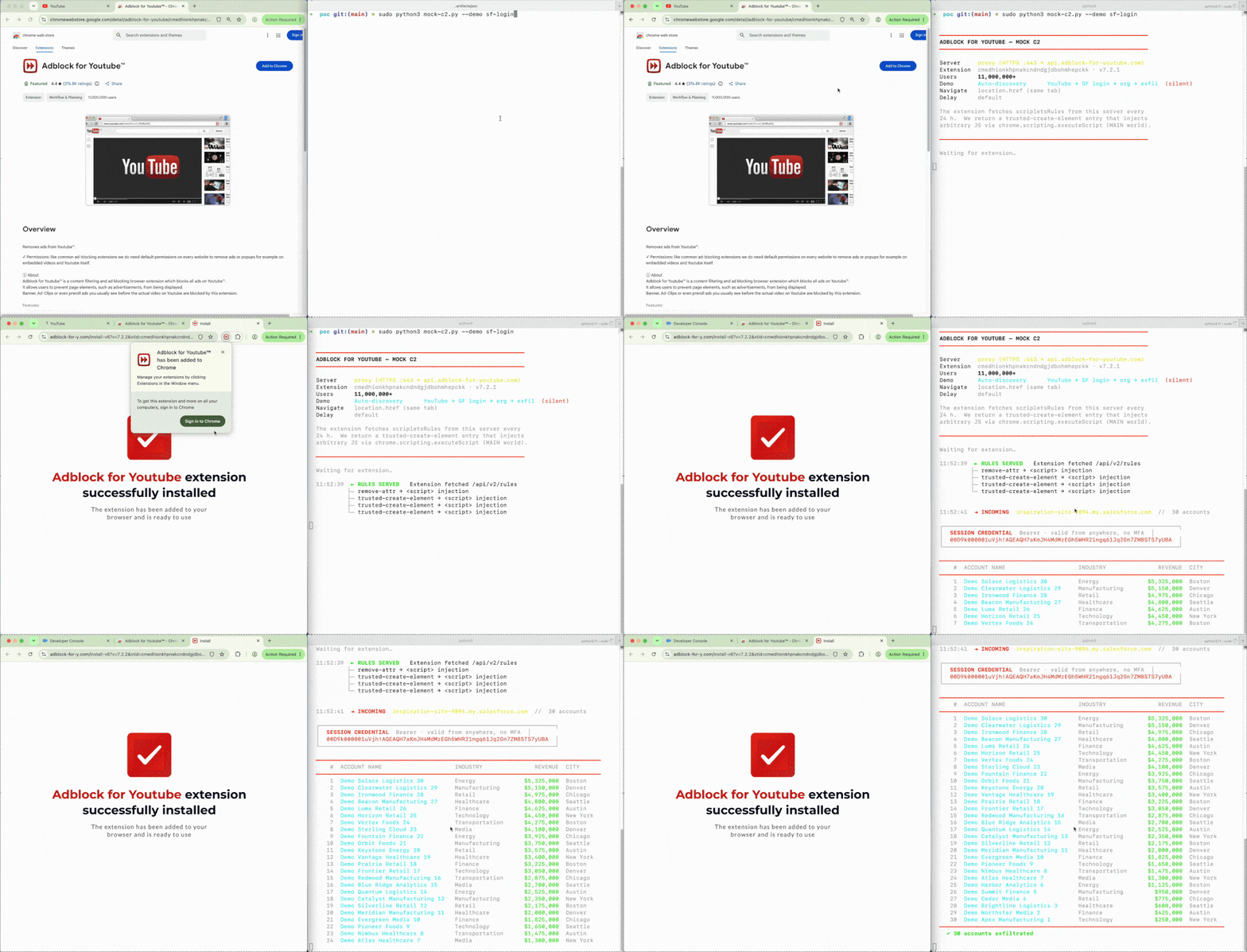
Proof of concept: YouTube to Salesforce
To validate the execution path, we built a controlled proof of concept using a local mock server. The server responded to the extension’s normal rules API request, but the extension itself was not modified: same package, same permissions, same URL check, same scriptlet library, same injection logic.
Step 1: The extension fetches a server-selected scriptlet. After installation, the extension requests its normal rules configuration. Our mock server returns one scripletsRules entry, which the extension stores and later uses for page injection.
Step 2: The scriptlet runs on YouTube. The user opens youtube.com, so the extension’s /youtube\.com/ check passes naturally. The server-selected scriptlet is injected into the YouTube tab and opens a Salesforce URL containing youtube.com in the query string.
Step 3: The same scriptlet runs on Salesforce. The Salesforce page opens under the user’s authenticated browser session. Because the full URL still contains youtube.com, the extension’s URL check passes again, and the scriptlet is injected into Salesforce.
Step 4: Salesforce data reaches the server. Once running inside Salesforce, the scriptlet can act in the context of the user’s session. In the proof of concept, it reads account data visible to the user and sends it back to the mock server.
The entire chain requires one server-side configuration change. No extension update, no new Chrome Web Store review, and no visible change to the user.
The history of the extension
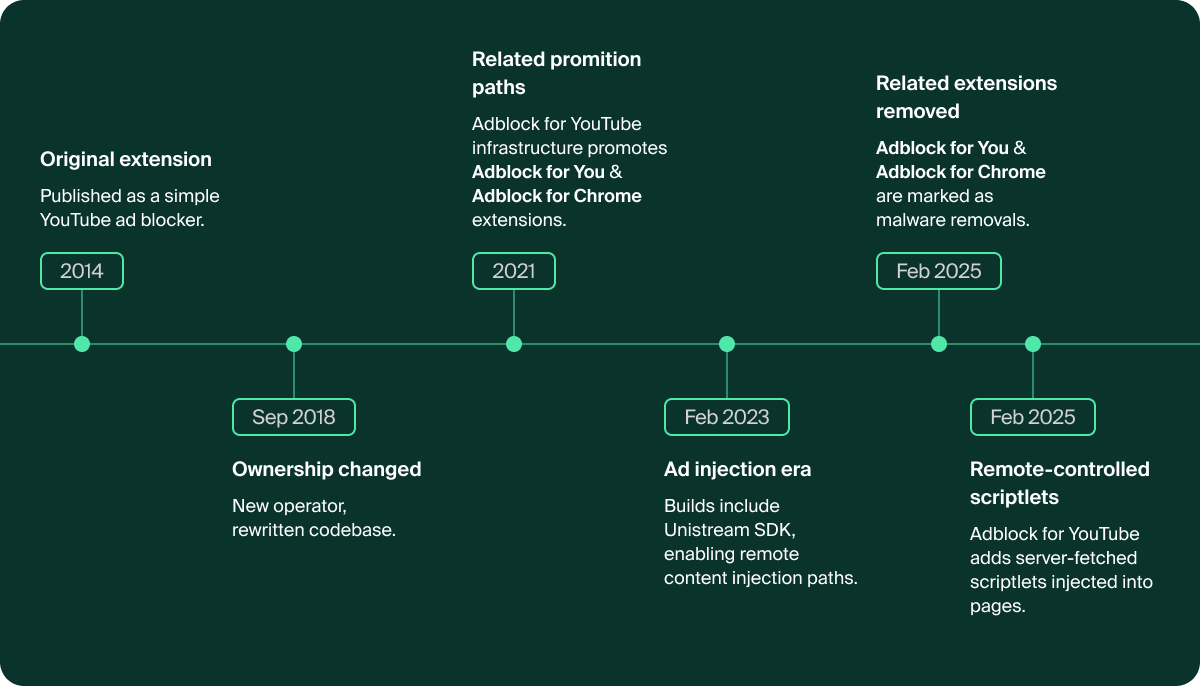
Adblock for YouTube has been on the Chrome Web Store for more than a decade. That kind of age creates trust: users recognize the name, installs accumulate, and the extension becomes part of normal browsing.
But long-running extensions can change while that trust stays in place. Ownership can change. Codebases can be rewritten. Backend infrastructure can move. Permissions can expand. Users usually do not see any of that; they just see the same extension name in the browser.
The extension changed hands
Adblock for YouTube appears to have started as a straightforward YouTube ad blocker published by a small independent developer around 2014. In those early versions, we did not identify the current remote-controlled script injection architecture.
Around 2018, the extension changed ownership and was substantially rewritten. That shift is visible in archived Chrome Web Store metadata, historical extension packages, and code diffs across versions. After that change, the extension grew from hundreds of thousands of users to more than 10 million. Its backend infrastructure and public listing also changed over time.
Sister extensions removed for malware
Adblock for YouTube also had ties to other ad-blocking extensions that were later removed from the Chrome Web Store for malware, including Adblock for Chrome (onomjaelhagjjojbkcafidnepbfkpnee) and Adblock for You (ogcaehilgakehloljjmajoempaflmdci). Historical landing pages on get.adblock-for-youtube.com and update.adblock-for-y.com funneled users from the Adblock for YouTube infrastructure into those extensions.
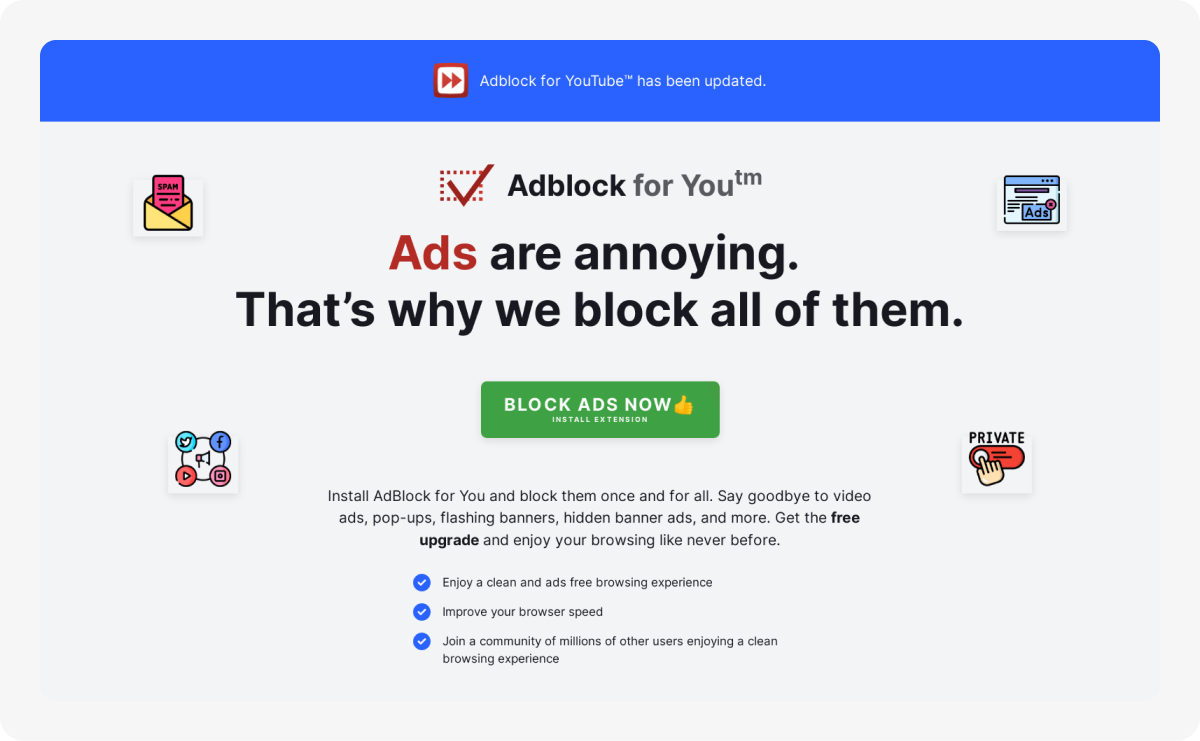
Adblock for Chrome is the clearest related case. It appeared in the same infrastructure window as Adblock for YouTube, and historical versions contained a bridge that allowed page-injected code to call privileged chrome.* extension APIs. Google later removed it from the Chrome Web Store for malware, a removal also documented by GitLab's Threat Intelligence team.

Adblock for You followed the same broader pattern: promotion through the same upsell infrastructure, all-site access, remote configuration, CSP modification, and MAIN-world injection. It used a separate remote configuration domain (abu-xt.com), but those overlaps place it in the same surrounding ecosystem.
Earlier ad-injection infrastructure
Earlier versions of Adblock for YouTube shipped with the Unistream SDK, an ad-injection SDK that has been associated with adware activity and was flagged by Bitdefender in the wild. That SDK was removed in June 2024.
During our review of those earlier builds, we also identified remote-controlled script injection paths. The implementation changed over time, but the broader pattern remained: server-side configuration could influence code execution inside pages visited by the user.
The bottom line
The concern is not a single suspicious line of code. It is the combination: a high-install extension with all-site access, a remote-controlled injection path, prior ad-injection infrastructure, a major ownership and codebase change, and related extensions that were removed from the Chrome Web Store for malware.
We did not observe active exploitation. We observed a risk profile that deserves serious attention. The extension users trust today is not the same small ad blocker that originally entered the store.
What this means for organizations
Browser extensions run where employees work: email, SaaS apps, source code, customer data, admin panels, and internal tools. An extension with page access is not outside the security perimeter. It is inside it.
An employee installs a trusted ad blocker with millions of users and good reviews. It looks harmless, and in this case, it really does block ads. But once installed, the extension also has access to work sessions, including applications behind SSO.
The key risk is the remote control. With one small server-side change, the operator could decide what script to run and where to run it. No extension update, no new permission prompt, no additional Chrome Web Store review.
Static review may show a working ad blocker. The real question is what the extension can be told to do later. If server-controlled logic injects code into the page context, it runs alongside the application’s own JavaScript, with access to the same DOM, session state, and visible data.
What to do about it
Blocking all ad blockers is not the answer. Good ones are genuinely useful, and blanket bans push employees toward worse workarounds. The answer is control with precision.
Audit host permissions against stated purpose. A YouTube ad blocker that requests <all_urls> instead of *://*.youtube.com/* should be reviewed.
Watch for remote control paths. Extensions that fetch configuration from external servers and use it to control page injection logic are architecturally different from extensions that ship self-contained rulesets.
Monitor for ownership and permission changes. The permission escalation from v5 to v7 happened over 18 months, one reasonable-looking step at a time.
Treat the browser as a managed endpoint. The browser sees the working surface of the company. It deserves the same continuous visibility and policy enforcement as any other endpoint in the stack. Island is built for that model: giving organizations control over which extensions can run, where they can run, and how browser activity is governed across the enterprise.
Final thought
Adblock for YouTube is not just a story about one risky extension. It shows how much trust can accumulate around code running inside the browser, and how little it may take for that trust to become dangerous.
The browser has become the employee workspace. Any extension that can run inside that workspace should be treated like code running inside the enterprise.
Appendix: Indicators of Compromise
Extension IDs
cmedhionkhpnakcndndgjdbohmhepckk— Adblock for Youtube™ v7.2.2 (live, 11M+ users)onomjaelhagjjojbkcafidnepbfkpnee— Adblock for Chrome v3.3.3 (removed from Chrome Web Store for malware)ogcaehilgakehloljjmajoempaflmdci— Adblock for You v3.0.3 (removed from Chrome Web Store for malware)gekoepiplklhniacchbbgbhilidiojmb— AdBlock Suite v1.3.1 (removed by Google, Sep 2023)
Active Infrastructure
api.adblock-for-youtube.com— scripletsRules distribution (GET /api/v2/rules)get.adblock-for-youtube.com— lifecycle beacons (install, update, uninstall)
Historical Infrastructure
unistream.io / cdn.unistream.io / data.unistream.io— Unistream ad-injection SDK (associated with the current developer, Bitdefender-flagged)adblock-for-chrome.com— backend/domain family for the removed Adblock for Chrome sister extensionabfc-extension.com— remote config endpoint used by Adblock for Chromeadblock-for-y.com / update.adblock-for-y.com— historical upsell funnel that promoted Adblock for Youabu-xt.com— remote config endpoint used by Adblock for You
.avif)
Oleg is a Lead Security Researcher at Island, helping make Island the most secure and resilient enterprise browser. With a background in cybersecurity from Unit 8200 and leading security companies, Oleg drives security research, threat hunting, and vulnerability discovery. His work uncovering critical vulnerabilities and threat campaigns has helped shape Island’s security practices and strengthened its security standards.
.png)
Shachar is a Senior Security Researcher at Island, focused on staying one step ahead of threat actors through proactive security research and threat hunting. With over 10 years of experience across reverse engineering, malware analysis, threat detection, and cloud security, Shachar drives offensive and defensive research to anticipate and outpace emerging threats. His work uncovering threat campaigns and building high-fidelity defenses has directly shaped Island's security practices and raised the bar for browser security.






.svg)
.svg)

