.svg)
ShadyPanda: the New Era of Architecture-Aligned Browser Attacks
The recent browser extension-based attack exposed a serious trust gap in the workspace. Here’s what it means and why the Enterprise Browser provides the governance and protection modern work requires.

Security researchers at Koi Research and security expert Tuval Admoni recently uncovered a long-running campaign — now referred to as ShadyPanda — that stands out not because of a clever exploit, but because of its patience and precision.
Attackers weren’t hijacking existing extensions or injecting code into trusted apps. In many cases, they created browser extensions that appeared completely harmless, offering simple utilities or productivity conveniences. These extensions behaved normally, passed store reviews, accumulated users, and in some cases remained benign for years.
Then, with a single update, everything changed.
A once-innocuous extension flipped into a tool for surveillance and data theft — quietly capturing activity, extracting information, and communicating with attacker infrastructure. And critically, it did all of this within the permitted capabilities of the consumer browser extension architecture. No exploit. No vulnerability. No malware dropper.
Simply a manipulation of the trust and flexibility built into modern browsers.
ShadyPanda didn’t break browser security. It operated inside it — cleanly, legitimately, and effectively by exploiting the ‘trust gap’ in browser extension stores.
This is the important lesson: the browser has become the enterprise’s most important workspace, while extension mechanisms were built for a mission centered on openness, flexibility, and innovation — not enterprise governance.
What are "Architecture-Aligned" Attacks?
This term highlights a dangerous shift in how attackers operate. Rather than using "exploits" (code that breaks the browser), they weaponized the browser's intended architecture.
- Weaponizing the Update Pipeline: The extensions were installed legitimately. The attackers waited years, then pushed a malicious code update through the official, trusted auto-update mechanism (the architecture designed to keep you safe).
- Bypassing Static Analysis: Because the extensions were clean when first reviewed by Google/Microsoft, they passed all security checks. The malicious code was only fetched dynamically after installation, aligning with how modern web apps fetch data, making it nearly invisible to traditional antivirus.
- Service Worker Abuse: They used "Service Workers" (a standard browser feature for background tasks) to silently intercept network traffic, steal cookies, and hijack search queries without the user seeing any visual change.
Key Technical Components of the ShadyPanda Campaign
- The Trust Trap: ShadyPanda explicitly targeted the "Featured" and "Verified" badges. By maintaining clean code for years (as far back as 2018), they bypassed the rigorous scrutiny applied to new submissions.
- The Pivot: The attack did not start with malware. It began with "Affiliate Fraud" (injecting referral codes) to test the waters before escalating to full Remote Code Execution (RCE).
- The Mechanism: The core threat is the Auto-Update. Browser stores generally do not re-scan updates as thoroughly as new submissions. ShadyPanda used this to push the "loader" code that fetches the actual malware from api.extensionplay[.]com.
- Evasion: The malware actively checks if the user is a developer or researcher by monitoring for the opening of DevTools. If detected, it immediately stops malicious activity to avoid analysis.

Technical Breakdown of Stages
1. Infiltration & Trust (The Long Game)
- Tactic: Defense Evasion / Resource Development.
- Mechanism: The group published benign extensions (e.g., Clean Master, WeTab, Infinity V+) as early as 2018. They functioned exactly as advertised for years, garnering positive reviews and passing Google/Microsoft security assessments.
- Key Asset: Gaining "Verified" badges allowed them to bypass stricter scrutiny later.
2. Weaponization (The Update Vector)
- Tactic: Initial Access.
- Mechanism: ShadyPanda exploited the auto-update feature of modern browsers. By pushing a new version code to the store, they bypassed the user's consent. Because the extensions already had broad permissions (e.g., "Read and change all your data on websites you visit"), the malicious update did not trigger a new permission prompt.
3. Execution & Command and Control (C2)
- Tactic: Execution / Command and Control.
- Mechanism: The updated code introduced a "heartbeat". Every hour, the extension queries the C2 domain (api.extensionplay[.]com).
- Payload: It downloads a remote JavaScript file. This allows the attackers to change the malware's behavior dynamically without pushing another store update (which might trigger a review).
- Technique: Remote Code Execution (RCE). The downloaded script runs with the extension's high-level privileges, effectively bridging the gap between web content and browser internals.
4. Impact (Theft & Surveillance)
- Tactic: Collection / Exfiltration.
- Capabilities:
- Surveillance: Capturing every URL visited, search terms typed, and even mouse click coordinates.
- Session Hijacking: Stealing cookies and authentication tokens (allowing entry into email, banking, or corporate portals).
- Search Hijacking: Redirecting user searches through specific domains (e.g., trovi[.]com) to generate ad revenue or intercept traffic.
Why Attacks Like ShadyPanda Fit Naturally Into the Modern Browser Model
Browser extensions were engineered for broad creativity, personalization, and usability. To accomplish that, they were given deep, powerful capabilities:
- the ability to read and modify content
- access session information
- inject scripts
- communicate with external services
- update silently through trusted channels
This design supports an enormous ecosystem of legitimate innovation. But it also means an extension can appear benign for months or years, accumulate trust, then evolve into something dangerous through an update that looks routine.
All of this is permitted behavior — nothing about it is inherently suspicious from the browser’s point of view.
And because extension activity happens inside encrypted browser sessions, outside-the-browser tools such as proxies, SASE, and endpoint agents cannot reliably inspect or govern these behaviors.
Research has found that in the past 12 months, the number of browser extensions published to the major stores (Google Chrome and Microsoft Edge) falling under the categories of AI, VPNs, and Password Managers has exploded, accounting for almost 50% of all new submissions. We refer to these as the ‘Malicious Trinity’ because they are the primary vehicle to inject ads, deliver malware, infostealers, cryptojackers, and a host of other malicious software that puts browser data (and the host device) at risk of compromise.
The issue isn’t a flaw in consumer browsers. It’s a mission mismatch between what the extension ecosystem was designed to support and what enterprises now require from their browser environment.
The Mission Mismatch at the Core of the Problem
Consumer browsers are exceptional at their mission of delivering speed and compatibility, supporting a massive extension ecosystem, optimizing for billions of users, and encouraging openness and innovation. It is a noble mission that has created the foundation of the Internet as we know it today.
But the enterprise’s mission is fundamentally different. Organizations must provide access to resources for employees and other parties to perform their duties. However, while doing so, they must protect the organization’s most important resources. They must perform delicate actions such as preventing unauthorized data movements, enforcing contextual access decisions, gaining visibility into user interactions, protecting against exploitation events, controlling how code behaves inside of sensitive workflows, and maintaining compliance and governance where required.
These two missions do not conflict — they simply don’t overlap.
This is the rationale for the enterprise browser: a browser intentionally aligned to the needs, risks, and responsibilities of the enterprise environment.
How The Island Enterprise Browser Provides Enterprise-Grade Readiness for Attacks Like ShadyPanda
Island embeds security, governance, and visibility directly into the browser runtime itself — the environment where extension behavior occurs and where traditional defenses have no reach.
Below are the integrated capabilities that give enterprises readiness for attacks that leverage the extension architecture.
Continuous Extension Reputation & Behavioral Evolution Awareness
Extensions are not static artifacts — they evolve. Island continuously monitors how each extension behaves over time, establishing a behavioral baseline that includes:
- expected permissions
- typical API use
- data-access patterns
- publisher identity and ownership history
- normal update cadence
When an extension begins to diverge from this baseline — for example by:
- requesting new permissions
- issuing novel API calls
- altering its injection behavior
- changing ownership
Every new browser extension published to the extension ecosystem, as well as updates to existing extensions, are evaluated to determine the risk they may pose. Should a formerly benign extension suddenly become compromised by an updated version, Island can block the installation of the newer, compromised version. Island immediately surfaces detailed insights to administrators, allowing the enterprise to explicitly approve or deny the new extension behavior, thus eliminating the long-game strategy ShadyPanda relied on. The newly published compromised versions of all extensions associated with the campaign were immediately flagged by Island as malicious.
Even a trusted extension cannot silently shift into dangerous activity.
Context-Aware Governance of Extensions
Enterprises rarely need a binary “allow or block” answer for extensions. They need nuance. Island enables policies that align extension use with user identity, device posture, the application in use, location or network, sensitivity level of the data in the session, etc. An extension that is acceptable in a low-risk environment may be restricted entirely in a sensitive financial application.
Permissions can be precisely controlled, and extensions should be limited to the contexts where they make sense.
Governance becomes dynamic and adaptive, not static.
Visibility Into Extension Behavior and Data Interactions
ShadyPanda thrived in environments where extension behavior was invisible.
Island turns the browser into a transparent, governed workspace by providing granular visibility into extension actions, data movement (copy/paste, screenshots, uploads, downloads), user workflows inside web applications, and interactions across SaaS and internal apps. This is all performed without the complexity of breaking SSL or compromising performance.
This visibility gives enterprises both early-warning signals and the forensic depth required to investigate sophisticated campaigns.
Browser Self-Protection and Runtime Hardening
Extension-based threats often escalate to deeper browser manipulation. Island makes this far more difficult for such attacks by enforcing such things as browser integrity, anti-debugging protections, runtime safeguards against tampering, and strategic reduction of high-risk browser APIs or other internal resources. This dramatically reduces the attack surface of the browser itself, greatly reducing or even eliminating the ability for a malicious actor to exploit vulnerabilities in the underlying browser code or hijack stored cookies, session tokens, or credentials. And when context demands, Island’s Suspicious Device Detection can shut down the browser entirely in the presence of hostile behaviors or tooling. Even if an attacker gains significant device access, Island ensures the browser does not become a silent conduit.
Enterprise-Defined Data Boundaries That Remove Exfiltration Paths
As further protections are required, Island enforces strict boundaries that prevent it from leaving its legitimate context. It can ensure that no unauthorized copy/paste is allowed, no unapproved screenshots happen, sensitive materials can be watermarked or redacted at the presentation layer, rigorous enforcement of upload and download controls, and the prevention of data movement into personal SaaS or unmanaged environments where required. If sensitive data cannot cross the boundary, an extension cannot steal it.
The Island Enterprise Browser is specifically designed to prevent the kind of compromise described in the ShadyPanda browser extension example by applying strict enterprise-grade controls around browser behavior and extension management. Here’s how it mitigates such threats:
1. Extension Governance and Allowlisting
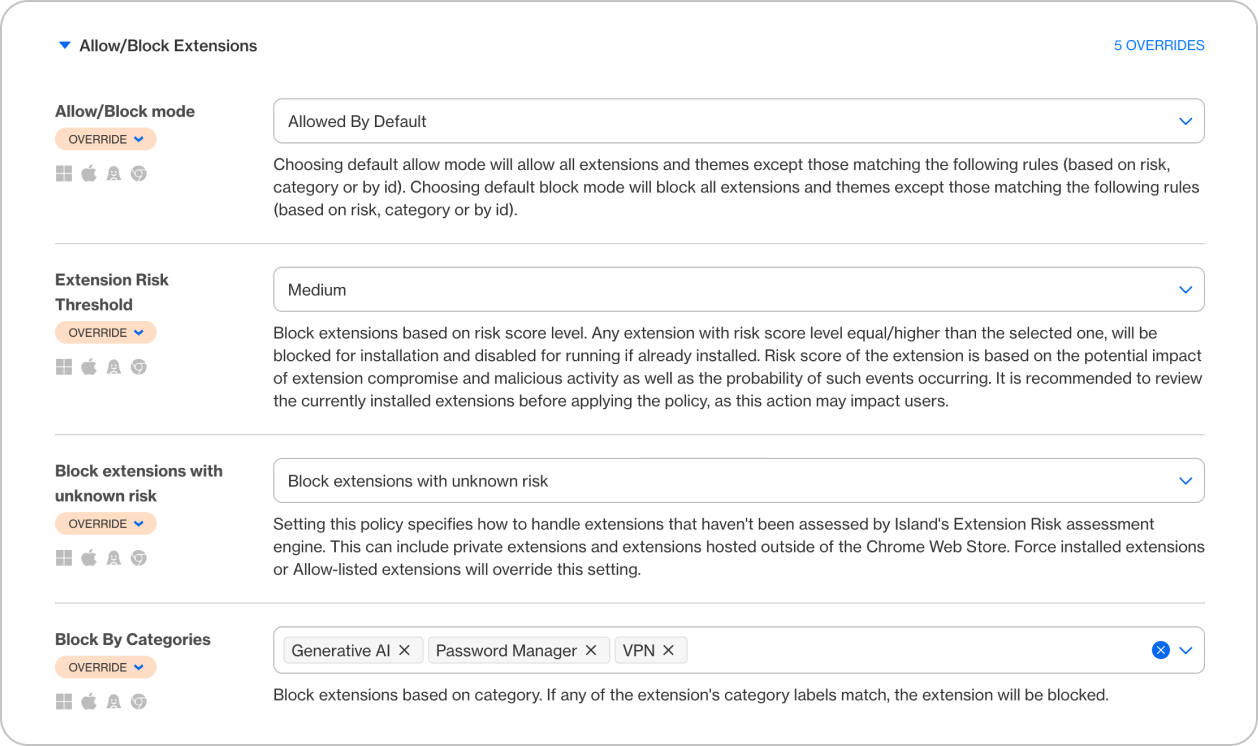
- Island performs continuous risk assessment of ALL browser extensions published to the Chrome store (and soon Edge), assigning granular categorization and risk metrics. Island administrators can centrally manage which extensions are allowed, by ID, publisher signature, category or risk level.
- Any unknown, modified, or newly updated extension (like a “weaponized” update from ShadyPanda stage 2) would be automatically blocked or require admin approval before activation.
2. Isolation of Enterprise Data
- Even if an extension somehow ran, Island enforces data loss prevention (DLP) rules that restrict clipboard access, file downloads, or web requests from sensitive apps (e.g., Salesforce, Workday).
- This isolation stops data theft or exfiltration described in ShadyPanda’s “Impact (Theft & Surveillance)” phase.

3. Policy-Based Control Over Browser Behavior
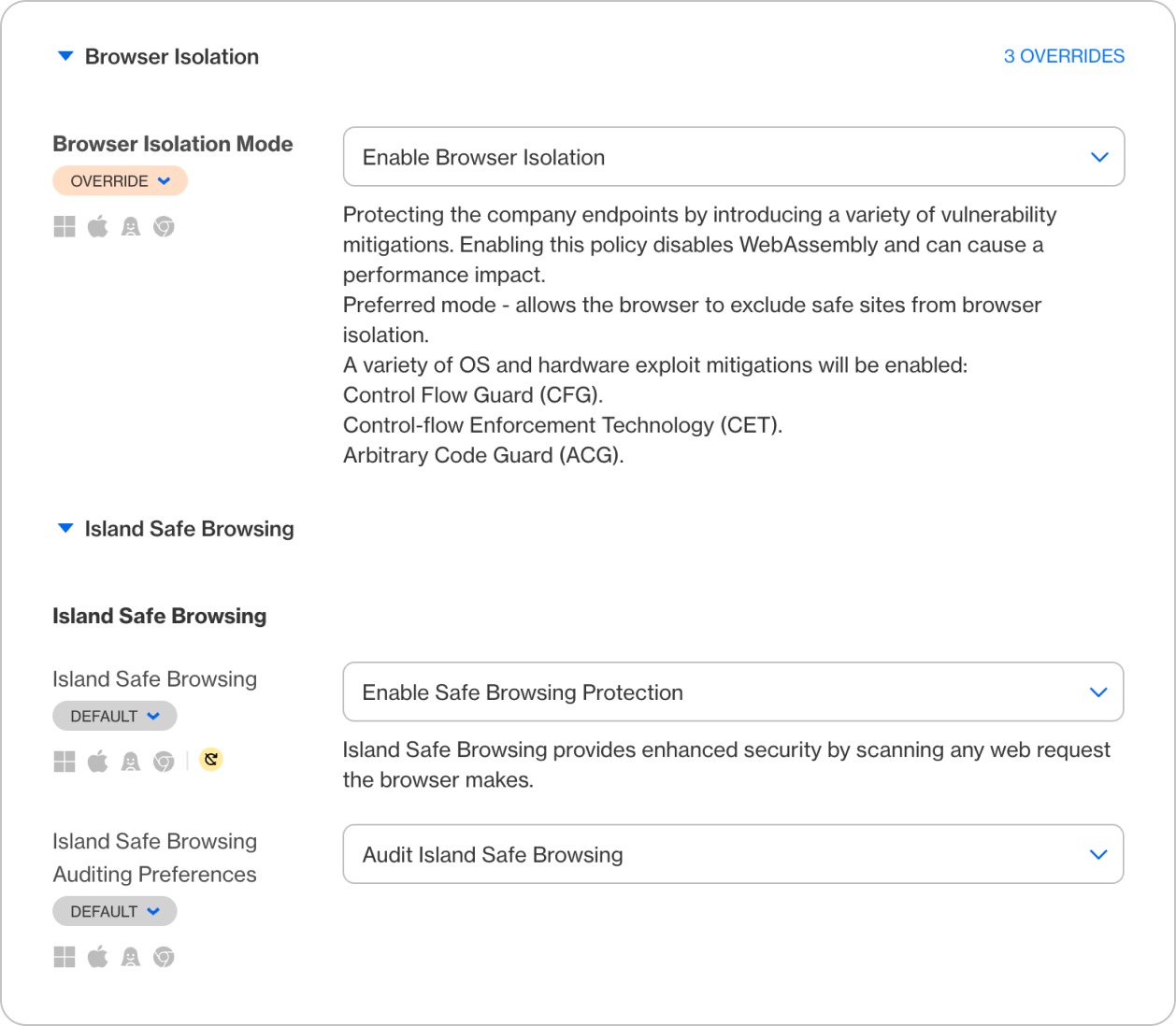
- IT can create contextual policies, such as blocking JavaScript injection, API calls, or external network requests from non-trusted origins.
- These controls effectively neuter C2 (Command and Control) communication attempts from a malicious extension.
4. Continuous Monitoring and Audit
- The browser provides visibility into all browser activity, including policy violations or suspicious extension usage.
- Security teams can receive alerts or automate incident response, closing the loop on reconnaissance or exploitation steps.

In effect, Island’s approach transforms the browser into a trusted workspace — controlling the execution environment, extension ecosystem, and data pathways — so that a ShadyPanda-style compromise would be blocked before it could establish persistence or exfiltrate anything.
Why Enterprise Browsers Are Emerging Right Now
This shift is not due to a failure of consumer browsers — they excel at their intended mission. It is due to the evolution of where work happens and what enterprises must protect.
The consumer browser mission serves the open web and maximizes innovation and performance for billions of users. Yet the enterprise has different needs. It must make users productive while keeping the organization safe. It must be prepared against adversaries playing the long game, such as ShadyPanda.
Both missions matter.
But enterprises have requirements that fall entirely outside the scope of the consumer-focused model.
The Strategic Reality: The Browser Is Now the Enterprise’s Core Workspace
SaaS adoption, distributed work, and identity-driven access models have made the browser the primary interface for application access, authentication, collaboration, data workflows, and internal and external communication.
This means the browser is now the enterprise workspace, and that workspace requires governance consistent with the sensitivity of what happens inside it.
Island brings the browser into alignment with the enterprise mission by embedding the required controls, visibility, and data protections directly into the browsing environment, including the extension ecosystem that has far too long been a wild west for organizations to cope with.

Michael is Field CTO at Island, bringing over 30 years of data networking, operations, and cybersecurity domain expertise. He formerly served as Head of Technical Marketing and Chief Cybersecurity Evangelist at SentinelOne where he was responsible for messaging and strategic development of their XDR product roadmap as well as the identity security portfolio. Prior to SentinelOne, he held the title of Chief Technical Strategist for McAfee. Michael was the co-founder and CTO of NitroSecurity – later acquired by McAfee – where he was responsible for developing and implementing their overall SIEM technology vision and roadmap and has held senior technical management positions at Cabletron and Avaya.

.png)


.svg)
.svg)

