.svg)
AI Moved the Risk. Most DLP Programs Haven't.
Island Data Protection is built for how data actually moves today: across browsers, desktop apps, AI tools, and networks, governed at the point of interaction.
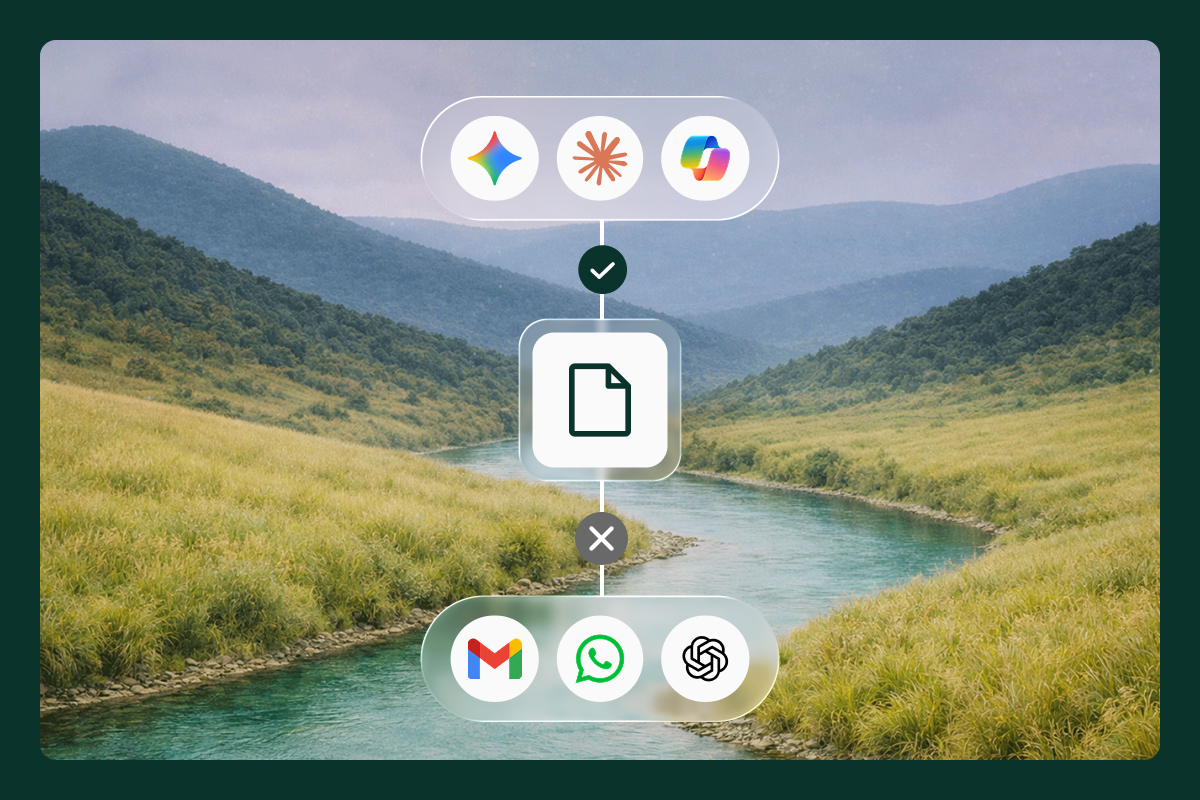
You have a DLP tool. Probably more than one. You have policies, detectors, and an analyst who spends half their day triaging alerts that turn out to be nothing.
And data is still leaving.
Not because your team isn't good. Because the architecture these tools are built on was designed before AI existed as a workplace tool. Before employees had personal ChatGPT accounts, AI coding assistants, and agentic workflows running in the background. Legacy DLP was built to inspect packets and scan files. It was never built for a world where the most sensitive data movement happens inside a prompt.
The result is familiar: alert fatigue, policy sprawl, constant tuning, and an AI exposure gap that didn't exist five years ago. And still, the data finds a way out.
The gap isn't a configuration problem
These scenarios happen every day in every enterprise.
- A developer sets up a new MCP using an API key he copied from a colleague. The key grants access to an external service, and hard-coded credentials now live inside the developer's environment. No file was transferred. No policy matched. No one was notified.
- An employee uses Granola to transcribe and summarize a customer call. The transcript includes pricing details, customer names, and deal terms. Without enforcement on how data moves between applications, they can copy that transcript from the corporate app straight into a personal email. No file was attached. No upload was scanned. No policy matched.
- A sales rep downloads a customer list from Salesforce into Excel, then moves the file to a personal USB drive before heading to a client meeting. The endpoint agent scanned the original download. It never saw the USB transfer. The data is left on a drive that IT doesn't control.
These aren't edge cases. They're normal patterns of modern work. And they represent the structural ceiling of every tool built on the legacy model: network gateways miss what happens on the device in the actual user interaction/session, endpoint agents miss what happens inside the browser, and neither has meaningful visibility into the data flowing into AI tools and agentic workflows.
The problem isn't that your policies are wrong. The control point is in the wrong place. Protecting data today means enforcing where it actually moves: inside the browser, across desktop applications, through the network, and at the point of interaction with AI tools and the MCP connections they make. That's what Island Data Protection is built to do.
Island's approach to data protection follows a simple progression: see, understand, enforce.
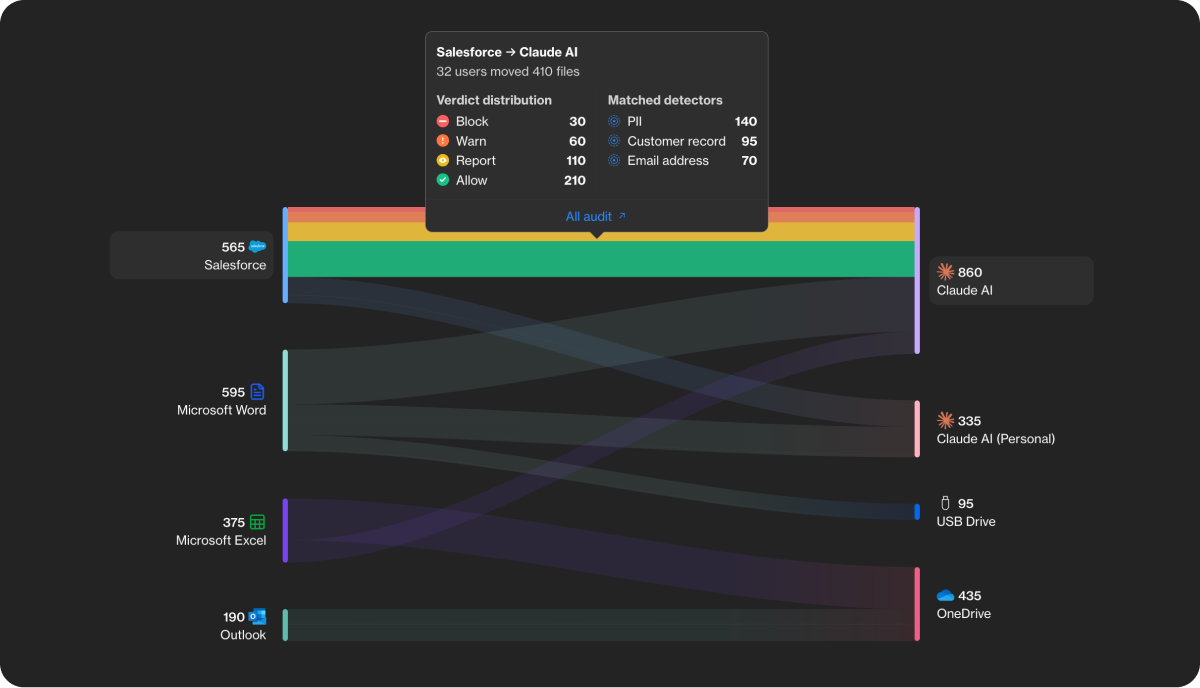
Data Lineage: see how data actually moves
Before you can fix the gaps, you need to see them clearly: not based on assumptions about how data should move, but on evidence of how it actually does.
Island Data Lineage provides continuous visibility wherever data moves: across the browser, desktop applications, device peripherals, SaaS platforms, and AI tools. Where a file originated. Which applications it passed through. Whether it ended up in a personal account, an unsanctioned AI tool, or a USB drive.
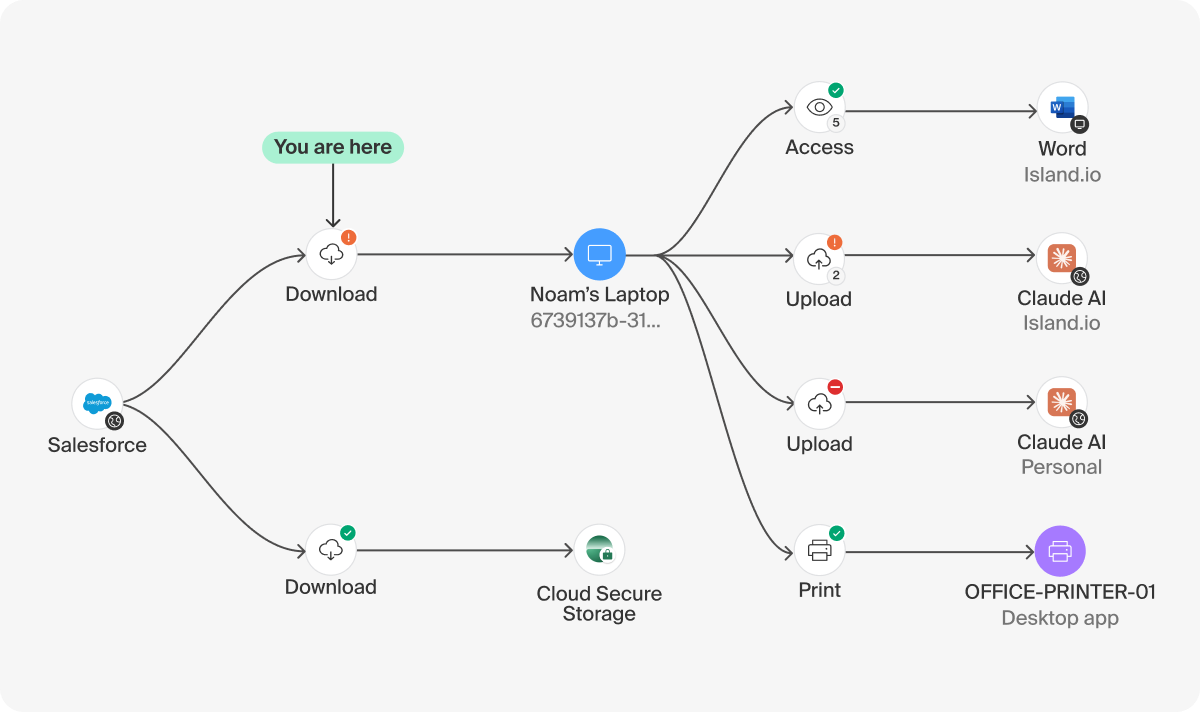
For files, Island surfaces a visual lineage graph that traces the full journey of a file across applications and devices, including uploads, downloads, desktop access, and sync folder transfers, aggregated into a single view that makes incident investigation significantly faster. And critically, the full context around every action: who did it, on what device, and from which location.
That visibility changes the conversation from reactive to intentional. Instead of reacting to alerts in isolation, teams can see patterns: which applications data flows through, where it tends to exit the organization, which workflows carry the most risk, and where enforcement would add noise rather than value. That context is the foundation for everything that comes next.
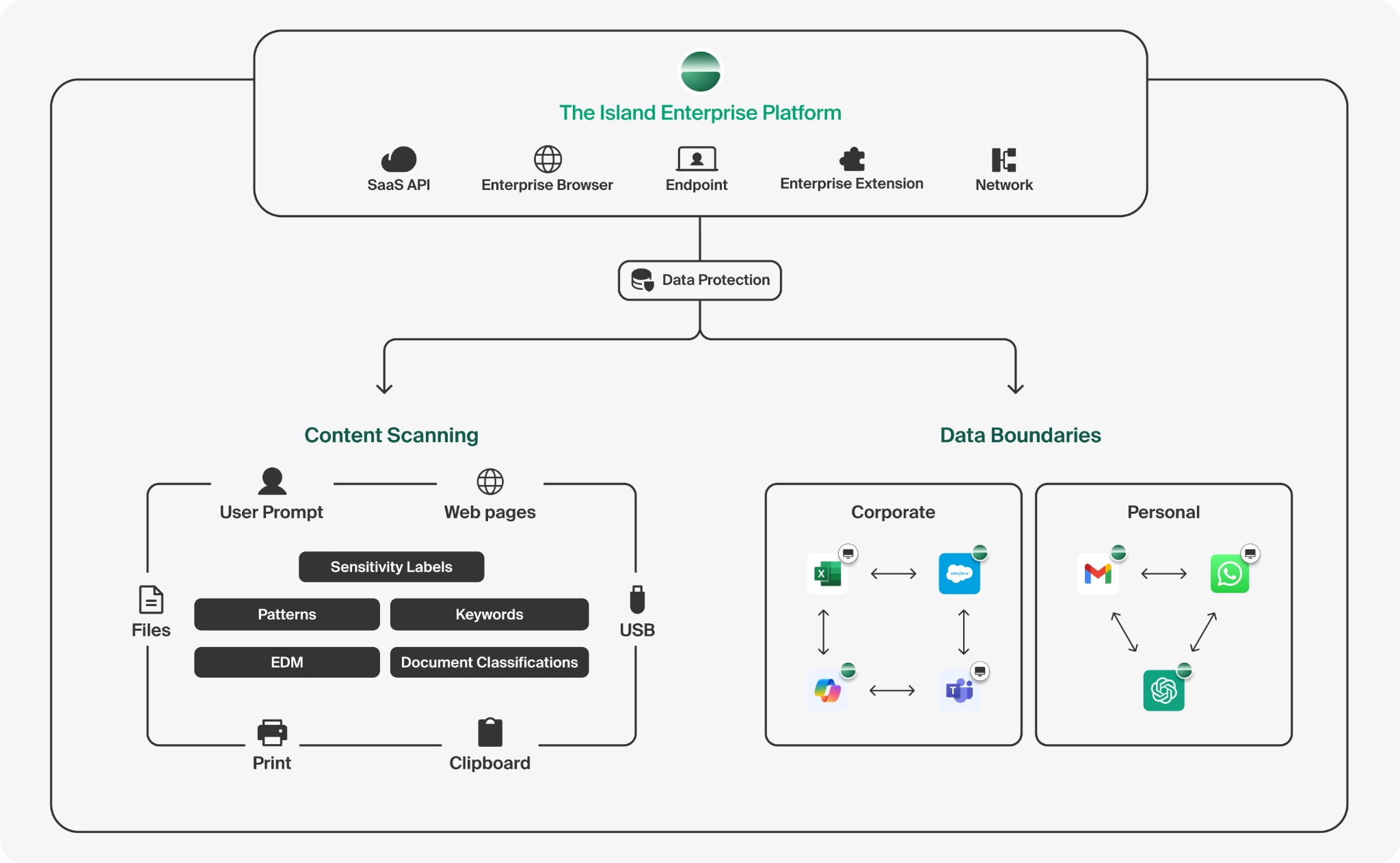
Data boundaries: contain before it escapes
Most DLP tools are built around content inspection: scan everything, match patterns, block what looks risky. The result is thousands of rules, constant tuning, and a false positive rate high enough that analysts stop trusting the alerts. The deeper problem is that most of what gets flagged is legitimate work, data moving between applications that should be allowed. If the flow is trusted, there's no reason to inspect the content at all.
Island Data Boundaries start from a different premise. Instead of writing hundreds of rules and defining what data can't do, administrators define where it's allowed to go: the applications, account types, and destinations that make up a trusted work environment. Inside a boundary, data moves freely. Context-driven enforcement reduces friction on legitimate work, so users only feel control when context warrants it.
When data attempts to move outside those trusted paths: into a personal account, an unsanctioned AI tool, a USB drive, a sync folder that isn't in the approved set, Island contains it. Not after the fact.
The finance analyst moves data freely between Salesforce, Excel on the desktop, Teams, and Copilot, then saves the final version to the corporate OneDrive account. All inside the boundary, across web, desktop, and AI applications. The moment that file moves to personal Gmail, it's blocked. Not flagged for review. Blocked inline, at the moment of interaction.
The contractor scenario changes, too. Island runs on the unmanaged device through the Enterprise Browser or the Island Enterprise Extension, enforcing the same Data Boundaries that apply to a fully managed laptop. No MDM enrollment, no VDI, no hardware provisioning. Full data protection enforcement from day one, on any device.
The result is better security and a simpler program to run. One boundary definition replaces dozens of brittle DLP rules, which means less tuning, fewer false positives, and analysts focused on real incidents instead of noise. Users work without friction. IT defines one set of trusted flows and watches false positives drop as legitimate work stops getting flagged.
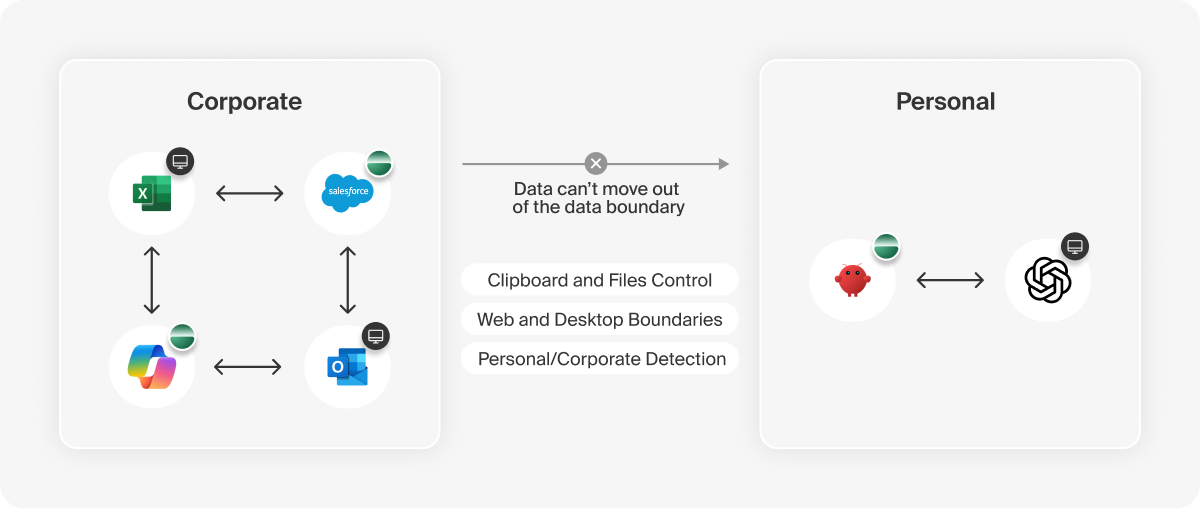
Endpoint data protection beyond the browser, inside the app
Most secure browsers stop at the browser level. Island doesn't.
For thick desktop applications, such as Excel, Outlook, and legacy clients, Island injects directly into the application and hooks OS-level APIs to govern clipboard events, file reads, and writes in real time.
A kernel-level minifilter driver intercepts file system activity before it reaches any local destination, including USB drives or sync folders. Verdicts are made locally by the on-device DLP engine, so enforcement happens even when the device has no network connection.
The result is full coverage across the workspace: browser, desktop apps, file system, and device peripherals, all under the same policy and the same audit trail.
Content-aware detection. Inspect when it matters.
Data boundaries are the first layer: defining which applications, account types, and destinations are trusted, and containing data that tries to move outside them. But trusted destinations aren't always risk-free. A sanctioned file-sharing app can still receive a document it shouldn't. An approved collaboration tool can still be used to move sensitive content in ways that cross a compliance line. That's where content inspection comes in as the second layer, running on top of approved flows to evaluate what's actually being moved, not just where it's going.
Island's detection engine covers the full range: pattern matching for structured data types like social security and credit card numbers, keyword matching for internal classifications, Exact Data Matching (EDM) for known sensitive records identified by hash without exposing raw data, and OCR for text inside images and scanned documents.
And AI Classifiers, which address content that no pattern can reliably catch.
Source code doesn't have a regex. A draft M&A agreement doesn't match an SSN pattern. An HR document reviewing compensation isn't flagged by a keyword list unless someone anticipated that exact phrasing. This is the data that leaves the organization, not because DLP missed a pattern, but because the content was never describable by a pattern.
Island AI Classifiers use large language models to evaluate meaning and context. An administrator writes a plain-language description of what to detect. Built-in classifiers cover NDAs, M&A documents, legal advice, PHI, HR data, source code, and more. Custom classifiers handle proprietary content that no out-of-the-box tool would know to look for. The detector library itself is continuously optimized using AI, cross-validating models and autonomously fine-tuning against accuracy metrics, with versioning so every change is tracked.
The detection engine is configurable to fit your organization's governance and regulatory requirements. For organizations with data residency requirements, Bring Your Own Model (BYOM) routes classification through the customer's own AI provider (OpenAI, Anthropic, Azure OpenAI, Google Gemini, or Amazon Bedrock) with full audit visibility per scan. Beyond content, Island factors in user context and intent as part of the risk evaluation.
Suspicious context or unusual behavior around sensitive data is treated as a signal in the decision process, not just the data itself. AI classifiers can also be tuned with organizational context to reduce false positives, like distinguishing a blank NDA template from a signed agreement.
The AI governance problem is getting harder
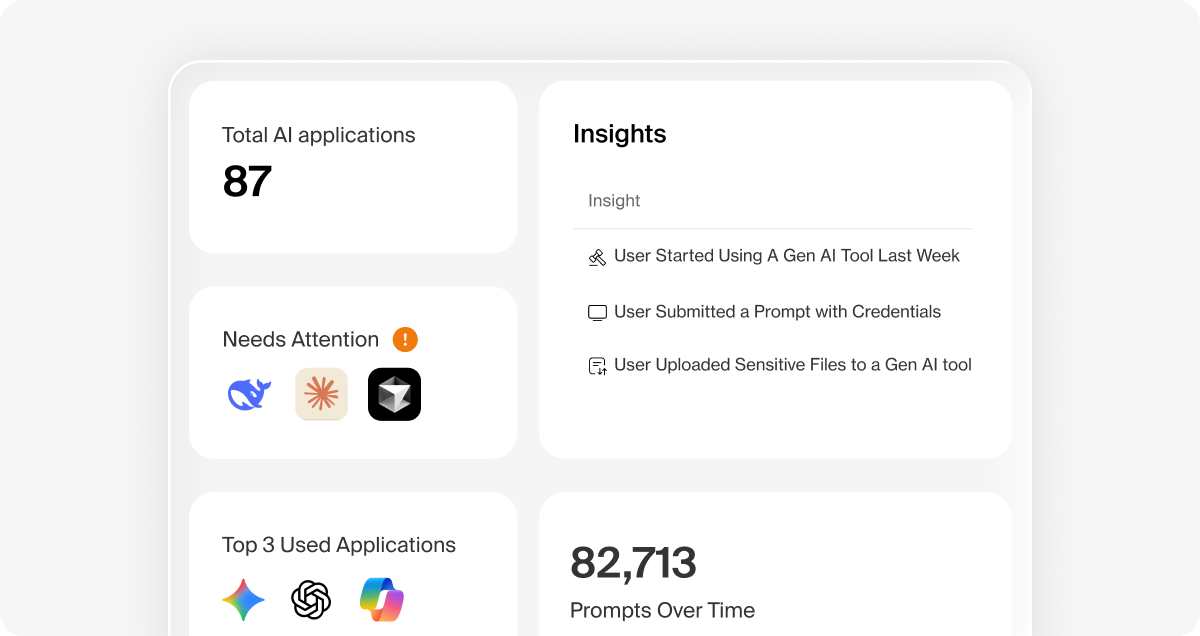
AI is now the highest-risk data movement channel in the enterprise, and most DLP programs have limited visibility into it. Nearly half of U.S. employees admit to uploading sensitive company information and intellectual property to public AI platforms, according to the KPMG Trust, Attitudes and Use of AI: A Global Study 2025. That's an architecture problem. The risk isn't just what goes into a prompt. It's which tenant receives it, whether the model trains on it, and whether the output ends up somewhere IT can see.
Some vendors respond by inspecting network traffic between users and LLMs. It provides partial coverage, but the limits are real: it's hard to deploy at scale, it shows you the tool call but not what the tool did with the data, and it doesn't scale across the fragmented model and agent landscape enterprises are already running.
Blocking AI doesn't solve this. It pushes usage underground to personal accounts and unreviewed tools. The exposure doesn't disappear. It just becomes invisible. That's shadow AI, and it's already in your environment.
Island governs AI with a level of context that network-only tools can't reach. Island Enterprise Network sees which services are accessed, by whom, and from where. Island Enterprise Browser and the Island Extension see the full interaction: who acted, from what device and location, whether the destination is a corporate or personal tenant on the same domain, the data moving in and out, the tools the agent called, and the actions it took. Island governs AI inside desktop applications like ChatGPT, Claude, and Cursor. Data Boundaries define which AI tools and tenants are approved, keeping corporate data inside sanctioned destinations, out of personal accounts, and away from models that aren't authorized to train on it.
That context is what makes governance precise rather than blunt. Instead of allowing or blocking, Island can mask sensitive data before it reaches the model, redact it from the prompt, or coach the user toward an approved alternative based on content sensitivity and request context.
For agentic AI, the challenge is deeper. A tool call can read a file, write to a database, or forward data to another agent without a human ever touching it. Island governs those actions at the presentation layer, where the agent interacts with data. Every tool call, MCP-based workflow, and agent-to-agent exchange is logged with full context: what was accessed, what was sent, and what happened next.
The outcome is the one executives actually want: AI adoption that doesn't compromise data integrity.
Network and SaaS protection - the layer underneath everything
Not all traffic originates in the browser. Zoom is running. Dropbox is syncing. Background services are making outbound connections. Island intercepts that traffic and routes it to Island SWG for full inline inspection: URL filtering, DLP, malware scanning, and application access control. For browser traffic, Island enforces locally at the DOM layer before content is encrypted for transit. No proxy round-trip, no SSL break-and-inspect, no backhauling cost.
Island SaaS API Protection (CASB) extends the same DLP policies out-of-band to SaaS platforms, covering files, permissions, and sharing behavior even when no one is actively touching them.
Every connection, browser or non-browser, is logged with user identity, destination, action, and outcome.
One platform. One policy.
The fragmentation that defines most DLP stacks (separate agents, separate consoles, separate policy models for browser, endpoint, network, and SaaS) is the operational cost that rarely shows up in vendor evaluations but defines the daily reality of running a DLP program. For most organizations, that means a dedicated team just to keep it from breaking.
Island runs on a single policy fabric. Data lineage, data boundaries, and content-aware detection apply consistently across the Island Enterprise Agentic Control Plane. One audit trail. One console. No gap between what the browser policy says and what the endpoint policy does.
Together, they enforce where data actually moves: browser, desktop, network, SaaS, and AI.
Island doesn't chase the data. It governs it at the point of interaction.
Request a data protection assessment and see exactly where your data is going.
.avif)
Tamar Cohen is a Product Manager at Island, leading AI Protect. Her work focuses on defining how enterprises can safely operationalize AI, from preventing sensitive data leakage to controlling how AI agents execute actions across production environments.

Noam is a Product Owner at Island, responsible for the Data Protection and Extension product domains. Her work focuses on how Island's browser enforces data policies at the point of interaction, giving enterprises precise control over what users can access, share, and move across both web and endpoint.



.png)
.svg)
.svg)

