.svg)
New Report: The Browser Is Now Enterprise Security's Biggest Blind Spot
Omdia research data reveals why browser-based attacks are surging, how traditional security tools are struggling to keep up, and what enterprises are doing about it.

The browser became the de facto enterprise workspace almost by accident. Work moved to SaaS, data moved to the cloud, and suddenly consumer browsers were running mission-critical workflows. Now, the browser is simultaneously today’s most-used enterprise application and the one least designed for enterprise security.
A new Omdia report, Browser Management and Security, puts hard numbers on the consequences. Surveying 400 enterprise IT and cybersecurity professionals, it found more than half (55%) experienced a successful attack or near-miss through employee browser use in the prior 12 months, with 22% hit multiple times. Despite years of security investment, the threat continues to grow.
It's not hard to see why. The browser is where SaaS applications, internal tools, AI systems, and sensitive data all converge, making it one of the most attractive attack surfaces in the enterprise. Yet most organizations are still protecting it from the outside in, layering VPNs, gateways, and agents around a consumer-grade tool that was never built for enterprise security in the first place.
Key findings from the report include:
- Browser-based attacks are the dominant threat category
- AI has become the number one security worry
- Traditional tools are showing their limits
Together, these and other data-supported results detailed in this report illustrate the browser security risks and challenges these IT and cybersecurity professionals are contending with — and the solutions they are pursuing.
1. Browser-based attacks are the dominant threat category
The numbers from the Omdia research overwhelmingly show browser-based attacks are the dominant enterprise threat category, and they are accelerating.
- 68% of organizations reported an increase in browser-based security incidents over the past two years
- 55% experienced a successful attack or near-miss through employee web browsing or browser-based application use in the prior 12 months — with 22% hit multiple times
- 97% have increased browser security spending in response
- 90% report browser security now ranks as a top-five priority
Phishing and data loss top the list of browser attacks reported by these orgs, followed by malicious browser extensions, vulnerable plugins, credential theft, and malicious scripts as the most frequent attack vectors.
The breadth and variety of attacks documented in the report demonstrate the inherent weakness of traditional browser security: protecting the browser via external gateways, agents, and proxies leaves an organization permanently one step behind. Threats that originate inside the browser session, in the rendering layer, in cached credentials, in extension permissions, simply don't surface until after the damage is done.
This is why an enterprise browser builds controls directly into the browser itself. Instead of surrounding the browser with security tools, Island detects and blocks malware before it reaches the endpoint, stopping phishing attempts before credentials are exposed, and governs extensions natively at the policy level rather than patching around them.
2. AI is the number one security worry
Another result: generative AI security now tops the list of use cases for secure browsing solutions, ahead of data loss prevention, general web security, and BYOD access.

Employees are using AI tools whether IT approves them or not. Every prompt submitted to an unsanctioned AI platform is a potential data leakage event, and traditional security tools have no visibility into what's happening inside that browser session.
With an enterprise browser, security teams can define which AI platforms are approved for use with company data, automatically block sensitive data from reaching unsanctioned tools, and maintain complete audit trails of AI interactions — all without blocking productivity. Instead of forcing a choice between AI adoption and data security, Island makes both possible at once.
3. Traditional security solutions are showing their limits
The Omdia data makes clear that the layered, perimeter-based approach to browser security is straining under the weight of modern threats. Among organizations relying on traditional tools as their primary browser security approach, 82% cited at least one significant challenge:
- 30% report high operational overhead and IT support burden
- 29% struggle with compatibility issues affecting internal or legacy web applications
- 28% have difficulty securing unmanaged or BYOD devices
- 27% lack secure mobile device coverage
Collectively, these demonstrate external browser security solutions (built for a different era of enterprise computing) can't consistently protect a workspace where critical applications need to be accessed from any device, any network, and increasingly, any AI platform.
Island consolidates what traditionally required multiple overlapping tools — DLP, ZTNA, CASB, extension management, access controls — into a single browser-native platform. The same policy framework that governs a managed corporate laptop extends equally to an unmanaged BYOD device or a third-party contractor's personal machine, without additional agents, proxies, or infrastructure.
What security professionals want from a secure browsing solution
The IT and cybersecurity leaders participating in this report are concerned more about browser security features and efficacy, however. They also prioritize ease of use, because a security tool employees actively resist doesn't provide real security. Friction drives workarounds, and workarounds create exposure.
When asked about the most important user experience factors in evaluating secure browsing solutions, ease of use edged out raw performance:
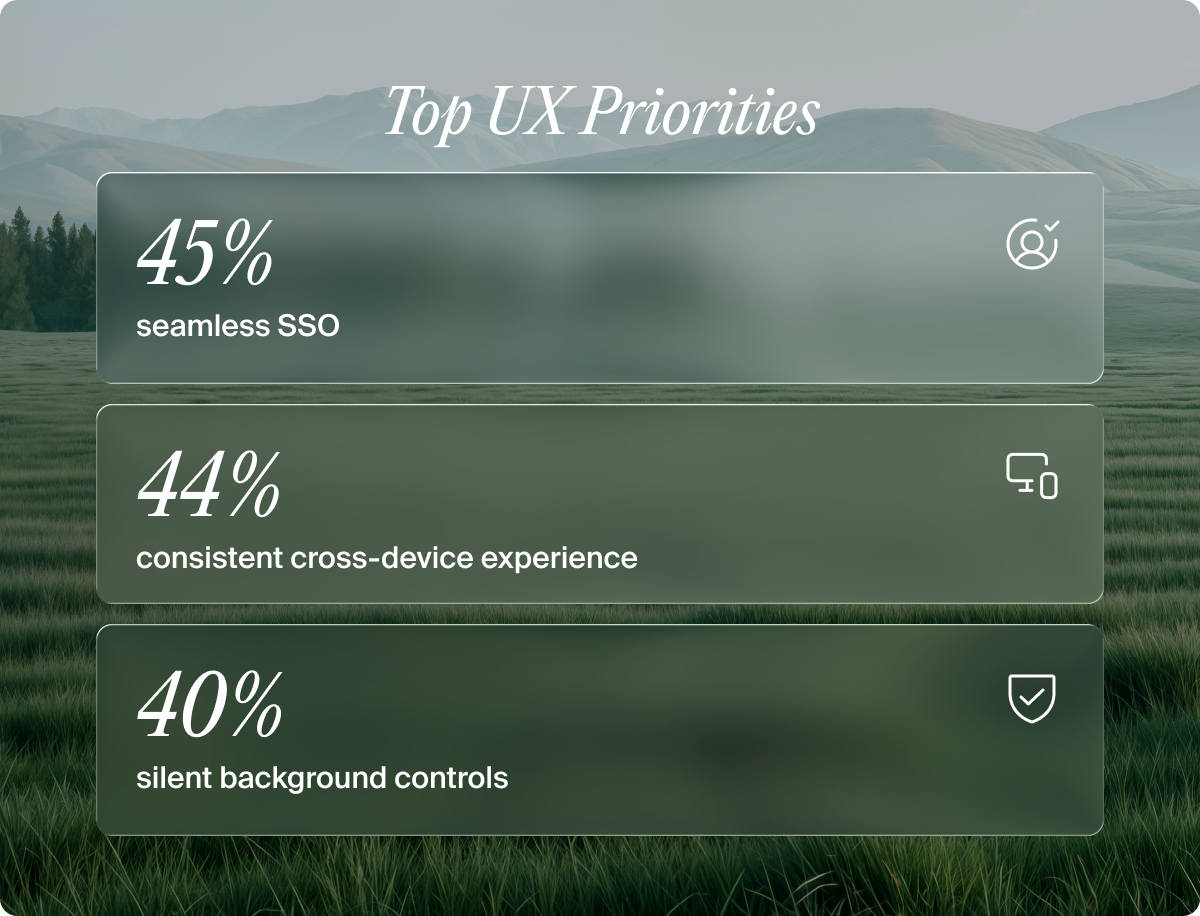
Unfortunately, traditional browser security approaches like VDI, inspecting network traffic, and static rule-based blocking tend to create more friction for users, not less. They are also categorically unable to provide real-time visibility into the user interactions happening inside a live browser session.
The Island enterprise browser is built on the same Chromium engine as Chrome and Edge, which means users encounter a familiar experience from day one, but with a single login surfaces everything a user needs based on their role and identity. And when Island's policies do intervene — blocking a data transfer, flagging an unsanctioned AI tool — users receive clear, branded notifications explaining what happened and why, rather than a confusing dead end.
Read the report for more and deeper insights
This high-level overview of Omdia’s Browser Management and Security report discusses findings that include the steady rise of browser-based attacks; generative AI’s data leakage risk that traditional tools cannot see; and the perimeter-based approach to browser security is buckling under the pressure of modern, distributed work. Security and IT leaders are reacting, with 85% planning to increase browser security budgets over the next 12 to 24 months.
But the report goes well beyond what we've covered here. It also examines:
- How organizations are managing application access across a surprisingly persistent mix of browser-based and Windows applications and why tool sprawl remains a stubborn problem
- The metrics security teams are tracking to measure the productivity impact of browser security decisions and what they reveal about where friction is hiding
- How enterprise browser deployments are being funded and how budget ownership is shifting between IT and security teams
Download the complete Omdia report, Browser Management and Security: Emerging Strategies, Requirements, and Success Factors, to see all the data.

FAQs
Q: What types of browser-based attacks are most common in enterprises?
According to the Omdia report, phishing and data loss top the list, followed by malicious browser extensions, vulnerable plugins, credential theft, and malicious scripts. What these have in common is that they originate inside the browser session, where traditional security tools have no visibility.
Q: Why can't existing security tools like VPNs, SASE, or endpoint agents protect the browser layer?
These tools were built to control access at the network or device level. They have no visibility into what happens inside a live browser session — actions like copy-paste, file downloads, AI prompt submissions, and credential use all occur at the presentation layer, which network-based controls simply cannot reach.
Q: How does an enterprise browser address the AI data leakage problem?
Island lets security teams define which AI platforms are approved for use with company data, automatically blocks sensitive data from reaching unsanctioned tools, and maintains a complete audit trail of AI interactions. Governance is enforced at the point of interaction, not after the fact.
Q: How does Island handle browser security for unmanaged devices and contractors?
Island extends the same policy framework that governs managed corporate devices to unmanaged devices, BYOD, and third-party contractor machines, without requiring additional agents, proxies, or infrastructure. The same controls that apply on a managed laptop apply on a personal device.
Q: Won't adding browser-level security controls slow employees down or create friction?
Island is built on the same Chromium engine as Chrome and Edge, so employees encounter a familiar experience from day one. When controls do intervene, users receive clear notifications explaining what happened and why. Security runs in the background and only surfaces when it needs to.

Andrew is a Product Marketing Manager at Island, working closely with the product and engineering teams behind all of Island's products. With over 12 years in cybersecurity, Andrew has built deep, hands-on expertise across network security, identity and access management, cloud native security, browser security, and AI security. He works close to the product, using the tools he's responsible for daily, building and maintaining demo environments, and translating technical capabilities into real-world security outcomes. His work bridges the gap between how a product actually works and why it matters.




.png)
.png)
.png)
.svg)
.svg)

