.svg)
The Island Password Manager: Password Management, Everywhere Work Happens
How Island brings enterprise-grade credential protection to every browser, every device, and every user.
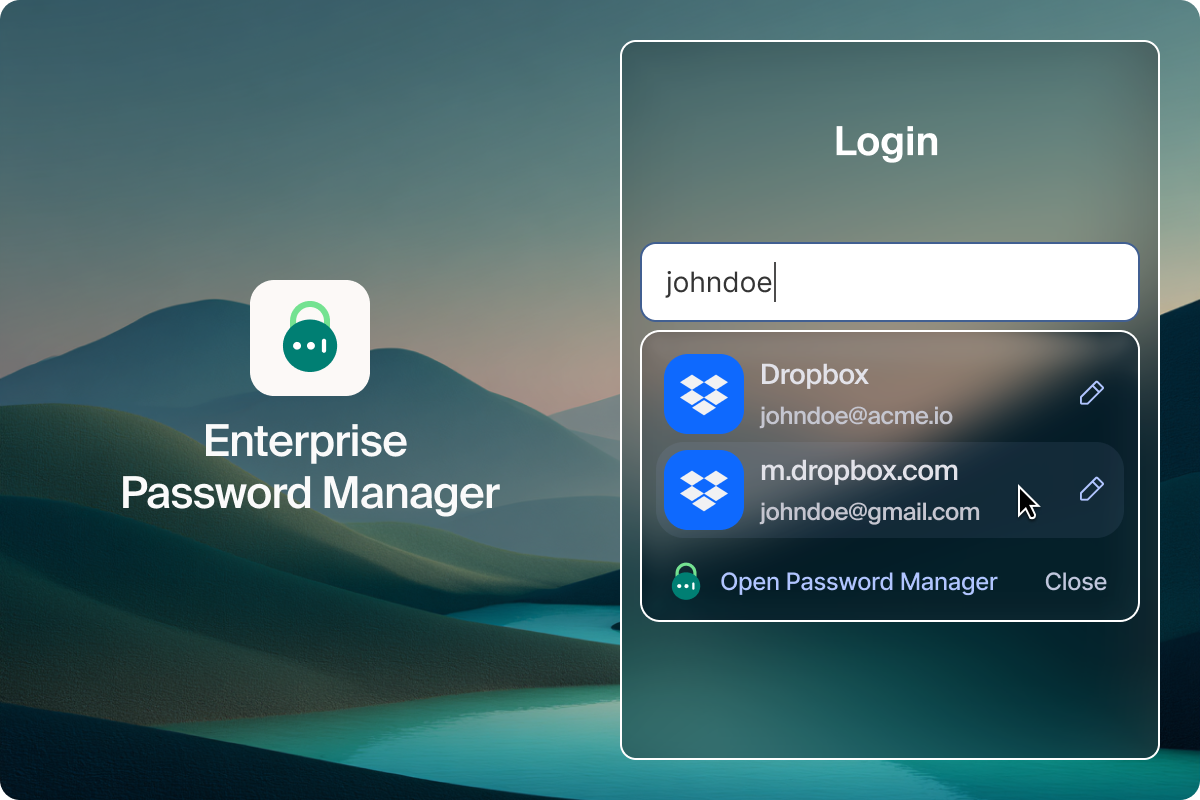
Everyone has a password manager that manages passwords.
Every organization depends on passwords, and most already use password managers to keep them safe. The challenge isn’t storing credentials, it’s governing how, where, and when they’re used.
Most tools secure the vault, not the usage. Once a credential is applied, visibility often stops. Passwords move freely across browsers and devices, outside consistent policies or audits. Risk accumulates when credentials are reused across business and personal accounts, contractors log in from unmanaged endpoints, or autofill drops passwords into phishing sites before any security control can react.
Consider a marketing contractor reusing the same password for an internal CRM and their own LinkedIn login, or an engineer signing in from a personal laptop that’s never passed corporate posture checks. All of this happens beyond the reach of IT visibility and enterprise governance.
IBM’s 2025 Cost of a Data Breach Report found that compromised credentials remain one of the top initial attack vectors, with malicious actors increasingly logging in rather than hacking in. Meanwhile, SpyCloud’s 2025 Identity Exposure Report uncovered more than 1.7 billion exposed credentials and 22 billion identity assets circulating in criminal marketplaces, a clear sign that credential theft and reuse continue to fuel enterprise breaches.
It’s not that password managers don’t work. They do exactly what they were built to do. The problem is that they were built for individual convenience and not enterprise governance.
The password manager built for how enterprises actually work
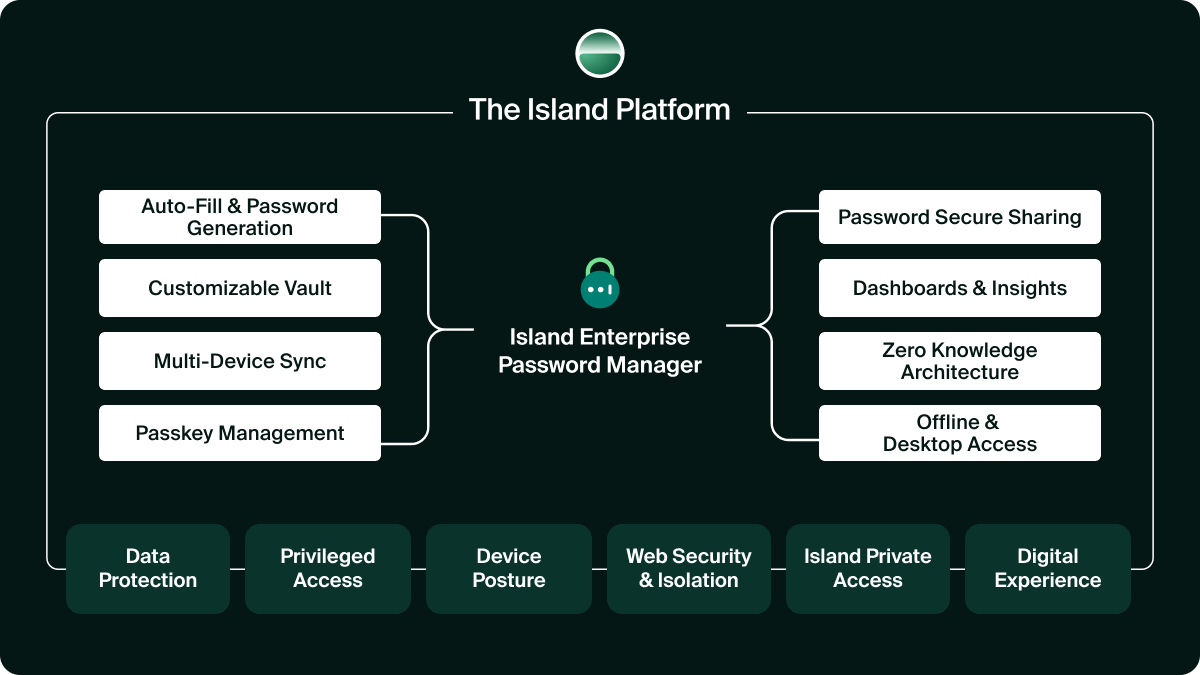
The Island Enterprise Password Manager isn’t an add-on or a plugin; it’s built into the Island Platform with the same policy engine that governs device posture, data protection, access control, and browser security.
That means credentials inherit the same intelligence and context as any other enterprise asset: identity, device health, network trust, and session integrity–enforced automatically, everywhere.
One policy, one console, one source of truth. Powered by Island.
Imagine a systems admin logs into an environment like AWS Management Console or VMware vCenter. Island Password Manager is active only when the device is trusted, the session is verified, and the domain is validated. If any condition fails, the password manager is disabled entirely, and the user is notified.
When a vendor requires temporary access, the credential works, but the actual password is never exposed. In the Enterprise Browser, PAM and protected sharing is activated as Island injects it securely at the network layer, for full auditability, revocation, and zero plaintext exposure.
These are the controls enterprises have always needed for credentials: posture validation, trusted-domain enforcement, phishing-safe autofill, and governed sharing. and now are delivered natively within the platform that already protects your data and access.
Enforcement wherever work happens
The Enterprise Password Manager is powered by Island. This means that password governance extends seamlessly across every environment, including the Enterprise Browser, consumer browsers, or mobile, all without the need to deploy or maintain a separate password management tool.
Every credential use is evaluated in real-time against the enterprise context and policy:
- Device posture validation (OS version, EDR status, and network trust)
- Domain and runtime context (trusted URL, and session integrity)
- Identity and authentication context (SSO, MFA, and IdP status)
- Audit and telemetry (user, device, session, and policy context)
Here’s how it works in practice:
A contractor opens the company’s ERP portal on their personal laptop. The device fails posture validation, so Island Enterprise Password Manager is temporarily disabled until compliance is restored, and the attempt is logged with full user and device context.
A phishing page imitates a SaaS login page. The password manager is never triggered because the domain fails verification, the credential isn’t exposed, and the user is made aware of the spoofed site and phishing attempt.
A shared account is needed across teams. In the Enterprise Browser, the Island Password Manager provides tokenized access so the real password never appears in the UI or DOM; access is revocable and auditable.
These enforcement mechanisms don’t just operate at login; they persist throughout every live session, applying the same policies in real time as users work, wherever they work.
Securing every credential, in real time
Most password managers focus on vault encryption. Island extends protection into the live session itself, where credentials are actually used, abused, or stolen.
These controls are embedded in the Island Enterprise Browser and extended across environments through the Island Platform, maintaining consistent enforcement and visibility wherever work happens.
- Device posture enforcement restricts credential use to endpoints that meet enterprise posture requirements (active EDR, current OS, trusted network).
- Phishing and domain validation confirm target domains and session integrity before activation, preventing credential use on spoofed or look-alike sites.
- Keylogger and memory protection secure the credential vault with encryption and limit plaintext exposure during secure injection, reducing the risk of local capture.
- Runtime and network integrity validate TLS certificates, sign outbound requests, and authenticate every API call to prevent interception or modification.
- Step-up authentication and MFA assertion can require re-authentication after inactivity, browser restart, or system lock, before sensitive credentials are revealed or used, even in legacy apps without native MFA.
These controls function continuously in the live session. They govern how credentials are used, not just where they’re stored, and extend naturally into passwordless models like passkeys, preventing credential reuse and phishing.
Enterprise-grade control for shared credentials
Shared accounts have always been one of the hardest assets to govern. With Island’s protected sharing mechanism, users can access shared accounts without ever seeing the actual password – a capability unique to Island.
Using Island’s proprietary network password transformation technology, the Island Password Manager injects a “fake” token during login. The Island Enterprise Browser transforms it at the network layer, replacing it with the real credential just before transmission to the authorized service. The true password never appears in the DOM or UI and cannot be reused outside the Island runtime. Access is governed by policy, fully revocable and auditable, and can be configured to expire automatically.
Shared accounts remain usable only through Island, ensuring clean offboarding and preventing external reuse. Admins can define the highest sharing permission level directly through a browser policy setting.
Encryption architecture designed for the enterprise
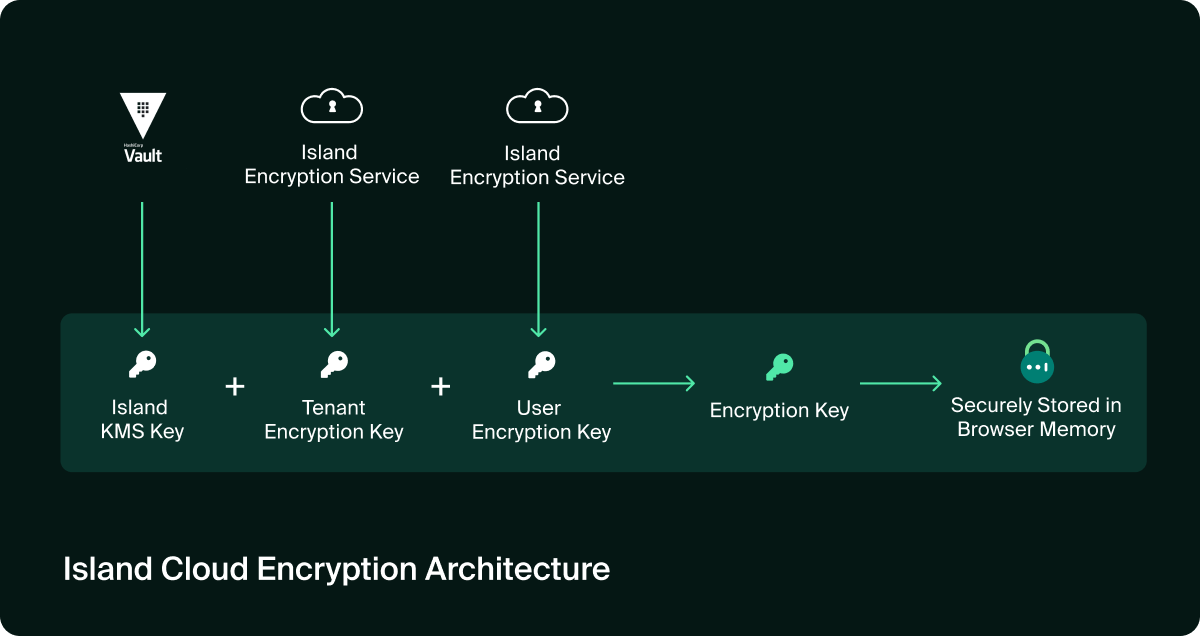
Island offers three encryption models aligned with enterprise key management and compliance standards:
- Cloud Encryption: Simplifies operations while maintaining layered key isolation. User, tenant, and vault keys are securely managed in Island’s cloud, with rotation fully controlled by the customer.
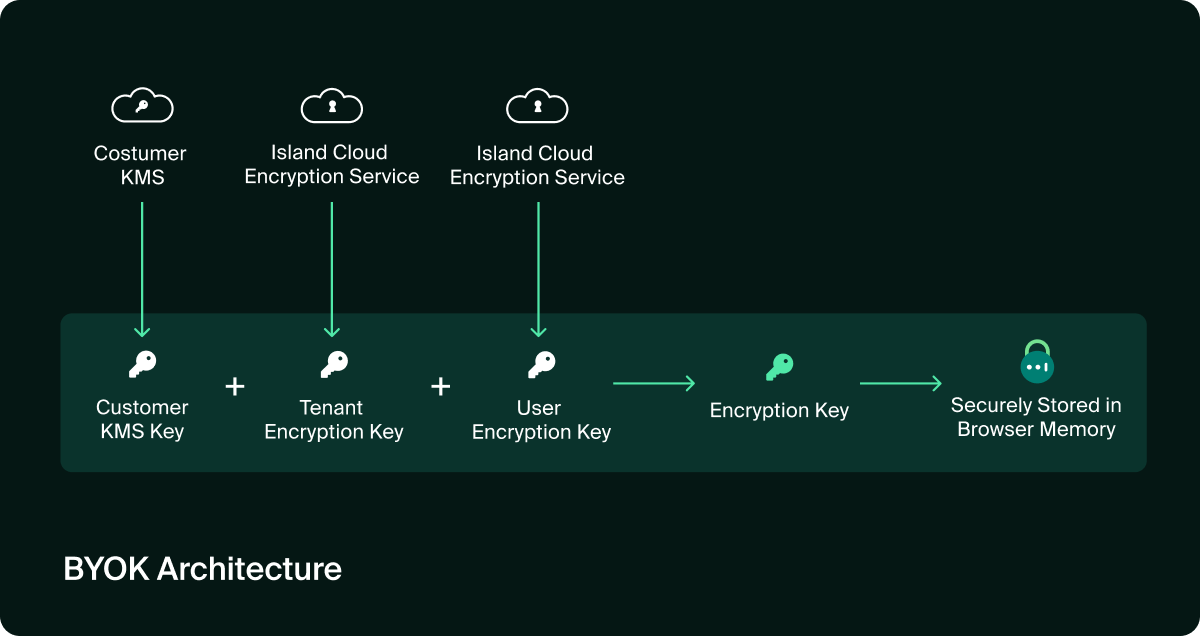
- BYOK (Bring Your Own Key): Enterprises host keys in their Key Management Service (KMS), giving them full ownership, auditability, and revocation rights while preserving a seamless end-user experience.
- Zero-Knowledge Architecture (ZKA): Encryption keys reside only on user devices, so no third party, including Island, can access or decrypt customer data.
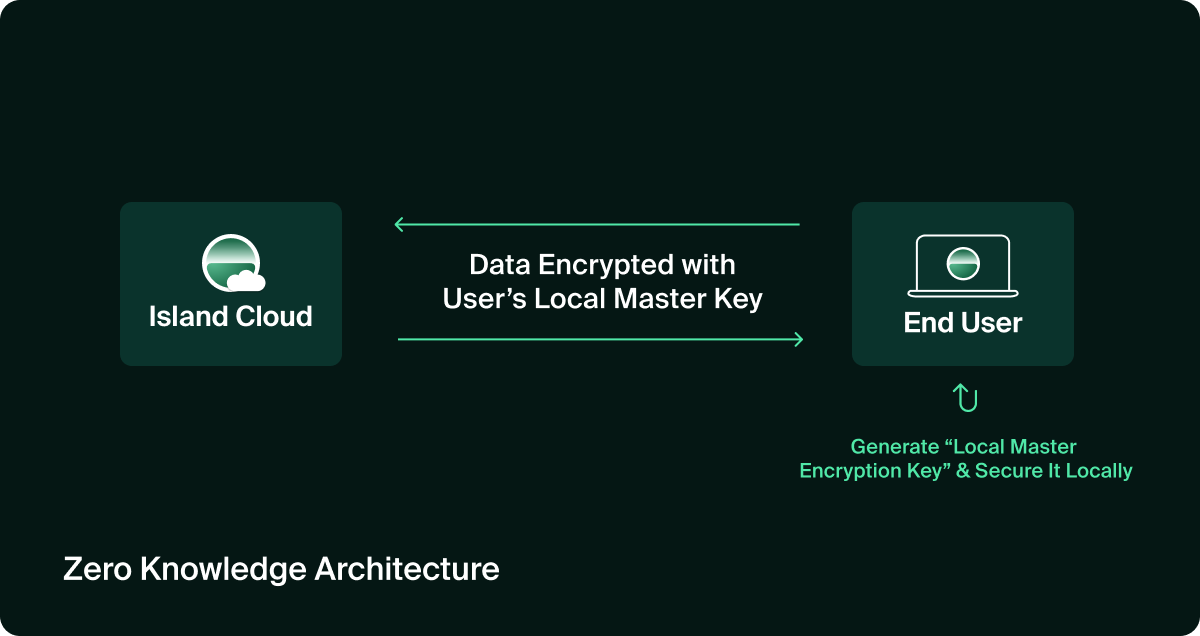
All models use AES-256 encryption for data at rest and in transit, fully integrated with Island’s policy engine and SIEM pipeline for unified governance and audit.
The outcome: credentials aren’t just stored securely, they’re governed and protected in real time under the same enterprise controls that already secure data, access, and identity.
Consistent policy, unified control, enterprise scale
Rather than deploying a separate password tool, adding agents, and managing yet another console, this platform-first model simplifies operational overhead.
Policies applied to credentials are the same policies you apply to identity, access, and data. Audit logs are unified. Alerts and SIEM integration flow from the same engine that monitors sessions, devices, and browsers.
When the CISO or IAM leader asks, “Which credential was used, by whom, from what device, under what conditions?” you have one place to answer instead of a dozen silos stitched together.
What happens without credential governance
Threat actors increasingly favor stolen credentials because they grant them quiet, persistent access that traditional defenses rarely detect. Once an attacker logs in as a legitimate user, they move laterally, escalate privileges, and operate undetected for weeks or months.
The Picus Labs Red Report 2025 found that credential-theft malware activity tripled year-over-year, with attacks increasingly targeting credentials stored in browser vaults and password managers. This marks a growing trend toward exploiting authentication data at the session and endpoint layers, not just in transit or at rest.
And the impact is tangible. In several 2025 enterprise breaches, including incidents at a global financial services firm and a U.S. manufacturer, investigators traced initial access back to reused or cached credentials. These weren’t brute-force attacks; they were logins, not break-ins. Because when credentials aren’t governed, every login becomes a potential breach path.
So, without context, device posture, domain validation, or runtime control, enterprise defenses effectively stop at the vault.
Summary
Everyone has a password manager. Few have control.
The Island Enterprise Password Manager transforms a standalone convenience tool into a core component of your security posture. With Island’s browser-native approach, every credential - wherever work happens - is subject to real-time enterprise policy, audit, and governance. Credentials finally follow the same rules as data, identity, and access. Password management stops being a siloed tool and becomes part of your enterprise security fabric. Secure by design. Integrated by default. Built for how enterprises operate.

Ella Siman is a Product Marketing Manager at Island with over a decade of experience shaping product strategy and go-to-market execution. She works closely with product teams to deeply understand users, influence how products are built, and translate complex security capabilities into clear positioning, messaging, and launches. Sitting at the center of product, sales, and GTM, she ensures Island’s products are differentiated, understood, and aligned with how modern enterprises buy and deploy security.




.svg)
.svg)
