.svg)
11 Legacy Tech Systems Reduced or Replaced with Island
From VDI to VPNs to DLP: what happens when the browser becomes the workspace
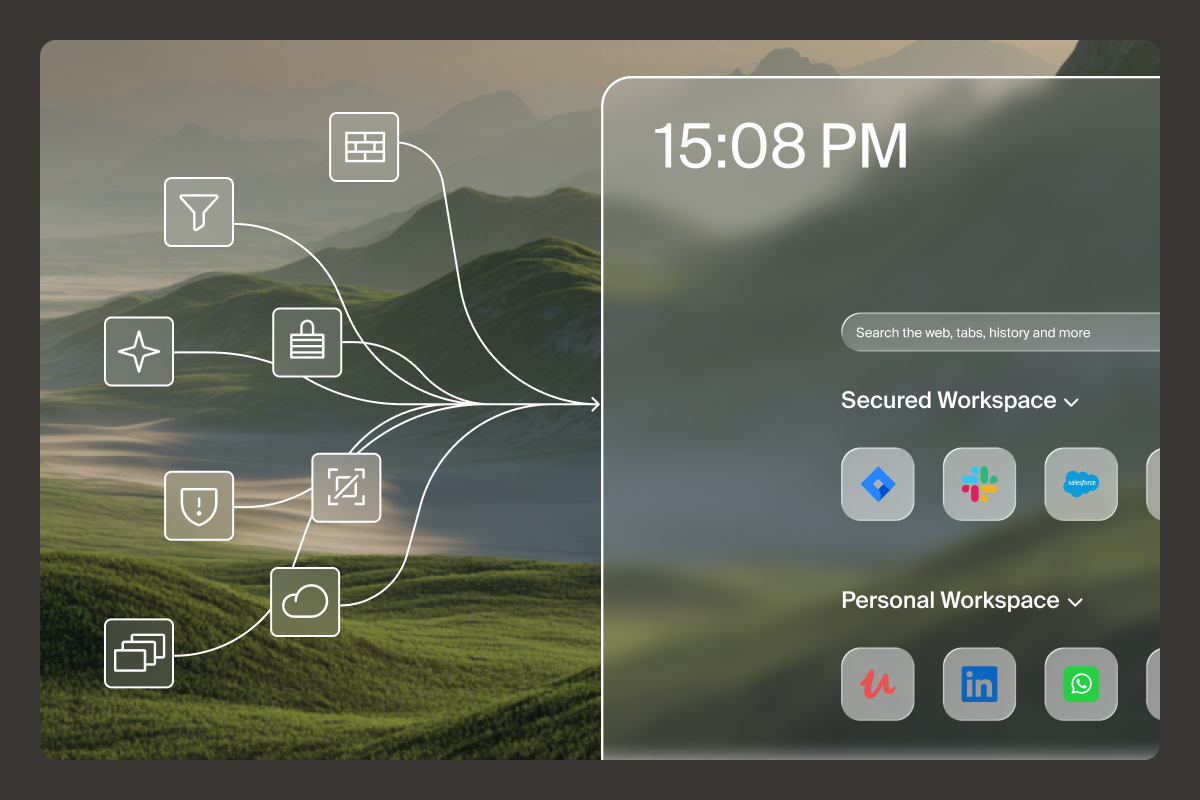
In today’s hybrid, SaaS-driven world, the web browser has evolved into the primary workspace for knowledge workers. But the browser should be more than a window into the web; it should be the intelligent, secure client for enterprise work.
With the Island, you begin to see the potential to reduce or replace a wide range of legacy tools and infrastructure. Let’s walk through several key categories of technology that Island can replace — or radically reduce — and how that works in practice.
Reduce Virtual Desktop Infrastructure (VDI)
Traditional VDI was designed to give enterprises control by centralizing desktops and applications away from user devices. However, most enterprise work now happens in the browser — not in a full virtual desktop. If the browser is the primary tool knowledge workers use within these virtual environments, that’s likely the most expensive and complex browser organizations can deploy. Not to mention the poor user experience this creates.
With Island, you can shift browser-based apps back to the endpoint, retain central policy control, and dramatically reduce the cost, complexity, and latency of full desktop virtualization.
For example, rather than building out large server farms, image libraries, streaming clients, and maintaining session brokers, IT can deploy an Enterprise Browser that works on any endpoint, while managing access, data controls, and device posture from the console. This means fewer VDI instances, less infrastructure overhead, and a better end-user experience. In other words, VDI becomes the exception rather than the default.
Govern and secure generative AI use at the browser layer
Artificial Intelligence (AI) tools, such as generative AI (chatbots), agentic AI (workflow automation), and coding tools (Claude Code, etc.), are proliferating. The browser is the most common place where employees access AI, so it stands to reason that’s where policy enforcement should be performed.
Because it has native, context-aware control over browsing sessions, download/upload behavior, credential management, clipboard controls, and device posture, much of the browser threat surface is handled intrinsically. In short: instead of stitching multiple AI-based modules to monitor and reduce AI risk, you deploy a browser built for that threat model from day one.
Modernize Data Loss Prevention (DLP)
Traditional DLP solutions rely on network-based or endpoint-based agents to detect and block sensitive data movement. With an enterprise browser, you can enforce last-mile controls directly in the browsing session: restrict copy/paste, block downloads/uploads, redirect downloads to secure storage, control printing destinations, add watermarks, and redact sensitive content in-session.
Another key difference: legacy DLP solutions offer a binary allow/block decision. By enforcing data protection at the presentation layer, however, granular policies can allow access to critical business sites while restricting access only to the data that violates the data protection policy by leveraging on-screen data redaction, protecting exposure of sensitive data.
Move beyond phishing simulations
Traditional anti-phishing programs typically rely on simulated phishing campaigns, training modules, and ongoing awareness programs. Research has shown that these are ineffective at best and a waste of time at worst.
The Island offers a different approach altogether: it enforces real-time protection and remediation when credentials, cookies, or risky sites are encountered. Island embeds security controls directly into the browsing environment, so you’re no longer teaching users not to click. Instead, you’re actively preventing credential compromise, isolating risky sessions, redirecting downloads, and monitoring suspicious behavior right in the browser.
So while you wouldn’t replace phishing training entirely (cultural education still matters), you can rely much less on reactive training campaigns and instead focus on proactive enforcement inside the browser.
Replace legacy VPN access
Legacy Virtual Private Networks (VPNs) were built to allow remote users to tunnel into the corporate network. But in the modern SaaS and web-based world, the network perimeter model is breaking down.
Island supports a Zero Trust access paradigm — verifying user identity, device posture, and session context, and then intelligently routing access to applications. By reducing reliance on broad network access, you shrink your attack surface, reduce latency, and avoid the burdensome management of VPN gateways, split tunneling rules, and network-based monitoring. In effect, the Enterprise Browser becomes the secure access client, not just the network tunnel.
Swap corporate laptops for secure BYOD
Because the Island supports Bring Your Own Device (BYOD) policies, contractors can safely access web and SaaS apps on their personal unmanaged devices. Organizations can shift from provisioning fully controlled corporate laptops to a model where the browser becomes the secure workspace on the device. This reduces device refresh cycles, lightens endpoint-configuration overhead, and gives end users more flexibility — all while retaining control of corporate data.

Simplify SaaS security without a CASB
Cloud Access Security Brokers (CASBs) are designed to mediate access to cloud services, apply policies, monitor behavior, and enforce DLP. But Island absorbs much of that functionality natively: controlling access to SaaS apps, which users are allowed to copy/paste/download/upload, managing session context, and logging activity inside the browser itself. It can identify when users share files outside their organization with overly permissive privileges, and it provides those users the ability to revoke permissions quickly and effectively from their browser workspace.
Modern web filtering with context-aware controls
Traditional web-filtering tools rely on network proxies, secure web gateways, or DNS-level controls to block risky sites, categorize traffic, and enforce acceptable-use policies. While these help manage broad internet access, they struggle with context: who the user is, what device they’re on, which app they’re using, and what data they’re interacting with at that moment. These solutions also depend on cloud-based architectures that must break and inspect network traffic to determine the intended destination, creating latency and a poor user experience.
Island solves this by applying web filtering directly at the point of interaction — inside the browsing session itself. With the Enterprise Browser, administrators can apply granular controls such as blocking or warning about specific categories, restricting downloads only from sanctioned domains, enforcing safe-search, or watermarking content when users access sensitive destinations. Because the browser inherently understands user identity, role, device posture, session attributes, and SaaS context, it enables far more precise and dynamic enforcement than network-based filtering systems.
Build password management into the workspace
Organizations deploy a dedicated Enterprise Password Manager to help users safely store and use credentials, generate strong passwords, reduce reuse, and integrate with SSO. Island’s built-in password manager is fully integrated with the Enterprise Browser, extending all the browser’s access controls, security policies, audit capabilities, and web protections. Island even allows users to share credentials with other users — or user groups — while keeping the password secure.
Eliminate standalone PDF tools
Many enterprises still license separate PDF editors for tasks like redaction, secure annotation, workflow reviews, and distribution. Even more risky are the multitude of browser extensions frequently installed for this purpose. Island’s built-in PDF editor builds productivity into the browser, where work already occurs, eliminating the need for standalone, bolted-on software.
Rethink Remote Browser Isolation (RBI)
RBI executes the browsing session in a remote (sandboxed) environment, isolating the endpoint from malicious web code. Instead, Island embeds the isolation and control within the browser itself. While a few very high-risk activities may still require web isolation, the Enterprise Browser delivers the necessary protections for the overwhelming majority of online activity, as well as a robust RBI solution built into the platform for risky or uncategorized web destinations.
The Enterprise Browser fundamentally rethinks how to deliver and secure work
Instead of layering controls on top of a consumer browser, or propping up legacy desktops and networks just to make SaaS safe, organizations can move to a model where the browser itself is the workspace. Managed, policy-rich, secure, and performant by design.
By collapsing security, access, and productivity controls into a single enterprise-managed client, you can dramatically simplify your architecture. The results are leaner stacks, lower licensing and infrastructure costs, faster performance for users, and stronger, more consistent policy enforcement.

Michael is Field CTO at Island, bringing over 30 years of data networking, operations, and cybersecurity domain expertise. He formerly served as Head of Technical Marketing and Chief Cybersecurity Evangelist at SentinelOne where he was responsible for messaging and strategic development of their XDR product roadmap as well as the identity security portfolio. Prior to SentinelOne, he held the title of Chief Technical Strategist for McAfee. Michael was the co-founder and CTO of NitroSecurity – later acquired by McAfee – where he was responsible for developing and implementing their overall SIEM technology vision and roadmap and has held senior technical management positions at Cabletron and Avaya.



.svg)
.svg)

