.svg)
How The Island Enterprise Browser Verifies Trusted DLLs
We traced the MicrosoftSignedOnly mitigation to its implementation in ci.dll, used AI to speed up the reverse engineering, and turned what we found into a maintainable DLL trust check for Island Enterprise Browser.
A while ago, a colleague asked me, “How can we verify that the Island process loads only trusted DLLs?” At first glance, this seems like a simple question, but knowing who was asking it, I realized it deserved a deeper look. So I replied: “Let me check that for you.”
Ensuring that a process loads only trusted DLLs is critical, because every loaded module becomes part of the process’s execution context. A single malicious or tampered DLL can execute arbitrary code within the process context, allowing attackers to bypass security boundaries, exfiltrate sensitive data, or undermine higher-level security guarantees. In a security-sensitive application like Island, where the browser process is responsible for handling credentials, tokens, and other sensitive data, uncontrolled DLL loading effectively nullifies many other defenses.
The naive approach would be to verify that every loaded DLL is digitally signed. However, on Windows, an attacker with sufficient privileges can create a self-signed certificate (or even a self-signed CA) and add it to the local certificate store. In other words, the certificate store itself cannot be fully trusted, which makes a simple certificate validity check alone insufficient.
At this point, I started asking a more fundamental question: what kinds of DLLs are actually loaded into the Island process?
They can be divided into three groups:
- Island-signed DLLs
- Windows (Microsoft-signed) DLLs
- A very small set of third-party DLLs
All of them must be signed. But subject/issuer strings alone aren’t a trustworthy identity signal: you need cryptographic binding (a valid chain) and ideally pinning of trust anchors/key material. That leaves us with two robust families of options: pinning identity material (thumbprints or public keys) and validating signatures against pinned trust anchors rather than trusting the local machine certificate store.
A certificate thumbprint is a short fingerprint computed from the certificate bytes. On Windows, “thumbprint” commonly refers to the SHA‑1 hash of the DER-encoded certificate, and it’s computed dynamically rather than being a field stored inside the certificate.
If you want a stronger identifier, you can compute a SHA‑256 fingerprint or pin the certificate’s public key (SPKI).
When a DLL is signed, the signature includes information about the signing certificate. If you extract the certificate used to sign the DLL and compute its thumbprint, you can compare it to one you already trust. If they match, it means the DLL was signed with that specific certificate, not just “a similar one” or another certificate with the same name.
The reason this is a strong origin check is that the certificate is tied to a private signing key. Only someone who has the private key corresponding to that certificate can produce a valid signature that verifies. An attacker can generate their own certificate, but it’s infeasible to produce a different certificate that matches a pinned thumbprint and also passes signature verification as that identity without the corresponding private key.
One nuance: a thumbprint match tells you which certificate was used, but you still want to ensure the signature is valid and, depending on your security requirements, that the certificate is still trusted and not revoked.
So far, we have a workable model: we can classify DLLs into three groups and verify each one using thumbprints. Maintaining a list of thumbprints for Island-signed DLLs and a small set of third-party DLLs is relatively straightforward. The real challenge is how to build a maintainable allowlist for Microsoft-signed binaries across Windows versions without relying on the local root store. That means identifying the Microsoft trust anchors / issuing CA identities.
This was the missing piece of the puzzle.
Naturally, I started wondering how Microsoft solves this problem internally. Windows exposes APIs such as SetProcessMitigationPolicy and UpdateProcThreadAttribute, which allow a process (or its child processes) to enable various security mitigations. One of these mitigations is ProcessSignaturePolicy, described by MSDN as:
“The policy of a process that can restrict image loading to those images that are either signed by Microsoft, by the Windows Store, or by Microsoft, the Windows Store, and the Windows Hardware Quality Labs (WHQL).”
The structure that specifies the signature policy flags:
typedef struct _PROCESS_MITIGATION_BINARY_SIGNATURE_POLICY {
  union {
    DWORD Flags;
    struct {
      // Signed by Microsoft.
      DWORD MicrosoftSignedOnly : 1;
      // Signed by the Windows Store.
      DWORD StoreSignedOnly : 1;
      // Signed by Microsoft, the Windows Store, and the
      // Windows Hardware Quality Labs (WHQL).
      DWORD MitigationOptIn : 1;
      // ...
    };
  };
} PROCESS_MITIGATION_BINARY_SIGNATURE_POLICY;
This gives us an important lead. If we can understand how ProcessSignaturePolicy enforces MicrosoftSignedOnly DLL loading, we might either discover a better approach altogether, or confirm that Microsoft itself relies on a mechanism similar to certificate thumbprint verification. Either outcome would be valuable.
Note that we can’t use the MicrosoftSignedOnly mitigation itself—at least not on the browser process—because it would prevent Island from loading any non-Microsoft signed DLLs, while the browser must load Island signed DLLs as well as third-party ones.
Before diving into the implementation details, I wanted to gather some data. If no real-world processes use this mitigation, it might be deprecated or unreliable. So the first step was to see who actually enables it.
To do that, I used the following PowerShell command to retrieve a list of processes with this mitigation enabled:
gps | %{
  $p=$_
  try{ $m=Get-ProcessMitigation -Id $p.Id -EA Stop }catch{ return }
  if($m.BinarySignature.MicrosoftSignedOnly -eq 'ON'){[pscustomobject]@{ProcessName=$p.ProcessName;Id=$p.Id}}
}
On my machine, there were quite a lot of processes, many of them well-known, that had this mitigation enabled. For a more visual and intuitive view, we can use System Informer:
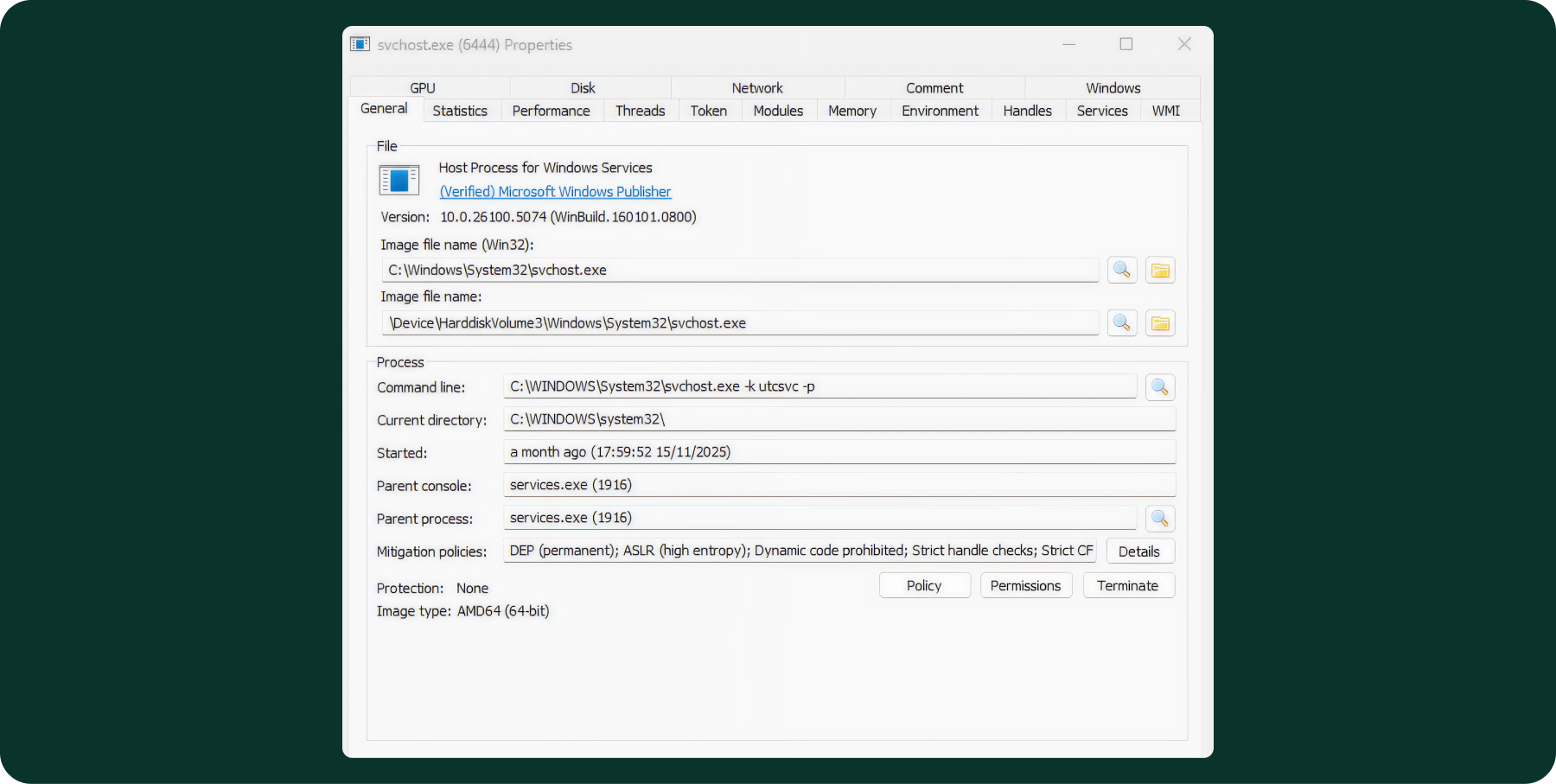
And in the details section:
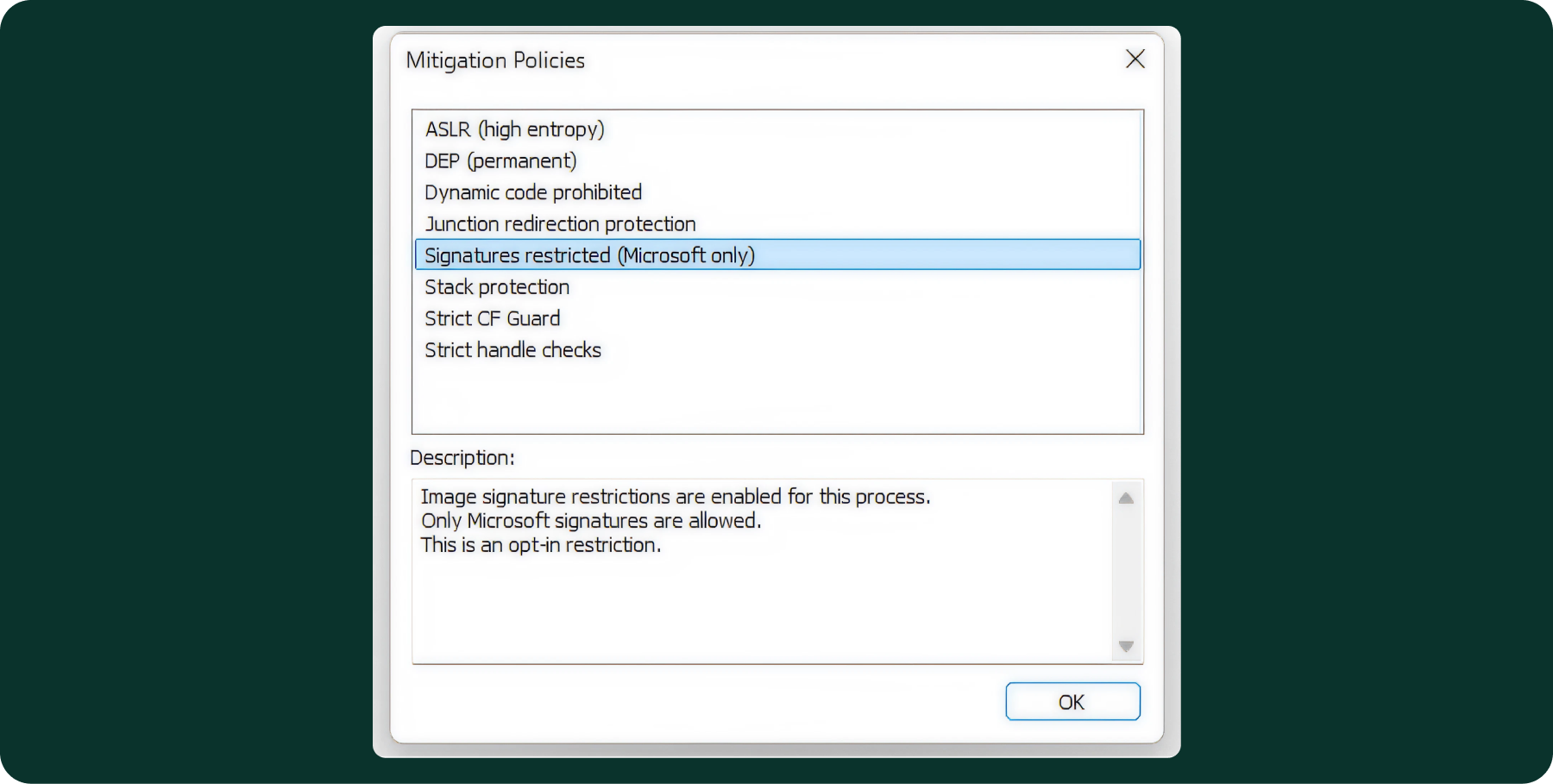
After confirming that this mitigation is actively used by various Windows processes and other vendors, the next step was to understand where its implementation lives in the OS.
To do that, I wrote a small sample program that calls SetProcessMitigationPolicy with MicrosoftSignedOnly enabled, and then deliberately attempts to load a third-party (non-MS) signed DLL. As expected, the load fails due to the policy enforcement.
When the program runs, the error we get back is ERROR_INVALID_IMAGE_HASH. I have a bit of background with Windows internals, so this error code immediately pointed me in a specific direction: ci.dll (Code Integrity).
ci.dll is a Windows kernel component (despite the “.dll” extension, ci.dll is not a user-mode DLL; it’s a built-in kernel module) responsible for enforcing code integrity policies. It verifies digital signatures on executable images (DLLs and EXEs) and allows only trusted and authorized code to load, based on the active security policies. That makes it a very natural and interesting starting point for further investigation.
Luckily, Microsoft publishes PDB symbols for ci.dll through the Microsoft Symbol Server.
After a short manual reverse-engineering session, I quickly ran into a function named CipReportAndReprieveUMCIFailure. This immediately caught my attention, since UMCI stands for User Mode Code Integrity, which I knew might be related to our investigation. Digging deeper into this function revealed a particularly interesting flow:
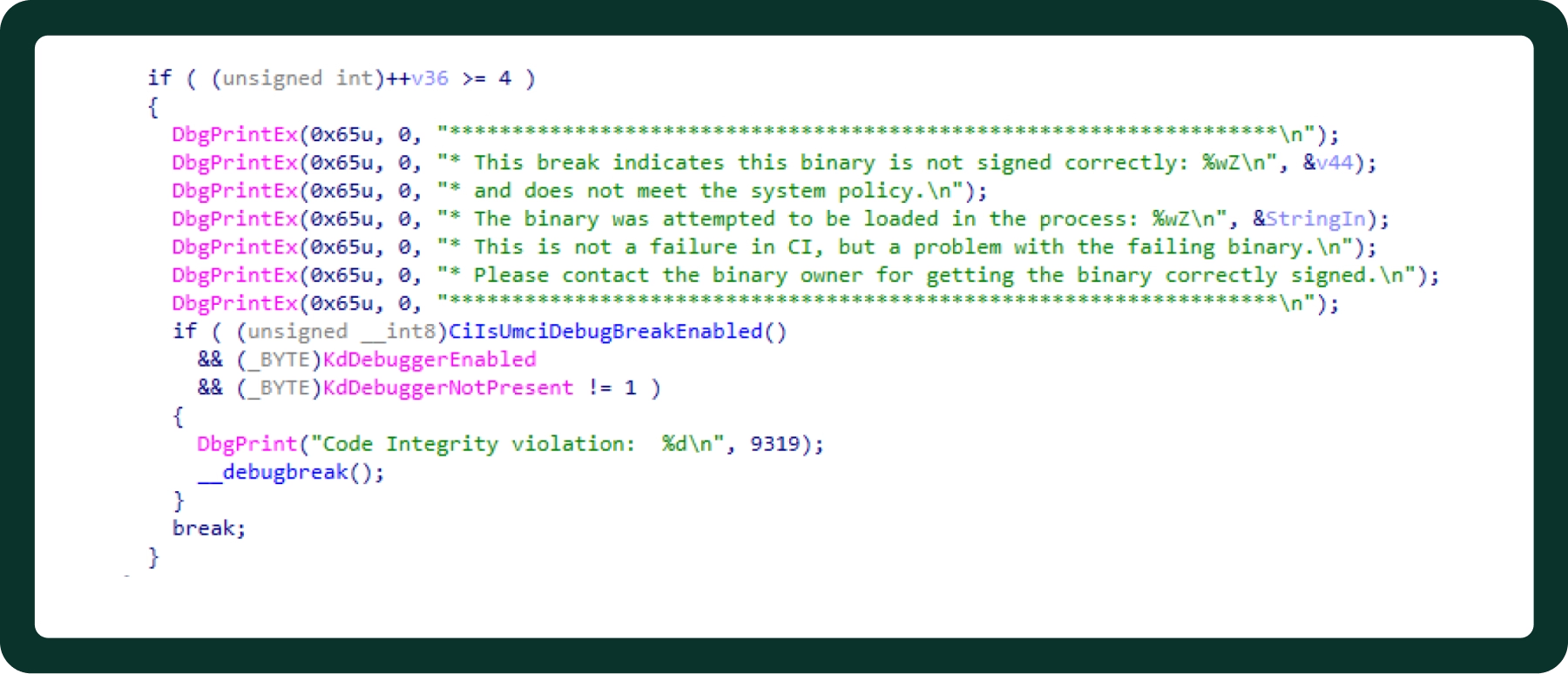
It appears that when code integrity verification fails and a kernel debugger is attached, the kernel deliberately triggers a debug break.
The next step was to verify this behavior in practice. To do that, I set up a virtual machine with a kernel debugger attached, then launched my test executable—the one that enables the MicrosoftSignedOnly mitigation and subsequently attempts to load a non-Microsoft signed DLL.
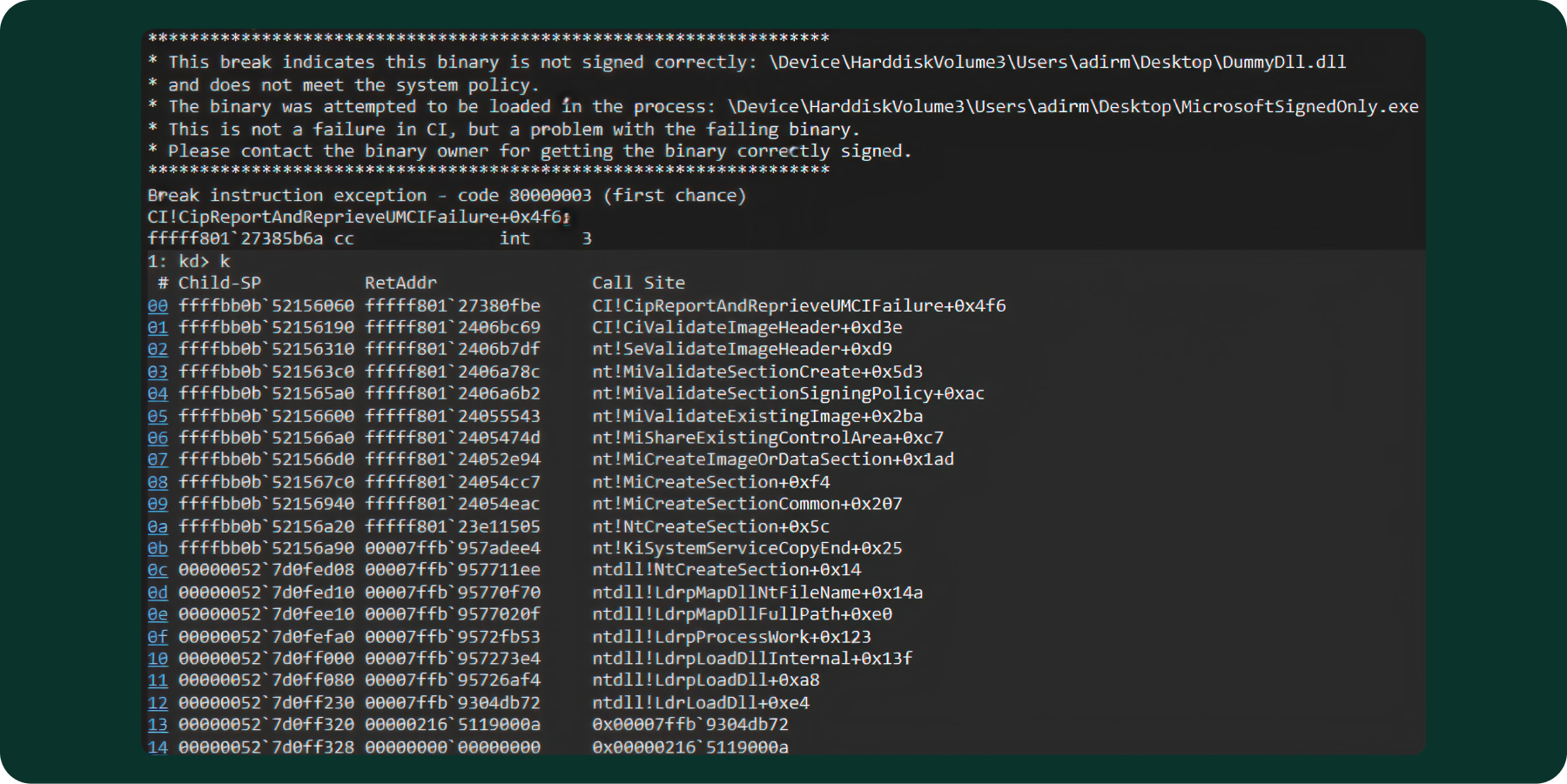
As expected, the kernel hit the breakpoint and execution returned to the debugger, confirming that enforcement occurs at the kernel boundary rather than in user-mode loader logic.
The flow begins in user mode at ntdll!LdrLoadDll, which resolves the target DLL, performs loader bookkeeping, and ultimately issues a request to map the image into the process address space. This request transitions into kernel mode via a system call that results in section object creation for the image file (via the NtCreateSection / NtMapViewOfSection path).
During section creation for executable images, the kernel invokes Code Integrity (CI) validation. At this stage, CI evaluates the image against the active process mitigation policy, which, in this case, is MicrosoftSignedOnly. Because the target DLL was non-Microsoft signed DLL, the CI validation path failed, and execution entered the enforcement logic inside ci.dll.
With a kernel debugger attached, this failure triggered the CI debug breakpoint, allowing us to intercept execution precisely at the policy enforcement point. This confirms that DLL signature enforcement is performed synchronously during image section creation, before the image is mapped into the process, and not as a post-load or user-mode check.
This was a huge step forward. It showed me exactly where the enforcement happens, and a reproducible way to trigger and debug it.
To minimize the amount of manual reverse engineering, I uploaded ci.dll along with its PDB to ChatGPT. However, the PDB isn’t something most tools (including ChatGPT) can parse directly. It’s a structured debug database, not a plain-text file. So instead, I used dia2dump, a small command-line utility built on Microsoft’s DIA (Debug Interface Access) SDK, to emit a human-readable text dump of the PDB’s contents. I uploaded the dia2dump output file along with the ci.dll.
After a few back-and-forth iterations in which I pointed it to ci!CiValidateImageHeader (captured earlier in the WinDbg call stack and very critical for the analysis), the results were honestly impressive.
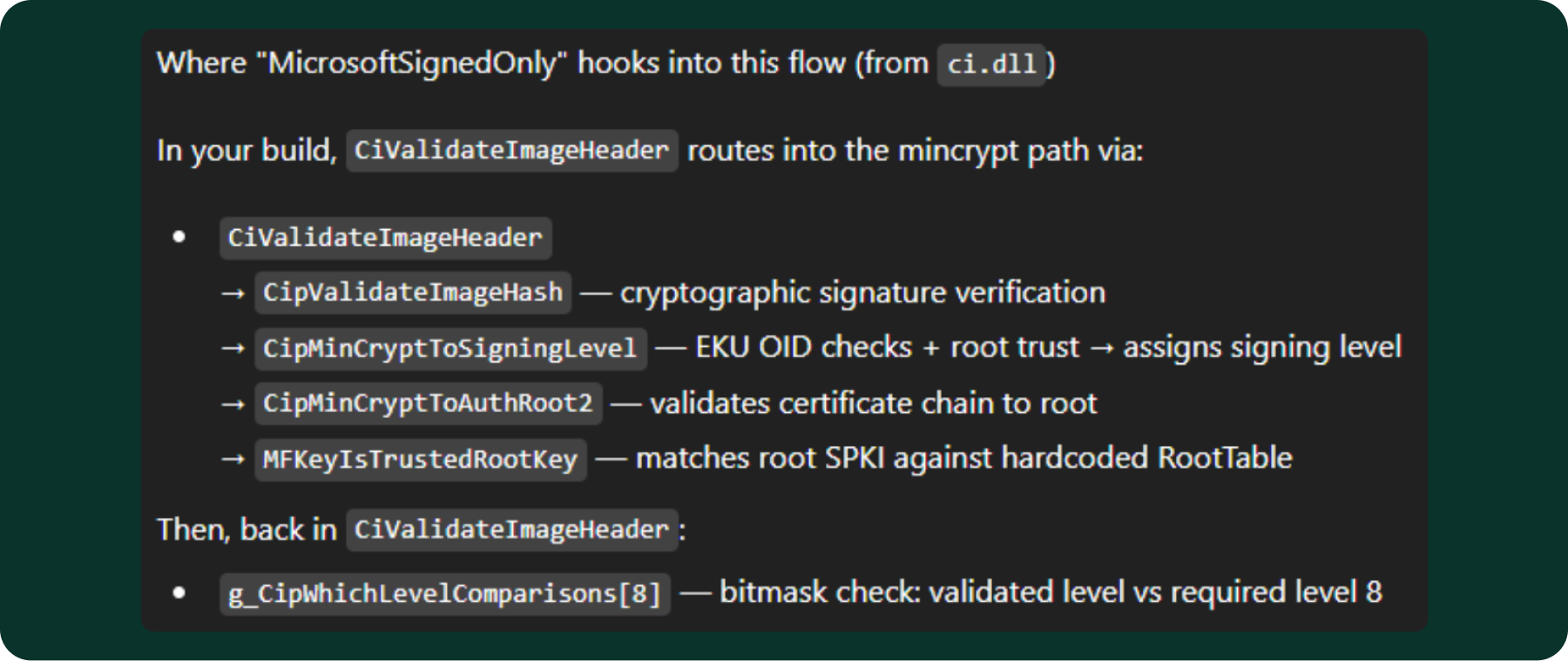
When an image load is evaluated under the “MicrosoftSignedOnly” mitigation, the kernel translates the policy flag into a required signing level (SE_SIGNING_LEVEL_MICROSOFT = 8) and passes it to CI!CiValidateImageHeader. CI selects the applicable validation actions for the image (CiGetActionsForImage), then performs cryptographic signature verification through CipValidateImageHash. The hash validation path calls CipMinCryptToSigningLevel, which examines the certificate chain’s EKU (Extended Key Usage) OIDs and root trust to assign a signing level to the image. As part of this process, MFKeyIsTrustedRootKey confirms that the certificate chain terminates at an approved Microsoft root by comparing the root certificate’s public key (SubjectPublicKeyInfo) against a hardcoded allowlist (RootTable) embedded in ci.dll. Finally, the validated signing level is compared against the required level via the g_CipWhichLevelComparisons bitmask table: if the validated level’s bit is set in the bitmask for level 8, the image is accepted; otherwise, the load is blocked.
MFKeyIsTrustedRootKey answers a very blunt question: does this signature chain end at a root key we trust? It does that by checking the root certificate’s public key (specifically its SubjectPublicKeyInfo) against a hardcoded allowlist embedded in CI/mincrypt. Each entry in the RootTable contains the DER-encoded subject name, the DER-encoded SubjectPublicKeyInfo, and a flags field that classifies the root (production, test, DRM, etc.). In other words, it doesn’t look at a certificate thumbprint. Rather, it pulls out the root’s key material and verifies that it matches one of the known Microsoft root keys compiled into the binary. Only roots with the production flag are accepted for MicrosoftSignedOnly enforcement. Additionally, the final signing level assignment depends on the EKU OIDs present in the certificate chain.
.png)
Because we needed to integrate these certificates into our existing solution, we chose to implement the check using certificate thumbprints rather than a public-key hash comparison. We implemented thumbprint pinning for ease of integration, but key/SPKI pinning is generally more stable across certificate reissuance (at the cost of different operational tradeoffs).
All Root CAs identified so far:
- Microsoft Authenticode(tm) Root Authority
- Microsoft Root Authority
- Microsoft Root Certificate Authority
- Microsoft Code Verification Root
- Microsoft Root Certificate Authority 2010
- Microsoft Development Root Certificate Authority 2014
- Microsoft Root Certificate Authority 2011
The analysis also uncovered a global array named g_SIPolicyCARemapList. While it doesn’t appear to be directly related to MicrosoftSignedOnly, it may still be useful as additional coverage. The array contains a baked-in list of Microsoft issuing CA identities. Each entry in the list includes:
- The CA subject name (as a string)
- An old TBS hash (SHA-256)
- A new TBS hash (SHA-384)
A TBS hash is the hash of a certificate’s “to-be-signed” (TBS) portion—the DER-encoded tbsCertificate fields that describe the certificate (issuer/subject, validity, public key, extensions, etc.) and are exactly what the CA signs. It’s different from the common Windows thumbprint, which is the hash of the entire certificate DER, and differs from an SPKI hash, which hashes only the public key block.
g_SIPolicyCARemapList:
- Microsoft Windows Production PCA 2011
- Old(32): 4E80BE107C860DE896384B3EFF50504DC2D76AC7151DF3102A4450637A032146
- New(48): 34EEC0CD7321C9C20309BEF31164D92B88E892341DE67FE2684D9E7FDA09C9E46B05498FB38E29B421E845FEB8C7A4CD
- Microsoft Code Signing PCA 2010
- Old(32): 121AF4B922A74247EA49DF50DE37609CC1451A1FE06B2CB7E1E079B492BD8195
- New(48): C64CE3455898F871D11C14DA412AAC58FA2022D4213D8AC05F8DD6909B2FB0FCC76C19A1913DF5BC0CB1662229AD15D1
- Microsoft Code Signing PCA 2011
- Old(32): F6F717A43AD9ABDDC8CEFDDE1C505462535E7D1307E630F9544A2D14FE8BF26E
- New(48): B52C1E712CF71D080614DDF95F8258BE0738C0722BD8A55F0AF4361BACEE35B6D73DCACB1B9DE10B5FD28508A3A50EAE
- Microsoft Windows Third Party Component CA 2012
- Old(32): CEC1AFD0E310C55C1DCC601AB8E172917706AA32FB5EAF826813547FDF02DD46
- New(48): FFFA64ABBB400583B3F812A196A8AF7ABF329D4882F26221A142D734620B759D1E168537CC6DA74807C2E20C70DA7B78
- Microsoft Windows PCA 2010
- Old(32): 90C9669670E75989159E6EEF69625EB6AD17CBA6209ED56F5665D55450A05212
- New(48): 84A5BD1CCB7CD6509FF7214F4BA27D51CCF72BE2AC4AA7F0E97BC066FC804EBB635E8305D7D1108F89B4CF7BB2CAFED9
It appears that ci.dll contains the relevant Microsoft issuing Root CAs and CAs. To validate this, I examined a large number of Microsoft-signed Windows DLLs and inspected their certificate chains. In all of the samples reviewed, the chain included one of those CAs.
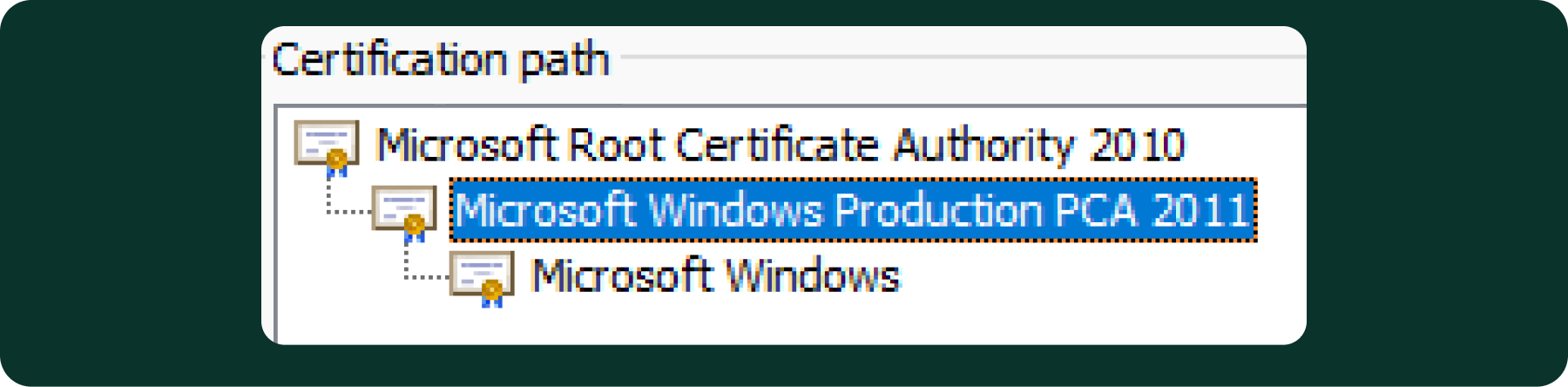
That said, there was still a practical concern: we still needed to verify how frequently these certificates change. Certificate stability is important because, in a production environment, it’s reasonable to expect that we may encounter additional thumbprints that were not observed during this initial analysis.
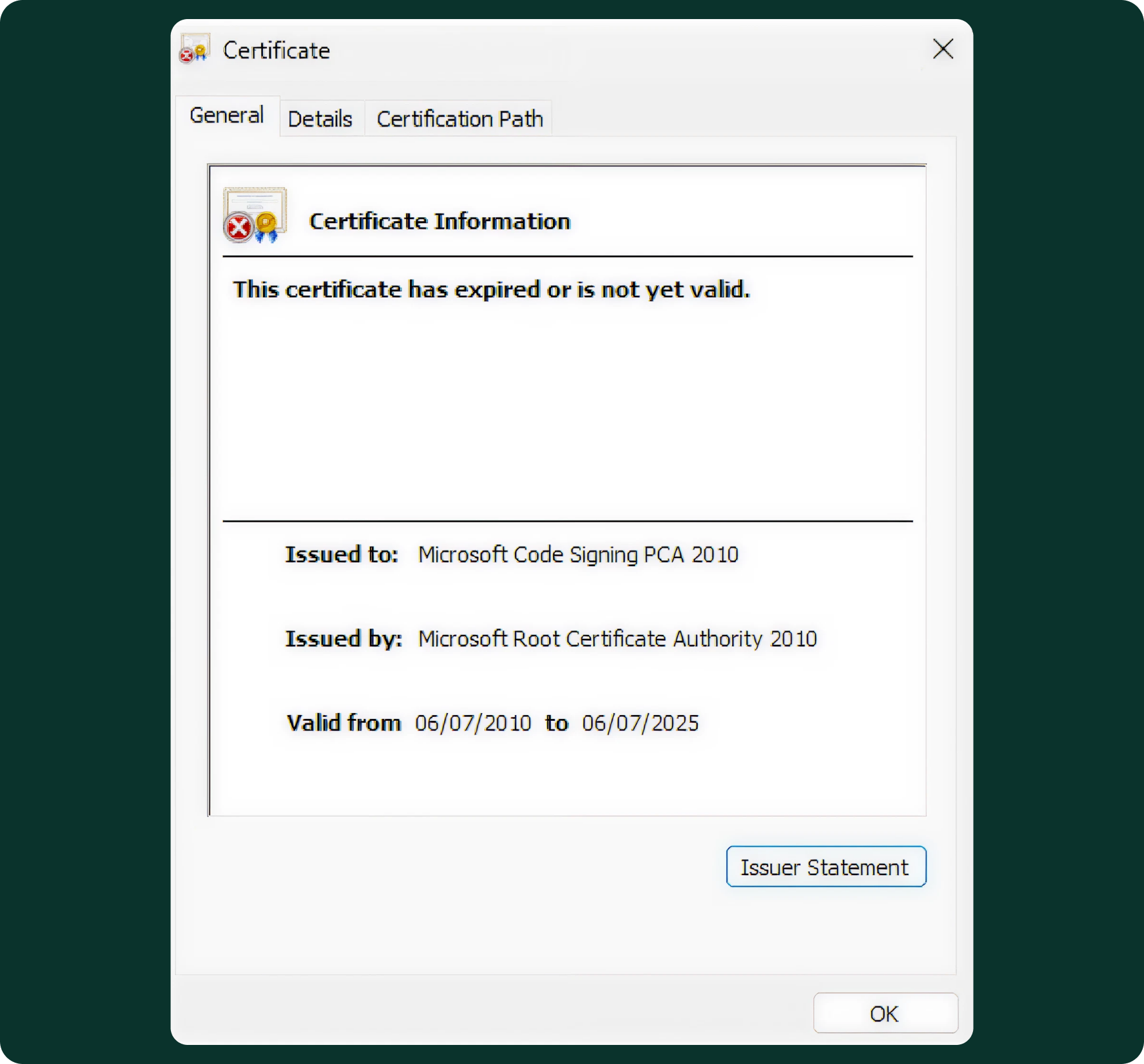
So it seemed that the first pick had expired. Can we trust them?
Then I found a Microsoft page that again contains these CAs, and also discusses the renewal of the certificates. For example:
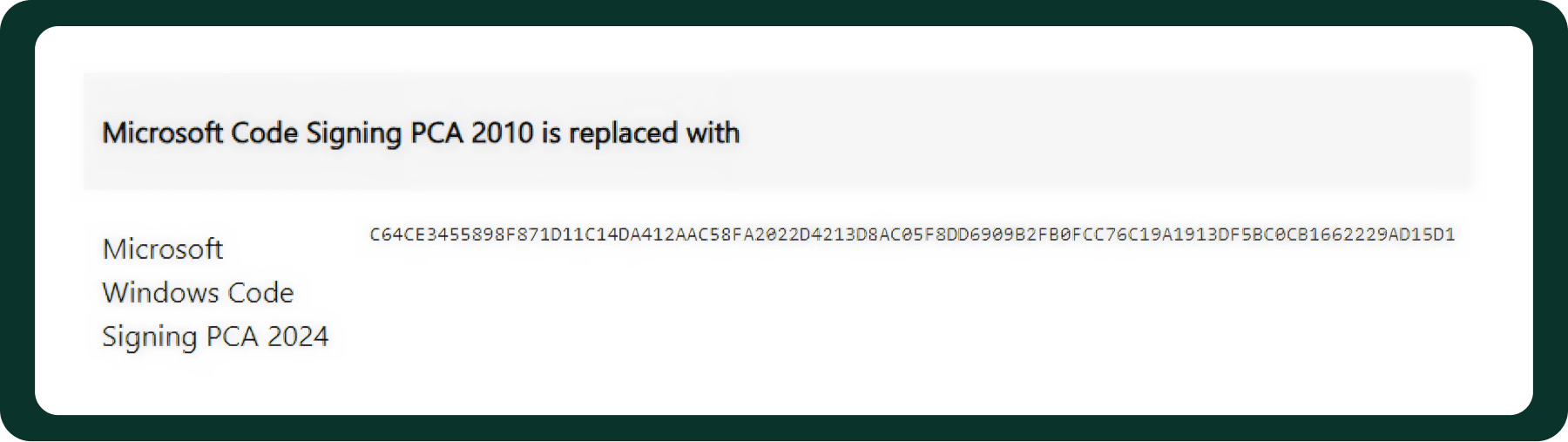
The new tbs hash is: C64CE3455898F871D11C14DA412AAC58FA2022D4213D8AC05F8DD6909B2FB0FCC76C19A1913DF5BC0CB1662229AD15D1
The new tbs hash is identical to the one found in ci.dll, but listed under the certificate’s previous name. This indicates that ci.dll already contains the new hash corresponding to the renewed certificate.
However, we still needed a holistic solution, not one that works only on a single machine or OS version. That meant we also needed to account for the older certificates and include their hashes alongside the new ones.These 15-year Microsoft issuing CAs begin expiring in July 2025, with others expiring through 2026 and 2027, depending on the CA.
The long validity periods provide reasonable confidence that this CA list is stable, easy to maintain, and unlikely to change frequently, making it practical for use in a production environment.
All the CAs identified so far:
- Microsoft Windows Production PCA 2011
- Microsoft Code Signing PCA 2010
- Microsoft Code Signing PCA 2011
- Microsoft Windows Third Party Component CA 2012
- Microsoft Windows PCA 2010
- Microsoft Windows Code Signing PCA 2024
- Microsoft Windows Component Preproduction CA 2024
- Microsoft Code Signing PCA 2024
- Windows Production PCA 2023
- Microsoft Windows Third Party Component CA 2024
At this point, I knew we had everything needed to build a proof of concept. For a quick PoC, I asked Cursor to write a program that captures all modules loaded by island.exe, iterates over each module, and verifies that it is digitally signed. If the module is signed, the program then checks whether the certificate thumbprint is Island’s own thumbprint, one of third party DLLs' thumbprints, or by walking the certificate chain: we accept Microsoft-signed modules if the chain terminates at one of our pinned Microsoft root identities, and the issuing CA matches one of the known Microsoft issuing CA identities (using the published TBS-hash set, including the old→new remap values). I decided to use both to get full coverage in case I missed something; however, it’s not necessarily needed. The PoC worked, and I replied to my colleague on Slack: “I think I have an idea.”
One final observation: AI-assisted reverse engineering is improving extremely quickly. Between completing the research and publishing it, I was able to reproduce the entire analysis using Claude Code with IDA Pro MCP and WinDbg MCP, with a kernel debugger attached. The results were remarkable.
As a validation step, I asked Claude Code to verify the main claims in this research by patching relevant code paths inside ci.dll and using the kernel debugger to bypass specific integrity checks in a controlled way. In just a few prompts, it reproduced the expected behavior.
That does not replace an understanding of Windows internals, but it does dramatically accelerate the work. Tasks that once required substantial manual effort can now be reproduced and tested much faster, making this kind of investigation both more accessible and easier to iterate on.

Adir is an Engineering Manager at Island who specializes in Chromium. Before Island, Adir spent years working in both small startups and large enterprises. His wide-ranging background includes developing an x86 hypervisor with full nesting support, building large Windows kernel components, and conducting low-level kernel research. You can follow Adir's work at https://www.linkedin.com/in/adir-makmel



.svg)
.svg)

