.svg)
What Is An AI Browser?

Key takeaways
- An AI browser puts AI inside the browsing session itself, with real-time page context and the ability to take actions, rather than leaving it in a separate chatbot tab.
- For consumer AI browsers, the enterprise risk is structural: they tend to work by sending as much data as possible to the model provider for better results.
- An AI browser is enterprise ready when it is model-agnostic and governs the interaction layer, redacting sensitive data, enforcing data boundaries, and logging activity where work happens.
- The real decision for IT and security leaders is not whether AI belongs in the browser. It is whether that interaction layer is governed or left as an invisible data-exposure gap.
Introduction
AI is already in the browser. People paste documents into chatbots, summarize reports in a sidebar, and let assistants draft replies, often through tools no one formally approved. The browser is where this is happening, and the pace is only increasing.
That shift has a name now: the "AI browser." The term covers a fast-moving category, and it means different things to a consumer and to an enterprise. This article explains what an AI browser is, why the browser became the place AI lives, and what separates a consumer novelty from something an enterprise can actually trust.
What an AI browser actually is
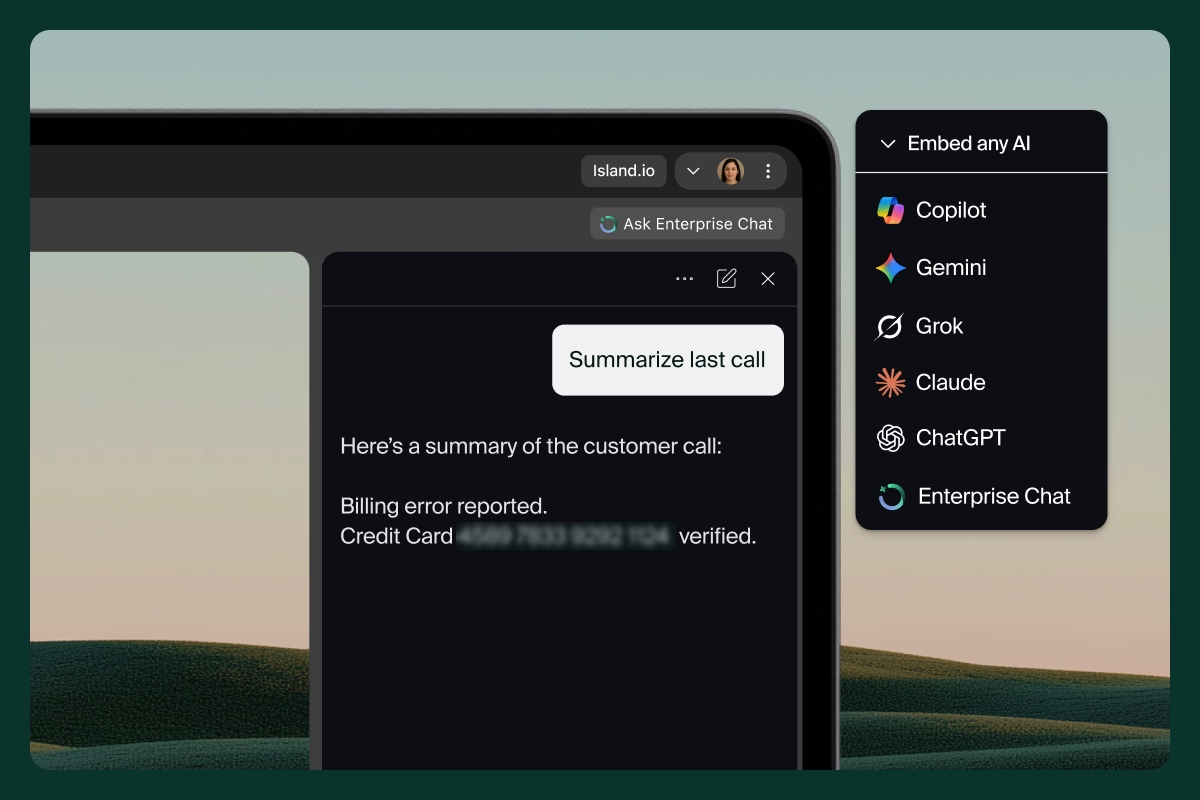
An AI browser embeds AI directly into the act of browsing. Instead of switching to a separate tab, the user works alongside an assistant that can see the page, answer questions about it, and take action on their behalf. The enterprise AI browser model puts a chatbot in the sidebar with real-time page context, so the assistant already knows what the user is looking at.
This is different from a chatbot in a tab. A standalone chatbot starts every conversation cold, with no knowledge of the work in front of you. An AI browser carries context with the session. It can read the open application, draft a response grounded in that content, and increasingly act as an agent that completes steps like scheduling a meeting or pulling data from a record.
Consumer AI browsers and the enterprise question
Most early AI browsers were built for individuals, and the design choice that makes them useful is also what makes them risky at work. To give better answers, a consumer AI browser tends to send as much of the page and the user's activity as possible to the model provider. For personal browsing, that tradeoff is fine. At work, it means corporate data flows to an outside model with no boundary and no record.
So the enterprise question is not "should we have AI in the browser." Users have already answered that. The question is whether the AI interaction layer is governed.
Why the browser became the place AI lives
Work moved into the browser years ago. SaaS apps, internal tools, and cloud consoles all run there, which is why security increasingly belongs built into the browser rather than layered around it. AI simply followed the work. The browser is where people read, write, and decide, so it is the natural home for an assistant that helps with all three.
That concentration creates a single, high-value surface. Everything a knowledge worker touches passes through the browser session, including the prompts and pastes that feed AI tools. When AI lives there too, the browser becomes both the most useful place to help users and the most important place to govern what they share.
The enterprise problem with consumer AI browsers
Most organizations have written AI policies, approved a tool list, and run training. The exposure still persists, because the controls enforcing those policies usually sit at the network or endpoint, not in the browser session where AI risk actually materializes. Network tools see traffic to an AI provider. They cannot see the customer list a user pasted into a prompt.
"Shadow AI," the use of unapproved AI tools and personal accounts, is the clearest symptom, and it is not a training failure. Employees reach for the tool with the fewest steps between a question and an answer. When the approved path adds friction, the personal AI tab one click away becomes the default. The behavior is rational; the architecture made the wrong choice the easy one.
Consumer AI browsers sharpen this gap. They rarely distinguish between a corporate account and a personal one, they keep no audit trail the security team can use, and they treat the page as raw material to send upstream. None of that is malice. It is simply a design built for individuals, asked to do a job it was never scoped for.
What makes an AI browser enterprise ready
An enterprise-ready AI browser starts from a different premise: give users the AI they want, and govern it where they use it. A few capabilities separate that approach from a consumer tool.
First, it is "model-agnostic." Teams can use ChatGPT, Copilot, Claude, Gemini, or an in-house model, choosing the right tool for the job without locking the organization into one vendor. Second, it enriches AI with enterprise context, like user role and approved company knowledge, so answers are relevant without exposing sensitive documents to unmanaged accounts.
Most importantly, it provides visibility and control across every AI entry point, including browser sessions, desktop apps, and AI extensions. That is the difference between knowing AI is in use and being able to govern what it does.
Governance at the point of interaction
The decisive feature is where policy runs. When governance lives in the browser, it travels with the session instead of the network. It can tell a corporate AI account from a personal one, and it can apply data protection enforced at the "last mile", the point where data actually moves, redacting sensitive data before it ever reaches a model provider.
This is also where defenses against "prompt injection," a recognized class of risk in the OWASP Top 10 for LLM applications, can operate at the point where the user and the AI actually interact. The result is prevention rather than after-the-fact alerts. Sensitive data is caught before it leaves, and every prompt and response can be logged for audit. The Island Enterprise Browser is designed so these controls sit at the interaction layer, not around it.
How to evaluate an AI browser
When IT and security leaders compare options, the useful questions are practical. Can users bring the models they already prefer? Does policy see what is typed and pasted, not just which site was visited? Can sensitive data be redacted before it reaches a provider, and is every interaction auditable across browser, desktop, and extensions?
One question matters more than the feature list: how much friction does it add? Adoption is the single biggest factor in whether a control actually gets adopted. The best AI governance is nearly invisible to the user, which is also what keeps people from routing around it. This is the spirit of the NIST AI Risk Management Framework, which encourages building risk management into everyday processes rather than treating it as a separate compliance step.
Conclusion
An AI browser brings AI into the place work already happens. For consumers, that is a convenience. For enterprises, it raises a clear question of governance, because the same session that makes AI helpful is also where sensitive data can quietly leak. The answer is not to block AI or to bolt another tool onto the stack. It is to govern the interaction layer directly, so users get the AI they want and security gets the visibility it needs. That is what it means to make AI work for the enterprise, in the ideal environment for enterprise work.
FAQs
Is an AI browser the same as a chatbot in a browser tab?
No. A chatbot in a tab starts each conversation without context and lives apart from the work. An AI browser embeds the assistant in the session itself, so it can see the open page, act with that context, and carry information across the workflow.
Why are consumer AI browsers a risk for enterprises?
They are built to give individuals better answers, which usually means sending as much page and activity data as possible to the model provider. At work, that pushes corporate data to an outside model with no data boundary, no distinction between corporate and personal accounts, and no audit trail.
Can we let employees use ChatGPT, Copilot, Claude, and Gemini safely?
Yes, if the AI browser is model-agnostic and governs the interaction layer. Users pick the model that fits the task, while policy decides what each tool can access and redacts sensitive data before it reaches any provider.
How does an AI browser prevent data leakage into AI tools?
Governance runs inside the browser, where prompts and pastes happen. Sensitive data can be detected and redacted before it leaves the session, rather than caught after it has already reached a model. Every prompt and response can also be logged for audit.
Where does an AI browser fit with our existing AI policy and frameworks?
It enforces the policy you already have at the point of interaction. That aligns with the NIST AI Risk Management Framework's emphasis on building risk management into everyday work, instead of running AI governance as a separate console or compliance exercise.
Does adding governance slow users down?
It should not. The most effective approach applies policy invisibly, so the secure path is also the easy path. Low friction is what keeps users from routing around controls with a personal AI tab.
See what a governed AI browser looks like
If your users are already reaching for AI in the browser, the next step is deciding how to govern that interaction layer without slowing them down. We're happy to walk through how this works in practice. Schedule a demo to see how Island governs AI where work actually happens and decide if the approach fits your environment.

Island is defining the future of work for people and AI agents. Its enterprise agentic control plane helps organizations enable, govern, and audit agentic workforces alongside people. Island boosts productivity across devices, browsers, applications, networks, and data while protecting sensitive information, simplifying access, and helping enterprises scale AI safely.



.svg)
.svg)

